-
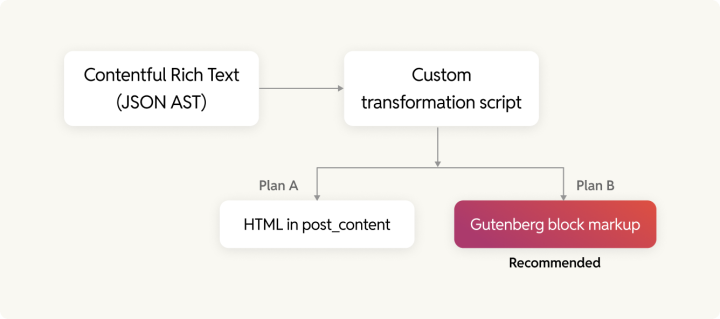
No off-the-shelf library does this since it requires custom development. The advantage is that editors get full Gutenberg editing capability after migration rather than a monolithic HTML blob in post_content. The block serialization format is formally specified in the [WordPress Block Editor Handbook](https://developer.wordpress.org/block-editor/getting-started/fundamentals/markup-representation-block/) and defined by a published Parsing Expression Grammar in [@wordpress/block-serialization-spec-parser](https://www.npmjs.com/package/@wordpress/block-serialization-spec-parser), a stable spec. It is worth the custom development investment for any organization planning long-term on WordPress.
Embedded entries and assets are the hardest part. Contentful Rich Text stores them as reference pointers (sys.id). Before conversion begins, make sure you map every Contentful entry and asset ID to its WordPress equivalent.
Always import assets before entries. Entries reference assets by ID, so the WordPress attachment IDs need to exist before any entry tries to point to them.
### Asset migration
Every Contentful asset is served from images.ctfassets.net, the CDN URLs authenticated against your Contentful organization account. When the subscription ends, every image will return a 403.
Use [media_sideload_image()](https://developer.wordpress.org/reference/functions/media_sideload_image/) to download each asset from Contentful’s CDN and register it in the WordPress Media Library during import. Build an asset ID lookup table (Contentful sys.id → WordPress attachment ID) for reference resolution after import.
Metadata mapping:
- Contentful title → WordPress attachment title
- Contentful description → WordPress alt text
For post-import cleanup, the [a8cteam51/wordpress-importer-fixers](https://github.com/a8cteam51/wordpress-importer-fixers) WP-CLI toolset from Automattic Special Projects handles broken featured image associations and gallery ID mismatches, two of the most common post-migration data integrity issues.
### Import architecture and best practices
Custom PHP scripts should be executed via [wp eval-file](https://wp-cli.org/), since browser-based processes are prone to failure.
Here are some critical implementation details from Automattic Special Projects:
- Set define('WP_IMPORTING', true) at script start. This suppresses publish notifications, pingbacks, and subscription emails during import.
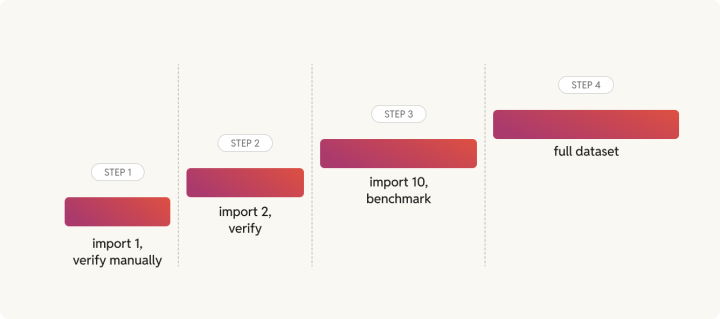
- Use the [Rule of 1-2-10](https://wordpress.com/blog/2023/11/30/building-a-contentful-custom-data-migration-to-wordpress/) to import 1 entry and verify manually, then 2, then 10. After the 10-entry run, benchmark execution time to estimate the full import duration. Only then run against the complete dataset.
- Store the raw Contentful import data in WordPress post meta. This makes debugging easier and helps ensure reruns don’t create duplicates.
- Import as draft status first, spot-check across content types, then bulk-publish. Make sure WP_IMPORTING is still defined when changing post status to avoid triggering notification hooks.
### Going headless: replacing the Contentful SDK with WPGraphQL
If your team is keeping an existing React, Next.js, or Nuxt frontend and swapping Contentful for WordPress as the content backend, the work will focus on four schema differences between the two platforms. Install [WPGraphQL](https://www.wpgraphql.com/) (free, open-source) and [Pods](https://wordpress.org/plugins/pods/), which has WPGraphQL integration built into core since version 2.9.
#### Query structure and field naming
Contentful auto-generates its GraphQL schema from content models at request time, using a {contentType}Collection { items { ... } } pattern. WPGraphQL follows the Relay specification: {contentTypePlural} { nodes { ... } } or edges { node { ... } }. Every Contentful query in the frontend codebase needs a rewrite.
#### Pagination
[Contentful uses offset-based](https://www.contentful.com/developers/docs/references/graphql/) skip/limit with a totalfield. WPGraphQL uses cursor-based pagination with first/after (forward) and last/before (backward) arguments, returning opaque cursor strings in pageInfo. WPGraphQL’s creator Jason Bahl [documented the design rationale](https://www.wpgraphql.com/2020/03/26/forward-and-backward-pagination-with-wpgraphql) for this approach in 2020. An optional offset pagination extension exists but isn’t recommended. Every paginated Contentful query requires a rewrite, and this is the most significant frontend code change in the migration.
#### Nested query complexity
Contentful enforces a default 11,000-entity complexity budget per request and an 8KB query size limit. Premium plans can bypass the size limit with persisted queries. WPGraphQL has no built-in complexity or size caps and uses DataLoaders for batched resolution. Queries still need restructuring, but WPGraphQL’s constraints are less restrictive at the API layer.
#### Asset handling
Contentful lets you resize and reformat images directly in a GraphQL query using url(transform: { width: 200, format: WEBP }). WPGraphQL takes a different approach: WordPress generates image sizes at upload time (thumbnail, medium, large, etc.), and WPGraphQL lets you pick which one you want via sourceUrl(size: LARGE).
Rich Text handling also gets simpler. Contentful delivers content as structured JSON that requires a dedicated rendering library (@contentful/rich-text-react-renderer) to convert into displayable HTML. WordPress stores content as ready-to-render HTML, so that entire library layer disappears from the frontend codebase.
Before switching over, run Contentful and WordPress backends in parallel on staging and compare GraphQL responses field-by-field.
rtCamp’s [wp-decoupled](https://github.com/rtCamp/wp-decoupled) Next.js + WPGraphQL starter and the [SnapWP framework](https://github.com/rtCamp/snapwp) provide a foundation for such a move.
### The traditional WordPress theme migration
For teams moving to a WordPress theme and wanting editors to own the full publishing experience, the benefit for editors is immediate.
Register Custom Post Types matching the mapped content model and build [Pods](https://wordpress.org/plugins/pods/) field groups for each. Develop the WordPress theme with block templates or Full Site Editing (FSE) templates corresponding to each content type’s editorial layout.
For complex landing page structures previously built in Contentful’s content model, map to Pods Flexible Content or native Gutenberg block patterns. Full Site Editing allows headers, footers, archive templates, and single post templates to be managed visually after launch.
## Multilingual migrations require a separate plan
Contentful and WordPress store translations differently, and that is where multilingual migrations get complicated.
[Contentful stores localizations at the field level](https://www.contentful.com/developers/docs/concepts/locales/) with one entry for multiple locale values per field. The structure looks like "title": { "en-US": "My Post", "de-DE": "Mein Beitrag" }. A single entry ID represents all locale versions.
WordPress multilingual plugins ([WPML](https://wpml.org/), [Polylang](https://wordpress.org/plugins/polylang/), [MultilingualPress](https://multilingualpress.org/)) all use a post-level model, each translation is a separate post linked to the original. One Contentful entry with 5 locale variants becomes 5 WordPress posts, each requiring language assignment, linking, and ongoing sync.
The migration script must maintain a {contentful_entry_id, locale} → wordpress_post_id mapping table. Non-localized fields must be duplicated or configured as copy-once. Cross-entry references must be resolved per locale.
All three plugins provide programmatic APIs for bulk import. WPML uses the wpml_set_element_language_details action hook, Polylang uses pll_set_post_language() , and MultilingualPress exposes a ContentRelations API.
[WordPress Core’s Phase 4 roadmap](https://wordpress.org/about/roadmap/) targets native multilingual support, which would eliminate the post-duplication model entirely. If your project won’t launch until late 2026 or beyond, that’s worth factoring in when you select a plugin for this aspect.
## Testing and launch
### Staging and rehearsal
Run the full migration in staging at least twice before going live. The second run confirms the scripts are rerunnable. They should produce no duplicates or data drift. A third run, if time allows, is useful as a speed benchmark.
Give the editorial team access to staging for User Acceptance Testing (UAT). Editors will catch content rendering issues, truncated text, wrongly formatted pull quotes, broken relationship fields, and missing image captions.
Run Core Web Vitals (PageSpeed Insights), GTmetrix, and Time to First Byte (TTFB) benchmarks in staging against the live Contentful baseline before launch to track the benefits of the migration.
### Pre-launch checklist

All redirects implemented and tested

SEO metadata (titles, descriptions, OG tags, schema markup) migrated and spot-checked

All media assets downloaded and rendered without broken references

Forms and lead capture workflows tested end-to-end

Integrations reconnected: analytics, marketing automation, Digital Asset Management (DAM), search

SSL certificate in place on the WordPress install

Backup verified and restore process tested

Rollback plan documented, with a clear record of who calls it, under what conditions, and who executes it

Content freeze window communicated to the editorial team
### Go-live
These are the steps you’ll need to follow:
1. Schedule the switch for your lowest-traffic window, typically 2–4 am. Run a final content sync for anything published in Contentful after the staging snapshot was taken.
2. Keep the Contentful subscription active for a cooling period of at least two weeks after launch.
3. Keep an eye on Google Search Console for crawl errors, your analytics for traffic baseline comparison, and server logs for 4xx/5xx spikes in the first 48 hours.
## Post-migration: onboarding and what comes next
### Editorial team onboarding
After migrating to WordPress from AEM, [Manheim’s](https://rtcamp.com/case-studies/aem-to-wordpress-migration-for-manheim/) marketing team went from full developer dependency to building and publishing pages independently. At [The Indian Express](https://rtcamp.com/case-studies/strategic-development-for-indian-express/), editors publish breaking news faster since moving to Full Site Editing in WordPress.
Focus early training on block editor basics, content model conventions, media management, SEO meta fields, and editorial workflow and roles.
A one-page reference card for the five most common editorial tasks will help reduce support queries.
### Integration replacement
**Contentful integration****WordPress equivalent**Segment / Google Analytics[Parse.ly](https://www.parse.ly/) (native to VIP), Site Kit, Segment pluginBynder / Cloudinary DAM (Digital Asset Management)Native WP plugins, [rtCamp GoDAM](https://godam.io/)Algolia / Elasticsearch[WP Search with Algolia](https://wordpress.org/plugins/wp-search-with-algolia/), [ElasticPress](https://www.elasticpress.io/)[, SearchWP](https://searchwp.com/)HubSpot / MarketoHubSpot WP plugin, WPForms, Gravity FormsPersonalizationParse.ly content insights, Optimizely pluginA/B testingParse.ly Headline Testing, VWOWordPress’s 61,000+ free plugins cover most integrations without the need for custom development. For organizations that built custom Contentful integrations, the same principle applies on WordPress, with more community-maintained starting points.
### Performance benchmarks to set
Compare Core Web Vitals before and after using the same device, network, and testing tool. The comparison is only meaningful if the methodology stays consistent.
Below are results from comparable rtCamp migrations:
- [Pasqal](https://rtcamp.com/case-studies/pasqal-wordpress-vip-migration/): Core Web Vitals (CWV) score *66 → 90*
- [VinSolutions](https://rtcamp.com/case-studies/migrating-vinsolutions-kentico-cms-to-wordpress-vip/) (Kentico → WordPress VIP): *48% CWV improvement*
- [KHM Travel](https://rtcamp.com/case-studies/vip-migration-and-codebase-audit-khm-travel-group/): TTFB *0.7s → 0.29s*
- [FleetNet America](https://rtcamp.com/case-studies/fleetnet-americas-online-presence-a-drupal-to-wordpress-migration-success-story/) (Drupal → WordPress VIP): roughly *2× CWV improvement*
- [NextGear Capital](https://rtcamp.com/case-studies/nextgear-capital-performance-focused-modernization/): *20% increase* in lead form submissions
- [Greater Kashmir](https://rtcamp.com/case-studies/greater-kashmir-case-study/) (proprietary CMS → WordPress): *320,000+ articles migrated*, *17% increase in mobile sessions* post-launch
Set review milestones at 30, 60, and 90 days after launch to track organic traffic trends, Core Web Vitals, lead form conversion rates, and editorial publishing speed.
### Governance setup
WordPress’s built-in roles – Administrator, Editor, Author, Contributor, Subscriber map directly to most editorial hierarchies and can be extended further with the [User Role Editor](https://wordpress.org/plugins/user-role-editor/) plugin.
### Migration engagement options with rtCamp
rtCamp is a [WordPress VIP Premier Agency Partner](https://wpvip.com/partner/rtcamp/) with 300+ completed migrations across enterprise publishing, media, and business-to-business (B2B) organizations. Engagements are structured in three tiers depending on how much of the work you want to own.
#### Free consultation (20 hours of scoping)
Contentful setup assessment, architecture recommendation, preliminary timeline and cost estimate, and an honest view of whether migration makes sense now. This includes a documented read-out you can take into internal planning.
#### Paid discovery (2–3 weeks)
A complete migration blueprint covering content model mapping, Extract-Transform-Load (ETL) architecture, redirect inventory, integration plan, and governance structure. Yours to execute in-house, with rtCamp, or with any partner.
#### Full migration service
End-to-end from discovery through 90 days of post-launch support, including editorial onboarding and performance validation.
### Get in touch
[**Book a free migration consultation**](https://rtcamp.com/business-inquiry/) if you’d like to know more about our [Contentful to WordPress migration services](https://rtcamp.com/contentful-to-wordpress-migration-service/). We build a custom Rich Text to Gutenberg renderer for your content model, map every redirect before migration starts, and run both platforms in parallel until cutover.
-
-
No off-the-shelf library does this since it requires custom development. The advantage is that editors get full Gutenberg editing capability after migration rather than a monolithic HTML blob in post_content. The block serialization format is formally specified in the [WordPress Block Editor Handbook](https://developer.wordpress.org/block-editor/getting-started/fundamentals/markup-representation-block/) and defined by a published Parsing Expression Grammar in [@wordpress/block-serialization-spec-parser](https://www.npmjs.com/package/@wordpress/block-serialization-spec-parser), a stable spec. It is worth the custom development investment for any organization planning long-term on WordPress.
Embedded entries and assets are the hardest part. Contentful Rich Text stores them as reference pointers (sys.id). Before conversion begins, make sure you map every Contentful entry and asset ID to its WordPress equivalent.
Always import assets before entries. Entries reference assets by ID, so the WordPress attachment IDs need to exist before any entry tries to point to them.
### Asset migration
Every Contentful asset is served from images.ctfassets.net, the CDN URLs authenticated against your Contentful organization account. When the subscription ends, every image will return a 403.
Use [media_sideload_image()](https://developer.wordpress.org/reference/functions/media_sideload_image/) to download each asset from Contentful’s CDN and register it in the WordPress Media Library during import. Build an asset ID lookup table (Contentful sys.id → WordPress attachment ID) for reference resolution after import.
Metadata mapping:
- Contentful title → WordPress attachment title
- Contentful description → WordPress alt text
For post-import cleanup, the [a8cteam51/wordpress-importer-fixers](https://github.com/a8cteam51/wordpress-importer-fixers) WP-CLI toolset from Automattic Special Projects handles broken featured image associations and gallery ID mismatches, two of the most common post-migration data integrity issues.
### Import architecture and best practices
Custom PHP scripts should be executed via [wp eval-file](https://wp-cli.org/), since browser-based processes are prone to failure.
Here are some critical implementation details from Automattic Special Projects:
- Set define('WP_IMPORTING', true) at script start. This suppresses publish notifications, pingbacks, and subscription emails during import.
- Use the [Rule of 1-2-10](https://wordpress.com/blog/2023/11/30/building-a-contentful-custom-data-migration-to-wordpress/) to import 1 entry and verify manually, then 2, then 10. After the 10-entry run, benchmark execution time to estimate the full import duration. Only then run against the complete dataset.
- Store the raw Contentful import data in WordPress post meta. This makes debugging easier and helps ensure reruns don’t create duplicates.
- Import as draft status first, spot-check across content types, then bulk-publish. Make sure WP_IMPORTING is still defined when changing post status to avoid triggering notification hooks.
### Going headless: replacing the Contentful SDK with WPGraphQL
If your team is keeping an existing React, Next.js, or Nuxt frontend and swapping Contentful for WordPress as the content backend, the work will focus on four schema differences between the two platforms. Install [WPGraphQL](https://www.wpgraphql.com/) (free, open-source) and [Pods](https://wordpress.org/plugins/pods/), which has WPGraphQL integration built into core since version 2.9.
#### Query structure and field naming
Contentful auto-generates its GraphQL schema from content models at request time, using a {contentType}Collection { items { ... } } pattern. WPGraphQL follows the Relay specification: {contentTypePlural} { nodes { ... } } or edges { node { ... } }. Every Contentful query in the frontend codebase needs a rewrite.
#### Pagination
[Contentful uses offset-based](https://www.contentful.com/developers/docs/references/graphql/) skip/limit with a totalfield. WPGraphQL uses cursor-based pagination with first/after (forward) and last/before (backward) arguments, returning opaque cursor strings in pageInfo. WPGraphQL’s creator Jason Bahl [documented the design rationale](https://www.wpgraphql.com/2020/03/26/forward-and-backward-pagination-with-wpgraphql) for this approach in 2020. An optional offset pagination extension exists but isn’t recommended. Every paginated Contentful query requires a rewrite, and this is the most significant frontend code change in the migration.
#### Nested query complexity
Contentful enforces a default 11,000-entity complexity budget per request and an 8KB query size limit. Premium plans can bypass the size limit with persisted queries. WPGraphQL has no built-in complexity or size caps and uses DataLoaders for batched resolution. Queries still need restructuring, but WPGraphQL’s constraints are less restrictive at the API layer.
#### Asset handling
Contentful lets you resize and reformat images directly in a GraphQL query using url(transform: { width: 200, format: WEBP }). WPGraphQL takes a different approach: WordPress generates image sizes at upload time (thumbnail, medium, large, etc.), and WPGraphQL lets you pick which one you want via sourceUrl(size: LARGE).
Rich Text handling also gets simpler. Contentful delivers content as structured JSON that requires a dedicated rendering library (@contentful/rich-text-react-renderer) to convert into displayable HTML. WordPress stores content as ready-to-render HTML, so that entire library layer disappears from the frontend codebase.
Before switching over, run Contentful and WordPress backends in parallel on staging and compare GraphQL responses field-by-field.
rtCamp’s [wp-decoupled](https://github.com/rtCamp/wp-decoupled) Next.js + WPGraphQL starter and the [SnapWP framework](https://github.com/rtCamp/snapwp) provide a foundation for such a move.
### The traditional WordPress theme migration
For teams moving to a WordPress theme and wanting editors to own the full publishing experience, the benefit for editors is immediate.
Register Custom Post Types matching the mapped content model and build [Pods](https://wordpress.org/plugins/pods/) field groups for each. Develop the WordPress theme with block templates or Full Site Editing (FSE) templates corresponding to each content type’s editorial layout.
For complex landing page structures previously built in Contentful’s content model, map to Pods Flexible Content or native Gutenberg block patterns. Full Site Editing allows headers, footers, archive templates, and single post templates to be managed visually after launch.
## Multilingual migrations require a separate plan
Contentful and WordPress store translations differently, and that is where multilingual migrations get complicated.
[Contentful stores localizations at the field level](https://www.contentful.com/developers/docs/concepts/locales/) with one entry for multiple locale values per field. The structure looks like "title": { "en-US": "My Post", "de-DE": "Mein Beitrag" }. A single entry ID represents all locale versions.
WordPress multilingual plugins ([WPML](https://wpml.org/), [Polylang](https://wordpress.org/plugins/polylang/), [MultilingualPress](https://multilingualpress.org/)) all use a post-level model, each translation is a separate post linked to the original. One Contentful entry with 5 locale variants becomes 5 WordPress posts, each requiring language assignment, linking, and ongoing sync.
The migration script must maintain a {contentful_entry_id, locale} → wordpress_post_id mapping table. Non-localized fields must be duplicated or configured as copy-once. Cross-entry references must be resolved per locale.
All three plugins provide programmatic APIs for bulk import. WPML uses the wpml_set_element_language_details action hook, Polylang uses pll_set_post_language() , and MultilingualPress exposes a ContentRelations API.
[WordPress Core’s Phase 4 roadmap](https://wordpress.org/about/roadmap/) targets native multilingual support, which would eliminate the post-duplication model entirely. If your project won’t launch until late 2026 or beyond, that’s worth factoring in when you select a plugin for this aspect.
## Testing and launch
### Staging and rehearsal
Run the full migration in staging at least twice before going live. The second run confirms the scripts are rerunnable. They should produce no duplicates or data drift. A third run, if time allows, is useful as a speed benchmark.
Give the editorial team access to staging for User Acceptance Testing (UAT). Editors will catch content rendering issues, truncated text, wrongly formatted pull quotes, broken relationship fields, and missing image captions.
Run Core Web Vitals (PageSpeed Insights), GTmetrix, and Time to First Byte (TTFB) benchmarks in staging against the live Contentful baseline before launch to track the benefits of the migration.
### Pre-launch checklist

All redirects implemented and tested

SEO metadata (titles, descriptions, OG tags, schema markup) migrated and spot-checked

All media assets downloaded and rendered without broken references

Forms and lead capture workflows tested end-to-end

Integrations reconnected: analytics, marketing automation, Digital Asset Management (DAM), search

SSL certificate in place on the WordPress install

Backup verified and restore process tested

Rollback plan documented, with a clear record of who calls it, under what conditions, and who executes it

Content freeze window communicated to the editorial team
### Go-live
These are the steps you’ll need to follow:
1. Schedule the switch for your lowest-traffic window, typically 2–4 am. Run a final content sync for anything published in Contentful after the staging snapshot was taken.
2. Keep the Contentful subscription active for a cooling period of at least two weeks after launch.
3. Keep an eye on Google Search Console for crawl errors, your analytics for traffic baseline comparison, and server logs for 4xx/5xx spikes in the first 48 hours.
## Post-migration: onboarding and what comes next
### Editorial team onboarding
After migrating to WordPress from AEM, [Manheim’s](https://rtcamp.com/case-studies/aem-to-wordpress-migration-for-manheim/) marketing team went from full developer dependency to building and publishing pages independently. At [The Indian Express](https://rtcamp.com/case-studies/strategic-development-for-indian-express/), editors publish breaking news faster since moving to Full Site Editing in WordPress.
Focus early training on block editor basics, content model conventions, media management, SEO meta fields, and editorial workflow and roles.
A one-page reference card for the five most common editorial tasks will help reduce support queries.
### Integration replacement
**Contentful integration****WordPress equivalent**Segment / Google Analytics[Parse.ly](https://www.parse.ly/) (native to VIP), Site Kit, Segment pluginBynder / Cloudinary DAM (Digital Asset Management)Native WP plugins, [rtCamp GoDAM](https://godam.io/)Algolia / Elasticsearch[WP Search with Algolia](https://wordpress.org/plugins/wp-search-with-algolia/), [ElasticPress](https://www.elasticpress.io/)[, SearchWP](https://searchwp.com/)HubSpot / MarketoHubSpot WP plugin, WPForms, Gravity FormsPersonalizationParse.ly content insights, Optimizely pluginA/B testingParse.ly Headline Testing, VWOWordPress’s 61,000+ free plugins cover most integrations without the need for custom development. For organizations that built custom Contentful integrations, the same principle applies on WordPress, with more community-maintained starting points.
### Performance benchmarks to set
Compare Core Web Vitals before and after using the same device, network, and testing tool. The comparison is only meaningful if the methodology stays consistent.
Below are results from comparable rtCamp migrations:
- [Pasqal](https://rtcamp.com/case-studies/pasqal-wordpress-vip-migration/): Core Web Vitals (CWV) score *66 → 90*
- [VinSolutions](https://rtcamp.com/case-studies/migrating-vinsolutions-kentico-cms-to-wordpress-vip/) (Kentico → WordPress VIP): *48% CWV improvement*
- [KHM Travel](https://rtcamp.com/case-studies/vip-migration-and-codebase-audit-khm-travel-group/): TTFB *0.7s → 0.29s*
- [FleetNet America](https://rtcamp.com/case-studies/fleetnet-americas-online-presence-a-drupal-to-wordpress-migration-success-story/) (Drupal → WordPress VIP): roughly *2× CWV improvement*
- [NextGear Capital](https://rtcamp.com/case-studies/nextgear-capital-performance-focused-modernization/): *20% increase* in lead form submissions
- [Greater Kashmir](https://rtcamp.com/case-studies/greater-kashmir-case-study/) (proprietary CMS → WordPress): *320,000+ articles migrated*, *17% increase in mobile sessions* post-launch
Set review milestones at 30, 60, and 90 days after launch to track organic traffic trends, Core Web Vitals, lead form conversion rates, and editorial publishing speed.
### Governance setup
WordPress’s built-in roles – Administrator, Editor, Author, Contributor, Subscriber map directly to most editorial hierarchies and can be extended further with the [User Role Editor](https://wordpress.org/plugins/user-role-editor/) plugin.
### Migration engagement options with rtCamp
rtCamp is a [WordPress VIP Premier Agency Partner](https://wpvip.com/partner/rtcamp/) with 300+ completed migrations across enterprise publishing, media, and business-to-business (B2B) organizations. Engagements are structured in three tiers depending on how much of the work you want to own.
#### Free consultation (20 hours of scoping)
Contentful setup assessment, architecture recommendation, preliminary timeline and cost estimate, and an honest view of whether migration makes sense now. This includes a documented read-out you can take into internal planning.
#### Paid discovery (2–3 weeks)
A complete migration blueprint covering content model mapping, Extract-Transform-Load (ETL) architecture, redirect inventory, integration plan, and governance structure. Yours to execute in-house, with rtCamp, or with any partner.
#### Full migration service
End-to-end from discovery through 90 days of post-launch support, including editorial onboarding and performance validation.
### Get in touch
[**Book a free migration consultation**](https://rtcamp.com/business-inquiry/) if you’d like to know more about our [Contentful to WordPress migration services](https://rtcamp.com/contentful-to-wordpress-migration-service/). We build a custom Rich Text to Gutenberg renderer for your content model, map every redirect before migration starts, and run both platforms in parallel until cutover.# Contentful to WordPress migration: The complete enterprise guide
*Published:* 2026-03-25
*Author:* Salman Ravoof
> Complete guide to Contentful to WordPress migration — architecture, Rich Text transformation, SEO preservation, and cost of ownership for enterprise teams.
Your marketing manager just filed her third ticket this week, asking for one more content field in Contentful. Somewhere at the top of your inbox, a billing email with the word “overage” is still unread.
That’s the point you might want to consider a Contentful to WordPress migration. This guide covers the business case around this decision, the architecture involved, the execution, and the steps after going live.
Traditional WordPress and headless WordPress (WordPress + WPGraphQL) are the targeted end results, with a decision-making framework provided to help you choose between them.
If you’re still evaluating whether to move at all, the [Contentful vs WordPress comparison](https://rtcamp.com/handbook/contentful-vs-wordpress/) will have you covered. If WordPress isn’t the only platform on your shortlist, our [Contentful Alternatives](https://rtcamp.com/resources/contentful-alternatives/) guide evaluates eleven CMS and DXP options, from headless platforms like Sanity and Storyblok to Sitecore and AEM.
## Why enterprises leave Contentful
### Trouble around the pricing model
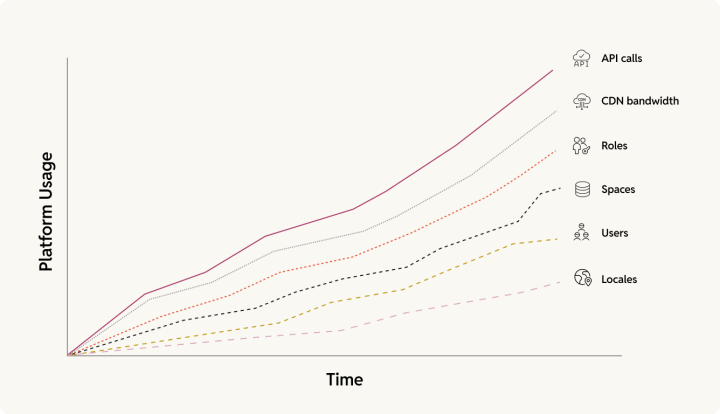
[Contentful’s pricing](https://www.contentful.com/pricing/) grows across six dimensions simultaneously: API calls, CDN bandwidth, roles, spaces, users, and locales.
The Lite plan starts at $300/month, while the Premium plan is custom-priced. [Vendr’s buyer transaction data](https://www.vendr.com/buyer-guides/contentful) puts the median contract at over $50,000/year.
Contentful contracts may include annual price escalations of 3–7%, and Vendr’s data suggests that buyers who accept initial quotes without citing budget limits or alternatives tend to pay more than those who push back.
A [Trustpilot reviewer](https://www.trustpilot.com/reviews/673dd2ebb59bf14e1c01a858) documented Contentful reducing their plan from 4 locales to 3 without the customer initiating the change, forcing a tier upgrade from $300/month to around $2,000/month.
After migrating from Contentful to WordPress, Emplifi’s CMS fee savings were reported at over $4,000 per month.
[WordPress VIP](https://wpvip.com/pricing/) starts at $25,000/year with no per-seat costs or API overage fees.
### Your editorial team is still filing tickets
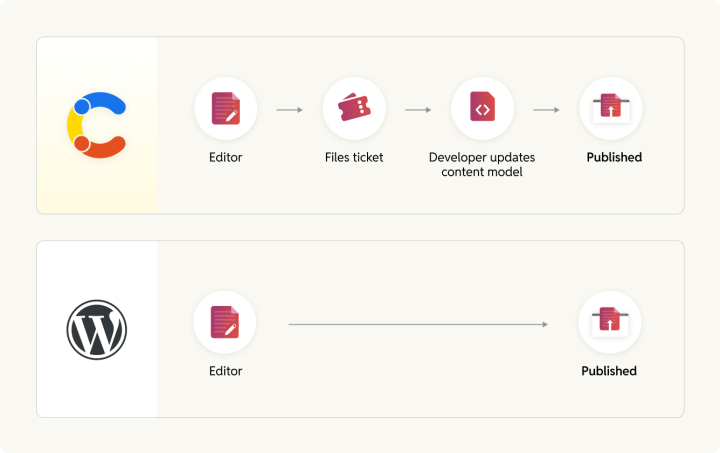
Restructuring a content type in Contentful either needs admin-level access or a developer writing a migration script.
However, WordPress’s Gutenberg block editor is a WYSIWYG experience. A marketing manager can build a new landing page without filing a ticket.
PhantomBuster’s publishing time fell from 90 minutes per article on Contentful to 10 minutes on WordPress.
Foursquare’s migration from Contentful to WordPress, completed in 12 weeks, produced a 54% improvement in page load times, from 7.0 seconds to 3.1 seconds. The engineering work and editorial workflow change happened simultaneously.
## Choose your migration path first
Not every Contentful migration has the same result. If you’re running a React or Next.js frontend you want to keep, headless WordPress with WPGraphQL is the right target. If you want editors to own the full publishing experience without a decoupled frontend, traditional WordPress is the solution.
This guide covers both, with a decision framework for choosing between either of them.
**If you…****Go with…**Have a React/Next.js frontend you want to keepHeadless WordPress + WPGraphQLWant editors to own the full WYSIWYG experienceMonolithic (traditional) WordPressRun a marketing site with modest dev resourcesMonolithic WordPressNeed WordPress as a content backend for multiple frontendsHeadless WordPressWant WordPress VIP with full managed platform supportMonolithic WordPressAre on a Jamstack or edge-deployed frontendHeadless WordPressAre migrating from headless Contentful and want to drop the decoupled frontendMonolithic WordPress### The headless path
This replaces Contentful as the content backend while the frontend stack (Next.js, Nuxt, etc.) stays intact. The primary work is swapping the Contentful SDK for [WPGraphQL](https://www.wpgraphql.com/) queries, remapping the content model, and rebuilding Rich Text rendering logic.
rtCamp’s open-source [SnapWP framework](https://rtcamp.com/snapwp/) provides a foundation for headless WordPress with WPGraphQL. SnapWP keeps your existing WordPress designs, styles, and page structure working on a headless frontend.
### The traditional path
This puts both CMS and frontend on WordPress. Editors get the Gutenberg block editor from the beginning. The migration involves building a WordPress theme alongside migrating content.
## Pre-migration: discovery and planning
Close attention to the discovery and planning phase is important to prevent problems from showing up when it’s too late.
### Content inventory and audit
1. First, run the [contentful export](https://www.npmjs.com/package/contentful-export) via the Contentful CLI. The output is a single JSON file containing all content types, entries, assets, locales, webhooks, roles, and editor interfaces. Key flags: --include-drafts, --download-assets, --environment-id.
2. Parse the export to generate a frequency map: entry counts per content type. Don’t write transformation scripts until you’ve reviewed this map.
3. Sort content into three buckets:
**–** **Migrate:** Active, high-traffic, brand-relevant
**– Update:** Needs revision before or during migration
**– Retire:** Outdated (archive or delete)
Supplement this with Google Search Console and Screaming Frog or Ahrefs for backlink data. High-traffic, high-backlink URLs require special handling in redirect mapping and shouldn’t get lost in bulk migration logic.
The CMA rate limit of 7 requests/second (default) means large spaces take time to export. The CLI handles rate limiting automatically. Build this into the schedule and don’t interrupt it.
### Data model mapping
Every Contentful content type must map to a WordPress equivalent before any import code gets written.
**Contentful concept****WordPress equivalent**Content typeCustom Post Type (CPT)Short/Long Text field[Pods](https://wordpress.org/plugins/pods/) or ACF text or textarea field, or native post_title/post_contentRich Text fieldpost_content (HTML) or Gutenberg block markupReference (linked entry)Pods or ACF Relationship field + post ID lookup tableArray of referencesPods or ACF Relationship field (multi-select) or Repeater/Group fieldAsset (image/file)WordPress Media Library (attachment post type)Locale field variantsSeparate translated posts via [WPML](https://wpml.org/), [Polylang](https://wordpress.org/plugins/polylang/), or [MultilingualPress](https://multilingualpress.org/)SpaceStandalone WordPress install or Multisite networkEnvironmentWordPress staging environment (host-provided or plugin-based)TagWordPress tag taxonomyWebhookWP-Cron or Action Scheduler for scheduled tasks; outgoing webhooks via plugin (e.g., WP Webhooks) or custom REST API endpointsIf a property needs filtering or navigation, use a taxonomy. If it’s descriptive metadata only, use post meta. Author and contributor references can map to the WordPress Users table or the [Co-Authors Plus](https://wordpress.org/plugins/co-authors-plus/) plugin.
The table above uses [Pods](https://wordpress.org/plugins/pods/) as the custom fields layer, but it’s one of several options. [Meta Box](https://metabox.io/), [Carbon Fields](https://carbonfields.net/), and [Toolset](https://toolset.com/) are all well-maintained alternatives.
The trickiest part of any Contentful-to-WordPress migration is reference mapping. Contentful links entries to each other using internal IDs (sys.id), and WordPress uses its own post IDs. A mapping table that connects the two must be built at the start of the migration and kept intact throughout the process. If that table is lost or corrupted, every cross-reference in the migrated content will break.
### SEO preservation plan
Contentful has no native URL structure. Every URL lives in the frontend routing code, which means the redirect map has to come from that routing logic. Follow these steps to preserve SEO after migration:
1. Build a complete URL inventory before you touch anything else, with all indexable pages, top organic landing pages from Search Console, highest-backlink URLs from Ahrefs or Moz, sitemap entries, and vanity and campaign URLs.
2. Map every old URL to its new WordPress permalink and implement it via the [Redirection plugin](https://wordpress.org/plugins/redirection/) or server-level 301s.
3. Avoid the temptation to redirect everything to the homepage, because Google treats that as a soft 404 and you’ll lose SEO equity by doing so.
4. Migrate all meta titles, descriptions, Open Graph (OG) tags, and schema markup to [Yoast SEO](https://yoast.com/) or [Rank Math](https://rankmath.com/). Submit a new XML sitemap on launch day.
Drops in traffic after a migration are often the result of incorrect redirection, an action that is entirely within your control.
For a complete checklist, see rtCamp’s [CMS SEO migration guide](https://rtcamp.com/resources/cms-seo-migration/).
## The migration process
### Exporting from Contentful
[Automattic Special Projects](https://wordpress.com/blog/2023/11/30/building-a-contentful-custom-data-migration-to-wordpress/) and Emplifi both used a method that skipped using a WordPress plugin for the data load:
Contentful CLI export → JSON → custom transformation scripts
The export is a single JSON file. For large spaces, paginate using the [Content API’s](https://www.contentful.com/developers/docs/references/graphql/) cursor-based pagination. Before writing any transformation code, compare entry counts per content type against the Contentful dashboard. This check takes about an hour and can save days of rework.
### The Rich Text problem
Contentful’s Rich Text format is a proprietary JSON document tree. It can’t be imported into WordPress directly, and every Contentful migration requires a transformation step here, which is consistently the highest-complexity technical work in the project.
#### Path A: Convert to HTML
Use the official [@contentful/rich-text-html-renderer](https://www.npmjs.com/package/@contentful/rich-text-html-renderer) package (documentToHtmlString()) with custom renderNode handlers for each node type. Store output in WordPress post_content. This is reliable, straightforward to implement, and handles standard text formatting correctly.
#### Path B: Generate Gutenberg blocks (recommended for enterprise migrations)
Override each renderNode in @contentful/rich-text-html-renderer to emit Gutenberg block comment syntax instead of HTML:
-
-
-
No off-the-shelf library does this since it requires custom development. The advantage is that editors get full Gutenberg editing capability after migration rather than a monolithic HTML blob in post_content. The block serialization format is formally specified in the [WordPress Block Editor Handbook](https://developer.wordpress.org/block-editor/getting-started/fundamentals/markup-representation-block/) and defined by a published Parsing Expression Grammar in [@wordpress/block-serialization-spec-parser](https://www.npmjs.com/package/@wordpress/block-serialization-spec-parser), a stable spec. It is worth the custom development investment for any organization planning long-term on WordPress.
Embedded entries and assets are the hardest part. Contentful Rich Text stores them as reference pointers (sys.id). Before conversion begins, make sure you map every Contentful entry and asset ID to its WordPress equivalent.
Always import assets before entries. Entries reference assets by ID, so the WordPress attachment IDs need to exist before any entry tries to point to them.
### Asset migration
Every Contentful asset is served from images.ctfassets.net, the CDN URLs authenticated against your Contentful organization account. When the subscription ends, every image will return a 403.
Use [media_sideload_image()](https://developer.wordpress.org/reference/functions/media_sideload_image/) to download each asset from Contentful’s CDN and register it in the WordPress Media Library during import. Build an asset ID lookup table (Contentful sys.id → WordPress attachment ID) for reference resolution after import.
Metadata mapping:
- Contentful title → WordPress attachment title
- Contentful description → WordPress alt text
For post-import cleanup, the [a8cteam51/wordpress-importer-fixers](https://github.com/a8cteam51/wordpress-importer-fixers) WP-CLI toolset from Automattic Special Projects handles broken featured image associations and gallery ID mismatches, two of the most common post-migration data integrity issues.
### Import architecture and best practices
Custom PHP scripts should be executed via [wp eval-file](https://wp-cli.org/), since browser-based processes are prone to failure.
Here are some critical implementation details from Automattic Special Projects:
- Set define('WP_IMPORTING', true) at script start. This suppresses publish notifications, pingbacks, and subscription emails during import.
- Use the [Rule of 1-2-10](https://wordpress.com/blog/2023/11/30/building-a-contentful-custom-data-migration-to-wordpress/) to import 1 entry and verify manually, then 2, then 10. After the 10-entry run, benchmark execution time to estimate the full import duration. Only then run against the complete dataset.
- Store the raw Contentful import data in WordPress post meta. This makes debugging easier and helps ensure reruns don’t create duplicates.
- Import as draft status first, spot-check across content types, then bulk-publish. Make sure WP_IMPORTING is still defined when changing post status to avoid triggering notification hooks.
### Going headless: replacing the Contentful SDK with WPGraphQL
If your team is keeping an existing React, Next.js, or Nuxt frontend and swapping Contentful for WordPress as the content backend, the work will focus on four schema differences between the two platforms. Install [WPGraphQL](https://www.wpgraphql.com/) (free, open-source) and [Pods](https://wordpress.org/plugins/pods/), which has WPGraphQL integration built into core since version 2.9.
#### Query structure and field naming
Contentful auto-generates its GraphQL schema from content models at request time, using a {contentType}Collection { items { ... } } pattern. WPGraphQL follows the Relay specification: {contentTypePlural} { nodes { ... } } or edges { node { ... } }. Every Contentful query in the frontend codebase needs a rewrite.
#### Pagination
[Contentful uses offset-based](https://www.contentful.com/developers/docs/references/graphql/) skip/limit with a totalfield. WPGraphQL uses cursor-based pagination with first/after (forward) and last/before (backward) arguments, returning opaque cursor strings in pageInfo. WPGraphQL’s creator Jason Bahl [documented the design rationale](https://www.wpgraphql.com/2020/03/26/forward-and-backward-pagination-with-wpgraphql) for this approach in 2020. An optional offset pagination extension exists but isn’t recommended. Every paginated Contentful query requires a rewrite, and this is the most significant frontend code change in the migration.
#### Nested query complexity
Contentful enforces a default 11,000-entity complexity budget per request and an 8KB query size limit. Premium plans can bypass the size limit with persisted queries. WPGraphQL has no built-in complexity or size caps and uses DataLoaders for batched resolution. Queries still need restructuring, but WPGraphQL’s constraints are less restrictive at the API layer.
#### Asset handling
Contentful lets you resize and reformat images directly in a GraphQL query using url(transform: { width: 200, format: WEBP }). WPGraphQL takes a different approach: WordPress generates image sizes at upload time (thumbnail, medium, large, etc.), and WPGraphQL lets you pick which one you want via sourceUrl(size: LARGE).
Rich Text handling also gets simpler. Contentful delivers content as structured JSON that requires a dedicated rendering library (@contentful/rich-text-react-renderer) to convert into displayable HTML. WordPress stores content as ready-to-render HTML, so that entire library layer disappears from the frontend codebase.
Before switching over, run Contentful and WordPress backends in parallel on staging and compare GraphQL responses field-by-field.
rtCamp’s [wp-decoupled](https://github.com/rtCamp/wp-decoupled) Next.js + WPGraphQL starter and the [SnapWP framework](https://github.com/rtCamp/snapwp) provide a foundation for such a move.
### The traditional WordPress theme migration
For teams moving to a WordPress theme and wanting editors to own the full publishing experience, the benefit for editors is immediate.
Register Custom Post Types matching the mapped content model and build [Pods](https://wordpress.org/plugins/pods/) field groups for each. Develop the WordPress theme with block templates or Full Site Editing (FSE) templates corresponding to each content type’s editorial layout.
For complex landing page structures previously built in Contentful’s content model, map to Pods Flexible Content or native Gutenberg block patterns. Full Site Editing allows headers, footers, archive templates, and single post templates to be managed visually after launch.
## Multilingual migrations require a separate plan
Contentful and WordPress store translations differently, and that is where multilingual migrations get complicated.
[Contentful stores localizations at the field level](https://www.contentful.com/developers/docs/concepts/locales/) with one entry for multiple locale values per field. The structure looks like "title": { "en-US": "My Post", "de-DE": "Mein Beitrag" }. A single entry ID represents all locale versions.
WordPress multilingual plugins ([WPML](https://wpml.org/), [Polylang](https://wordpress.org/plugins/polylang/), [MultilingualPress](https://multilingualpress.org/)) all use a post-level model, each translation is a separate post linked to the original. One Contentful entry with 5 locale variants becomes 5 WordPress posts, each requiring language assignment, linking, and ongoing sync.
The migration script must maintain a {contentful_entry_id, locale} → wordpress_post_id mapping table. Non-localized fields must be duplicated or configured as copy-once. Cross-entry references must be resolved per locale.
All three plugins provide programmatic APIs for bulk import. WPML uses the wpml_set_element_language_details action hook, Polylang uses pll_set_post_language() , and MultilingualPress exposes a ContentRelations API.
[WordPress Core’s Phase 4 roadmap](https://wordpress.org/about/roadmap/) targets native multilingual support, which would eliminate the post-duplication model entirely. If your project won’t launch until late 2026 or beyond, that’s worth factoring in when you select a plugin for this aspect.
## Testing and launch
### Staging and rehearsal
Run the full migration in staging at least twice before going live. The second run confirms the scripts are rerunnable. They should produce no duplicates or data drift. A third run, if time allows, is useful as a speed benchmark.
Give the editorial team access to staging for User Acceptance Testing (UAT). Editors will catch content rendering issues, truncated text, wrongly formatted pull quotes, broken relationship fields, and missing image captions.
Run Core Web Vitals (PageSpeed Insights), GTmetrix, and Time to First Byte (TTFB) benchmarks in staging against the live Contentful baseline before launch to track the benefits of the migration.
### Pre-launch checklist

All redirects implemented and tested

SEO metadata (titles, descriptions, OG tags, schema markup) migrated and spot-checked

All media assets downloaded and rendered without broken references

Forms and lead capture workflows tested end-to-end

Integrations reconnected: analytics, marketing automation, Digital Asset Management (DAM), search

SSL certificate in place on the WordPress install

Backup verified and restore process tested

Rollback plan documented, with a clear record of who calls it, under what conditions, and who executes it

Content freeze window communicated to the editorial team
### Go-live
These are the steps you’ll need to follow:
1. Schedule the switch for your lowest-traffic window, typically 2–4 am. Run a final content sync for anything published in Contentful after the staging snapshot was taken.
2. Keep the Contentful subscription active for a cooling period of at least two weeks after launch.
3. Keep an eye on Google Search Console for crawl errors, your analytics for traffic baseline comparison, and server logs for 4xx/5xx spikes in the first 48 hours.
## Post-migration: onboarding and what comes next
### Editorial team onboarding
After migrating to WordPress from AEM, [Manheim’s](https://rtcamp.com/case-studies/aem-to-wordpress-migration-for-manheim/) marketing team went from full developer dependency to building and publishing pages independently. At [The Indian Express](https://rtcamp.com/case-studies/strategic-development-for-indian-express/), editors publish breaking news faster since moving to Full Site Editing in WordPress.
Focus early training on block editor basics, content model conventions, media management, SEO meta fields, and editorial workflow and roles.
A one-page reference card for the five most common editorial tasks will help reduce support queries.
### Integration replacement
**Contentful integration****WordPress equivalent**Segment / Google Analytics[Parse.ly](https://www.parse.ly/) (native to VIP), Site Kit, Segment pluginBynder / Cloudinary DAM (Digital Asset Management)Native WP plugins, [rtCamp GoDAM](https://godam.io/)Algolia / Elasticsearch[WP Search with Algolia](https://wordpress.org/plugins/wp-search-with-algolia/), [ElasticPress](https://www.elasticpress.io/)[, SearchWP](https://searchwp.com/)HubSpot / MarketoHubSpot WP plugin, WPForms, Gravity FormsPersonalizationParse.ly content insights, Optimizely pluginA/B testingParse.ly Headline Testing, VWOWordPress’s 61,000+ free plugins cover most integrations without the need for custom development. For organizations that built custom Contentful integrations, the same principle applies on WordPress, with more community-maintained starting points.
### Performance benchmarks to set
Compare Core Web Vitals before and after using the same device, network, and testing tool. The comparison is only meaningful if the methodology stays consistent.
Below are results from comparable rtCamp migrations:
- [Pasqal](https://rtcamp.com/case-studies/pasqal-wordpress-vip-migration/): Core Web Vitals (CWV) score *66 → 90*
- [VinSolutions](https://rtcamp.com/case-studies/migrating-vinsolutions-kentico-cms-to-wordpress-vip/) (Kentico → WordPress VIP): *48% CWV improvement*
- [KHM Travel](https://rtcamp.com/case-studies/vip-migration-and-codebase-audit-khm-travel-group/): TTFB *0.7s → 0.29s*
- [FleetNet America](https://rtcamp.com/case-studies/fleetnet-americas-online-presence-a-drupal-to-wordpress-migration-success-story/) (Drupal → WordPress VIP): roughly *2× CWV improvement*
- [NextGear Capital](https://rtcamp.com/case-studies/nextgear-capital-performance-focused-modernization/): *20% increase* in lead form submissions
- [Greater Kashmir](https://rtcamp.com/case-studies/greater-kashmir-case-study/) (proprietary CMS → WordPress): *320,000+ articles migrated*, *17% increase in mobile sessions* post-launch
Set review milestones at 30, 60, and 90 days after launch to track organic traffic trends, Core Web Vitals, lead form conversion rates, and editorial publishing speed.
### Governance setup
WordPress’s built-in roles – Administrator, Editor, Author, Contributor, Subscriber map directly to most editorial hierarchies and can be extended further with the [User Role Editor](https://wordpress.org/plugins/user-role-editor/) plugin.
### Migration engagement options with rtCamp
rtCamp is a [WordPress VIP Premier Agency Partner](https://wpvip.com/partner/rtcamp/) with 300+ completed migrations across enterprise publishing, media, and business-to-business (B2B) organizations. Engagements are structured in three tiers depending on how much of the work you want to own.
#### Free consultation (20 hours of scoping)
Contentful setup assessment, architecture recommendation, preliminary timeline and cost estimate, and an honest view of whether migration makes sense now. This includes a documented read-out you can take into internal planning.
#### Paid discovery (2–3 weeks)
A complete migration blueprint covering content model mapping, Extract-Transform-Load (ETL) architecture, redirect inventory, integration plan, and governance structure. Yours to execute in-house, with rtCamp, or with any partner.
#### Full migration service
End-to-end from discovery through 90 days of post-launch support, including editorial onboarding and performance validation.
### Get in touch
[**Book a free migration consultation**](https://rtcamp.com/business-inquiry/) if you’d like to know more about our [Contentful to WordPress migration services](https://rtcamp.com/contentful-to-wordpress-migration-service/). We build a custom Rich Text to Gutenberg renderer for your content model, map every redirect before migration starts, and run both platforms in parallel until cutover.
### Categories and Taxonomies
#### Categories
[Articles](https://rtcamp.com/blog/category/articles.md)
#### Tags
[Contentful to WordPress Migration](https://rtcamp.com/blog/tag/contentful-to-wordpress-migration.md), [WordPress Migration](https://rtcamp.com/blog/tag/wordpress-migration.md)
#### Service
[Contentful to WordPress](https://rtcamp.com/blog/service/contentful-to-wordpress-wordpress-migration.md)
#### Solutions
[WordPress Migration](https://rtcamp.com/blog/solution/wordpress-migration.md)
#### Topics
[Contentful to WordPress](https://rtcamp.com/topics/contentful-to-wordpress.md), [WordPress](https://rtcamp.com/topics/wordpress.md), [WordPress Migration](https://rtcamp.com/topics/wordpress-migration.md)
### Related Posts
- [AEM vs WordPress : Which is the better CMS?](https://rtcamp.com/resources/aem-vs-wordpress.md)
- [Sanity to WordPress migration : A complete how-to guide](https://rtcamp.com/resources/sanity-wordpress-migration.md)
- [Sanity vs WordPress: The honest comparison for enterprises going headless](https://rtcamp.com/resources/sanity-vs-wordpress.md)
- [HubSpot CMS vs WordPress : Should your CRM also run your website?](https://rtcamp.com/resources/hubspot-vs-wordpress.md)
- [A practical guide to the WordPress Abilities API](https://rtcamp.com/resources/abilities-api.md)