










Introducing OneLogs: Unified Activity Logging for Multisite, Multilingual, and Multi-Brand WordPress Networks
OneLogs is a plugin that brings centralized activity logging to OnePress, our framework for organizations managing multi-brand, regional, and multilingual WordPress networks with shared governance but local autonomy. Here is the GitHub repo.
With OneLogs, you can audit and monitor user activity across your entire WordPress multisite network from a single dashboard. Built on top of the trusted Stream plugin, OneLogs extends its capabilities to provide network-wide visibility. It automatically aggregates logs from every connected site while respecting your governance structure.
Whether you’re running a global media network, a franchise of regional sites, or a multi-brand corporate portfolio, OneLogs ensures you never lose sight of what’s happening across your digital ecosystem.
How It Works
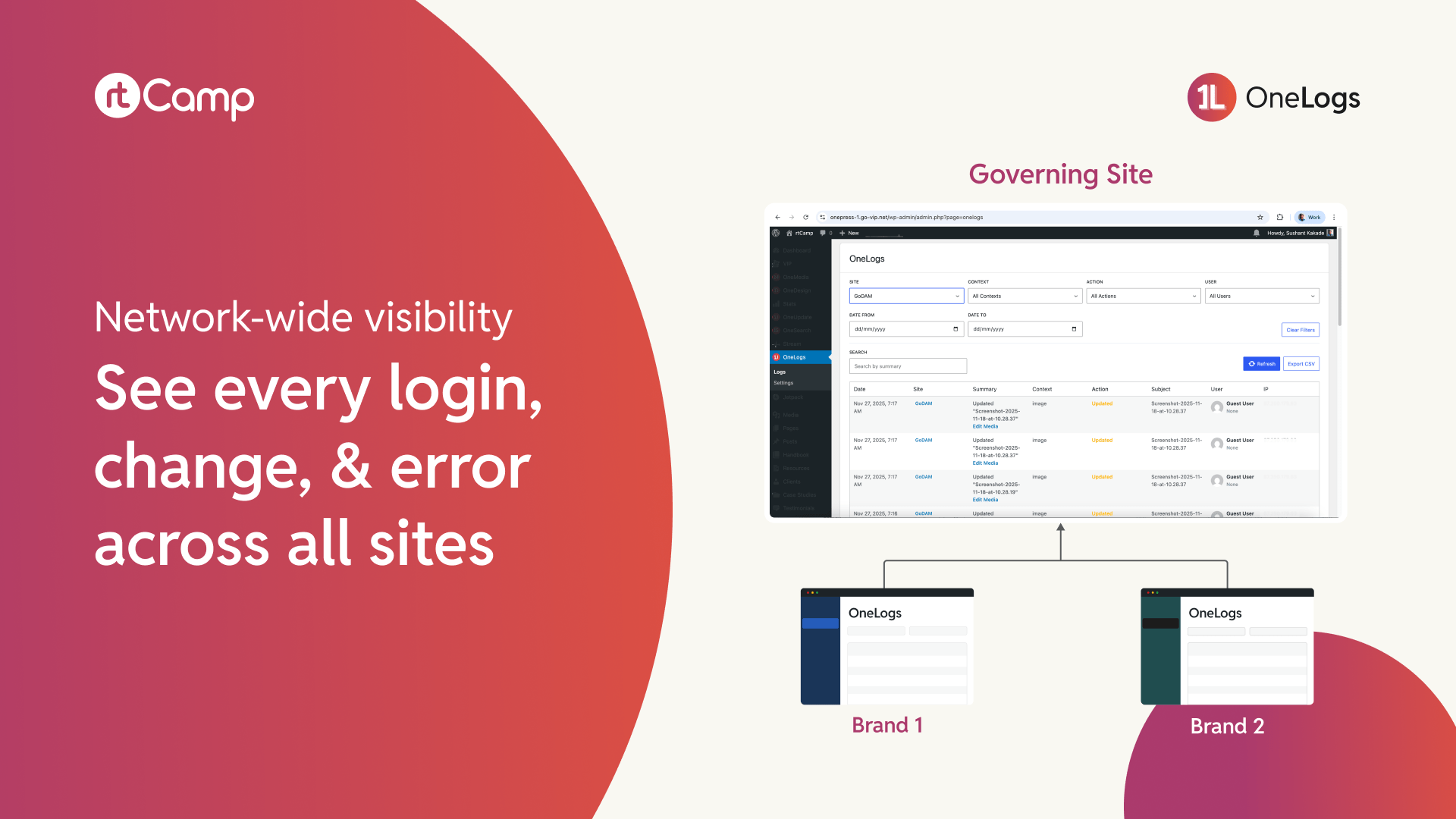

1. Designate Your Governing Site
Choose one site in your network to serve as the central hub. This is where you’ll view and manage logs from all connected sites.
2. Connect Your Brand Sites
Register each brand site in your network with OneLogs. The plugin generates secure API keys to authenticate communication between sites.
3. Monitor from One Dashboard
Access the OneLogs dashboard on your Governing Site to view activity from any connected site. Filter by user, action type, date range, or specific site.
4. Export and Analyze
Export filtered logs to CSV for compliance reporting, incident investigation, or offline analysis.
Why We Built It
In enterprise environments, we consistently see the same challenge: organizations with multiple WordPress sites struggle to maintain visibility into what’s happening across their network.
Stream handles logging WordPress sites beautifully, even in a Multisite setup.
But when you’re managing 10, 50, or 200 sites across different WP instances, jumping between dashboards to piece together activity becomes unsustainable. You end up with blind spots, delayed incident response, and compliance headaches.
This fragmentation leads to real problems:
- Security incidents go unnoticed because no one’s checking that particular site.
- Compliance audits become multi-week ordeals of manual log exports.
- Troubleshooting user issues requires guessing which site to investigate first.
OneLogs, built as part of our OnePress framework, addresses this directly. It gives you a single pane of glass for activity monitoring without sacrificing the autonomy that makes distributed site management work.
Who Benefits
- IT and security teams can use the centralized logging system to spot suspicious activity across the entire network in real time, rather than discovering issues days later during routine checks.
- Compliance officers can generate comprehensive audit trails without coordinating manual exports from dozens of sites. One dashboard, one export, complete visibility.
- Operations teams can troubleshoot user issues faster by searching activity across all sites from a single interface, instead of playing detective across multiple dashboards.
- Enterprise administrators get the oversight they need while brand sites retain their autonomy. While each site can still view its own logs locally, the governing site sees everything.
Key Features
Extending Stream
Built on the reliable Stream plugin, ensuring robust, proven event tracking that the WordPress community already trusts.
Unified Dashboard
View and manage activity logs across all connected sites from one interface.
Site Selector
Switch between Governing Site logs and individual Brand Site logs with a simple dropdown.
Advanced Filtering
Search by user, context, action, summary, or date range to find exactly what you need.
CSV Export
Export filtered or complete log datasets for offline analysis, compliance reporting, or archival.
Real-Time Sync
Log entries update instantly as new actions are recorded on connected sites.
Brand-Aware Access
The Governing Site can view all logs, while Brand Sites can only view their own, preserving appropriate boundaries.
Next Steps
We’ll continue to expand OneLogs’ capabilities. You can see the open issues and roadmap on GitHub. The code is open-source under GPLv2. We’d love your feedback, contributions, and ideas.
We’re committed to making WordPress the platform of choice for organizations with ambitious multi-site needs. OneLogs is another step towards the OnePress vision that enables it. Stay tuned for more releases in this space.
To learn more, get in touch with us.
On this page


Leave a Reply