










Drupal vs WordPress: A detailed comparison
What enterprise media teams need to know before choosing their next CMS platform
If you are evaluating a CMS platform decision in 2026, you already know this is not an easy choice. Drupal and WordPress have been the two dominant open-source CMS platforms for enterprise organizations for over two decades and have evolved significantly.
While both platforms are similar in their capabilities in some areas, their differences are significant in others, making the decision all the more consequential.
Enterprise teams weighing the Drupal vs WordPress comparison are not choosing between a beginner-vs-developer tool since both are mature platforms. Drupal prioritizes architectural flexibility and granular developer control, while WordPress prioritizes editorial ease, ecosystem diversity, and a lower total cost of ownership.
This guide seeks to provide a balanced analysis to help you make a confident call. It evaluates 14 enterprise criteria using independent benchmarks, verified migrations, and real-world deployments across government, media, and Fortune 500 organizations.
Where Drupal leads, the evidence is presented fairly. Where WordPress leads, the data speaks for itself. The right choice depends on your organization’s size, technical team, content complexity, and growth roadmap.
A summary of our comparison
| Criterion | WordPress | Drupal |
| Security and compliance | ★★★★★ | ★★★★☆ |
| Performance and scalability | ★★★★★ | ★★★★☆ |
| Backup and disaster recovery | ★★★★★ | ★★★★☆ |
| Customization, flexibility, and developer experience | ★★★★☆ | ★★★★☆ |
| Enterprise readiness and multisite | ★★★★★ | ★★★☆☆ |
| Access control and permissions | ★★★★☆ | ★★★★★ |
| Team experience | ★★★★★ | ★★★☆☆ |
| Total cost of ownership | ★★★★★ | ★★★☆☆ |
| Market position and community | ★★★★★ | ★★★☆☆ |
| AI and future roadmap | ★★★★☆ | ★★★★☆ |
| Ecosystem and integrations | ★★★★★ | ★★★★☆ |
| SEO and localization | ★★★★★ | ★★★★☆ |
| Migration and portability | ★★★★☆ | ★★★☆☆ |
| Accessibility and responsive design | ★★★★☆ | ★★★★★ |
What is Drupal?
Drupal is a free, open-source CMS written in PHP and licensed under the GPL. Created in 2000 by Dries Buytaert as an internal message board at the University of Antwerp, it evolved into a modular web application framework used by governments, universities, and enterprises worldwide.
Architecture and strengths
Drupal supports complex data relationships, granular permissions, and custom editorial workflows without third-party extensions. It offers multi-database support (MySQL, MariaDB, PostgreSQL, SQLite), built-in multilingual capabilities across 100+ languages, and approximately 50,000 contributed modules.
Since Drupal 8, the platform has adopted Symfony components, Twig templating with automatic output escaping, and a configuration management system that versions every site setting as human-readable YAML.
Market position
Drupal powers approximately 1 % of the CMS market (W3Techs, 2026).
The community includes more than 1,500 members actively contributing each month.
The enterprise space
Although Drupal has been sought after by many enterprises, the same organizations that chose Drupal for its flexibility are now re-evaluating their decisions as maintenance complexity and specialist hiring costs increase.
For organizations with well-resourced Drupal teams and no pressure to change, the platform remains capable. For those watching costs climb, a serious look at the total cost of ownership becomes necessary.
What is WordPress?
WordPress is a free, open-source CMS built on PHP and MySQL, licensed under the GPLv2. Released in 2003 by Matt Mullenweg, it has grown from a blogging tool into the dominant content management platform on the internet.
Architecture and strengths
WordPress combines simplicity for content teams with progressive extensibility for developers. The Gutenberg block editor and Full Site Editing let non-technical staff build complex enterprise page layouts without the need for contacting developers.
WordPress offers over 61,000 free plugins, built-in multisite functionality, automatic background security updates (since version 3.7 in 2013), and a mature REST API for headless architectures. WPGraphQL adds schema-enforced GraphQL queries for decoupled frontends.
Market position
WordPress powers approximately 60% of the CMS market (W3Techs, 2026). Its community spans 740+ local meetup groups across 109 countries, 61,000+ plugins in active development, and a contributor base on every continent. This translates directly into faster hiring, lower costs, and broader security patch coverage.
Enterprise track record
WordPress powers mission-critical platforms at NASA, the White House, TIME, and global media networks, including News Corp Australia and Al Jazeera.
WordPress VIP, the FedRAMP-authorized managed enterprise hosting platform, serves clients from government agencies to Fortune 500 publishers with Kubernetes-native infrastructure, 28 global CDN data centers, and 99.95–99.99% uptime SLAs.
For enterprise media organizations evaluating Drupal or WordPress, the combination of editorial accessibility, ecosystem breadth, and proven scale makes a strong case for WordPress.
Security and compliance
Drupal and WordPress are both demonstrably secure at the core. The “WordPress is insecure” claim fails to hold water when you look at the data: in 2025, just 6 of 11,334 ecosystem vulnerabilities affected WordPress core. The risk surface for either CMS is the extension and plugin ecosystem, not the platform itself.
For every Drupal to WordPress migration we carry out at rtCamp, we reduce that risk by carefully scrutinizing plugins, enforcing update policies, and layering Web Application Firewalls. What tips the balance for most enterprise teams is the operational overhead. WordPress pushes security patches to production automatically. Drupal sites must be patched manually, and the compliance stack you need depends on which host you choose, not which CMS you run.
Winner: WordPress. Automatic patching and WordPress VIP’s FedRAMP authorization deliver enterprise-grade security with lower ongoing effort.
Where Drupal holds ground: Twig auto-escaping, declarative CSRF protection, and Acquia’s compliance depth make Drupal a strong runner-up, particularly where a single vendor must cover compliance end-to-end.
👉 Read the full security and compliance breakdown for core vulnerability counts, patch response timelines, and hosting-layer certification comparisons.
Performance and scalability
In the enterprise space, Drupal and WordPress can be configured to run on equivalent cloud foundations. Acquia operates on AWS, while WordPress VIP runs its own private infrastructure across 28 origin data centers. At the infrastructure level, either platform can handle enterprise-level traffic.
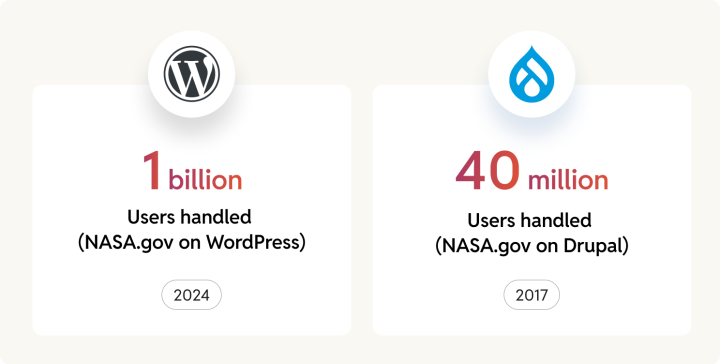
The differentiator is in the real-world stress tests. WordPress VIP handled 1 billion requests in 4.5 hours during the April 2024 solar eclipse on the NASA.gov site. During the November 2024 election, it managed 22 billion requests across customer sites over three days at 100% uptime. Drupal has credible proof points, but they are older and published with less metric-level transparency.
When our team at rtCamp migrated FleetNet Americas from Drupal 9 to WordPress VIP Multisite, we saw nearly 2× improvement in Core Web Vitals in weeks, with zero downtime or data loss.
Your procurement team will also be happy to know that WordPress has more than seven competing enterprise hosts fueling innovation and helping keep prices in check. Drupal, on the other hand, has three in the enterprise space.
Winner: WordPress. Documented billion-request benchmarks, broader hosting competition, and lower configuration overhead.
Where Drupal holds ground: Cache tags, BigPipe, and Dynamic Page Cache are framework-level advantages for complex personalization and high authenticated-user traffic.
👉 Read the full performance and scalability analysis for caching architecture comparisons, hosting provider benchmarks, and Core Web Vitals data.
Backup and disaster recovery
The best-known platforms for both Drupal and WordPress can achieve enterprise-grade geographic redundancy and disaster recovery, but close attention should be paid to the paths they follow.
WordPress makes backup and restore operationally simple. Major competing backup plugins push each other on features and reliability. WordPress VIP maintains real-time database replicas across four origin data centers with failover in minutes. For enterprise teams, the recovery workflow requires no custom scripting and no infrastructure engineering.
Drupal’s strength is configuration-level precision. Since Drupal 8, every site setting exports as a YAML file that teams can store in Git, review through pull requests, and roll back with a single command. For organizations that need documented change attribution for compliance audits, this native capability in Drupal may be a deciding factor.
In our experience at rtCamp, we’ve seen how crucial it is to factor in the engineering time demanded by recovery under intense pressure. Think of media organizations handling breaking news events. A managed enterprise host like WordPress VIP reduces that recovery time to a minimum.
Winner: WordPress. Real-time backups, competing plugin ecosystem, and managed host redundancy deliver enterprise recovery with low configuration effort.
Where Drupal holds ground: Git-native configuration management provides auditable, version-controlled rollback that WordPress does not replicate at the core level.
👉 Read the full backup and disaster recovery analysis for plugin comparisons, hosting-layer redundancy architecture, and configuration management workflows.
Customization, flexibility, and developer experience

Enterprise environments, especially in the media industry, require your teams to ship changes fast with less custom code. On this criterion, the two platforms reflect varying philosophies.
WordPress starts simple and scales through its ecosystem. A fresh installation creates 12 database tables. The Gutenberg block editor lets content teams build and restructure pages without filing developer tickets. With 61,000+ plugins, most common enterprise requirements have a ready solution that can be added and switched on at will. Backward compatibility has never been skipped.
Drupal starts versatile but stays code-first. Its native entity/field system handles complex content relationships without third-party dependencies. Typed fields, entity references, and version-controlled YAML configuration give development teams precise architectural control. This is a meaningful gain for deeply relational content structures.
At rtCamp, we have migrated organizations whose Drupal roadmaps had stalled under the weight of custom module dependencies and upgrade complexity. When we moved FleetNet Americas from Drupal 9 to WordPress, our engineers used Gutenberg blocks and existing plugins to rebuild content structures without complex custom development.
Winner: WordPress. Faster time-to-ship, broader plugin ecosystem, and upgrade paths that do not require a rebuild.
Where Drupal holds ground: Native content modeling and config-as-code give Drupal a real edge when complex relational data structures are a requirement.
👉 Read the full customization and developer experience analysis for database architecture comparisons, headless API capabilities, and custom module migration paths.
Enterprise readiness and multisite
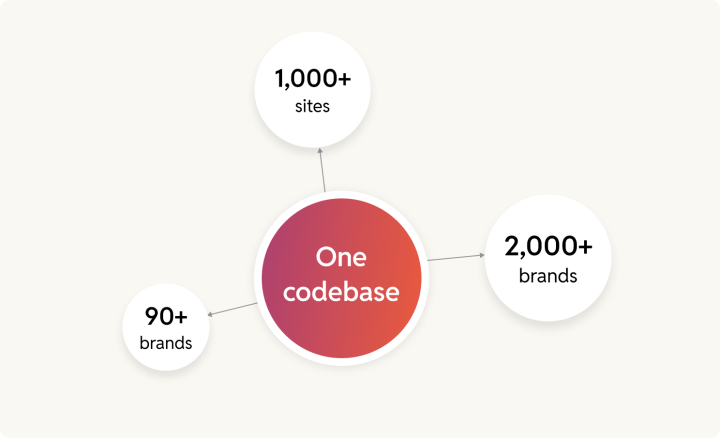
If your organization manages dozens or hundreds of sites from a single platform, the approach to multisite installations will help shape your CMS decision.
WordPress Multisite runs on a single codebase with per-site database isolation. You will need just one plugin update, security patch, and deployment, with the result that every site in the network receives it instantly. Harvard runs 2,000+ sites serving 9,000+ users on this model. News Corp Australia moved 90+ brands to WordPress VIP and cut publishing time from 10 minutes to 3. NASA’s migration to WordPress brought together 1,000+ public-facing websites, and the result comfortably took care of one billion requests during the 2024 solar eclipse without a performance dip.
Drupal is known to power multisite deployments too. However, the largest documented Drupal multisite, the Belgian Federal Police at 180+ sites, required multiple architectural iterations after the initial Aegir-based deployment proved impractical at scale.
At rtCamp, we have built enterprise WordPress solutions for Fortune 500 organizations and government agencies on WordPress VIP infrastructure. We’ve seen how centralized governance with decentralized publishing is where WordPress Multisite delivers a clear advantage.
Winner: WordPress. Proven at 1,000+ site scale with centralized governance, lower hosting costs, and faster deployment cycles.
Where Drupal holds ground: Adoption among universities and Gartner-recognized DXP status through Acquia.
👉 Read the full enterprise readiness and multisite analysis for architecture comparisons, hosting cost breakdowns, and documented migration case studies.
Access control and permissions
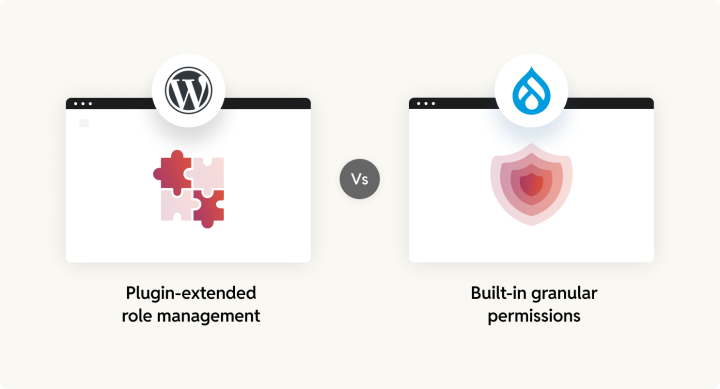
This is one of the criteria where Drupal earns an outright win. If your organization requires strict editorial compartmentalization with departments that cannot see each other’s content, multi-stage approval chains, or per-content-type permission boundaries, know that Drupal handles everything natively.
Drupal generates granular permissions for every content type by default. A typical enterprise installation involves 400–600+ individual permissions. Core Workflows and Content Moderation provide configurable editorial states (Draft, Review, Legal Approval, Published, Archived) with per-transition access control.
WordPress on the other hand, has five default roles mapped to roughly 70 capabilities cover most publishing workflows. Plugins like User Role Editor (700,000+ installs) and Members (300,000+) extend that model when needed. You can get good results, but only after extending the basic defaults.
Where WordPress narrows the divide is in identity integration and operational simplicity. Both platforms support Azure AD, Okta, and Google Workspace through SAML 2.0 and OIDC. WordPress VIP hosting handles SSO at the platform level. For teams that need role-based access without regulatory compartmentalization, WordPress delivers sufficient control with less configuration overhead.
Winner: Drupal. Native per-content-type permissions and core content moderation workflows make Drupal stronger for organizations with strict regulatory or departmental access requirements.
Where WordPress holds ground: Plugin-based role management across 1M+ combined installations and platform-level SSO provide practical access control at lower operational cost.
👉 Read the full access control and permissions analysis for permission model comparisons, content moderation workflow detail, and enterprise SSO integration paths.
Team experience
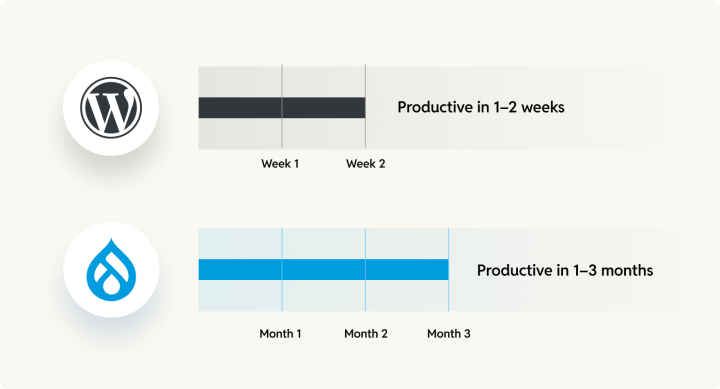
The CMS your team works in every day shapes hiring costs, onboarding speed, and how quickly your organization can respond to change. On this criterion, the platforms differ widely.
WordPress draws from a larger talent pool at every level. A PHP developer reaches basic WordPress productivity in 1–2 weeks. Drupal’s Symfony architecture, Twig templating, and entity system require months for basic proficiency..
At rtCamp, we regularly hire talented developers and help them grow into expert WordPress engineers, guided by experienced architects. A WordPress developer moving between engagements becomes productive in days. However, a Drupal developer joining a new project faces a more variable landscape.
On the editorial side, WordPress’s block editor gives content teams direct control over layout and publishing. Travelopia, managing 26 brands, cited this editorial dependency as their primary reason for leaving Drupal.
Winner: WordPress. Broader talent pool, faster onboarding, and editorial autonomy that reduces developer dependency.
Where Drupal holds ground: Developers who master Drupal’s architecture value its structural rigor. The risk is what happens when those specialists leave and replacements take months to find.
👉 Read the full team experience analysis for salary benchmarks, onboarding timelines, and editorial autonomy comparisons.
Total cost of ownership
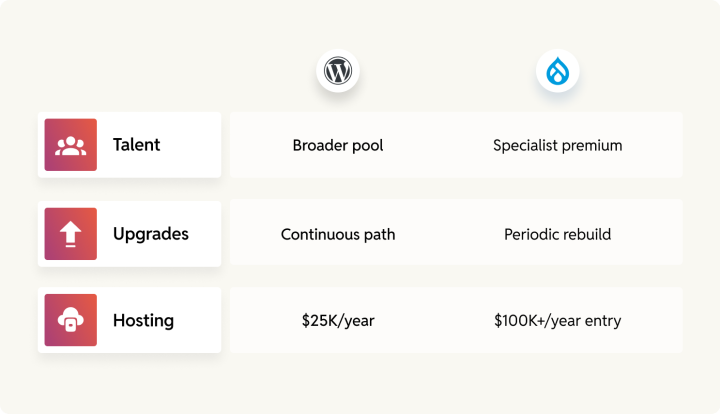
Open-source licensing makes both platforms free to adopt. The five-year cost difference is driven by three forces that have nothing to do with license fees: how easily you hire, how often you rebuild, and how many vendors compete for your hosting contract.
WordPress holds an advantage on all three. Its talent pool is broader, its upgrade path is continuous with no scheduled rebuild events, and its hosting ecosystem includes dozens of competing providers. Drupal’s talent market is tighter, its major version transitions can require ground-up rebuilds, and enterprise hosting is concentrated among three providers.
At rtCamp, clients who migrate from Drupal to WordPress consistently report yearly savings from easier hiring and lower maintenance costs.
Winner: WordPress. Structural cost advantages across talent, upgrades, and hosting competition deliver lower five-year TCO for most enterprise media platforms.
Where Drupal holds ground: Site factory operations at scale and compliance environments where Acquia’s certification depth is a procurement requirement.
👉 Read the full total cost of ownership analysis for salary benchmarks, hosting tier pricing, rebuild cost estimates, and the White House migration data.
Market position and community
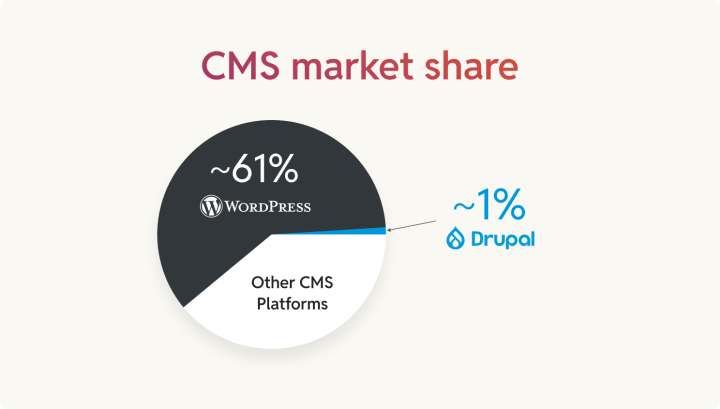
WordPress powers roughly 60–62% of CMS-driven websites. Drupal powers approximately 1%. That difference determines how quickly you fill an open role, how many agencies respond to your RFP, and how much pricing leverage you carry into a hosting negotiation.
Drupal’s enterprise footprint remains steady, albeit small. It holds 6.85% of the top 10,000 websites, carries Gartner DXP Leader recognition through Acquia, and its $1.5M AI Initiative shows continued corporate commitment.
Winner: WordPress. Ecosystem breadth delivers tangible advantages in hiring, vendor competition, and integration availability.
Where Drupal holds ground: Meaningful presence among high-traffic sites, Gartner recognition, and committed corporate sponsors investing in the platform’s future.
👉 Read the full market position and community analysis for trend data, community event benchmarks, and governance model comparisons.
AI and future roadmap
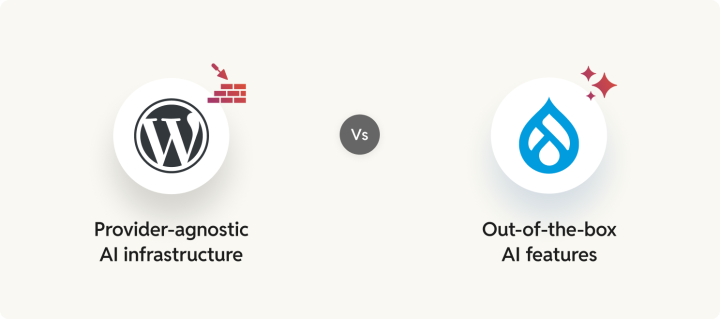
WordPress is building AI infrastructure into core. The WP AI Client, merging into WordPress 7.0, provides a provider-agnostic foundation that any plugin can build on. For enterprise teams already running on WordPress VIP, Parse.ly Content Intelligence delivers production-ready editorial AI today: headline testing, content recommendations, and smart linking.
Drupal is shipping product-level AI features directly. Drupal CMS 2.0 arrived in January 2026 with AI page generation, an admin chatbot, AI-generated alt text, and free tokens included out of the box. The contributed AI module supports 48+ provider integrations, and the $1.5M AI Initiative backed by 28 organizations is the largest coordinated AI investment in Drupal’s history.
This is one criterion where declaring a winner would be premature. Both platforms are in their early stages of AI adoption, and the scene will look different as years pass.
Verdict: Depends on use case. WordPress builds the foundation. Drupal ships the features. Execution over the upcoming years will settle the debate
👉 Read the full AI and future roadmap analysis for shipped-versus-roadmap breakdowns, provider integration comparisons, and WordPress VIP’s Parse.ly capabilities.
Ecosystem and integrations
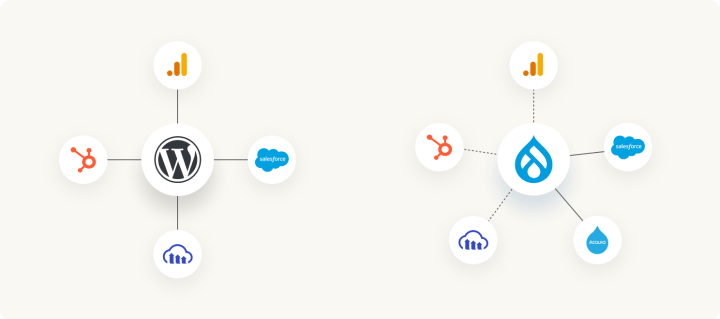
The speed at which your team connects a new marketing tool depends on whether someone has already built that connector and whether they are still maintaining it.
WordPress holds a decisive edge here. HubSpot, Google, ActiveCampaign, and Piano build and maintain their own WordPress plugins. When a vendor invests in a first-party integration, your team inherits their QA cycles, their API compatibility updates, and their support channel. That is a fundamentally different risk profile from a community-maintained module.
Drupal’s integration story is narrower but deeper in specific areas. Its Salesforce Suite is advanced, and core multilingual support spans 100+ languages and simplifies integrations for global content operations. And Acquia’s full DXP stack offers single-vendor integration at a premium price point for organizations that are looking for consolidated procurement.
At rtCamp, the trend we regularly see is that WordPress teams ship integrations rapidly, for the same reasons that the total cost of ownership stays both reasonable and predictable. Drupal teams ship comparable integrations over longer spans of time..
Winner: WordPress. First-party vendor integrations and a 5–10× larger connector library deliver faster time-to-market.
Where Drupal holds ground: Salesforce integration depth, native multilingual architecture, and Acquia’s consolidated DXP for complex CRM-driven environments.
👉 Read the full ecosystem and integrations analysis for vendor-by-vendor comparisons, DAM platform support, and the Acquia DXP versus WordPress VIP cost breakdown.
SEO and localization
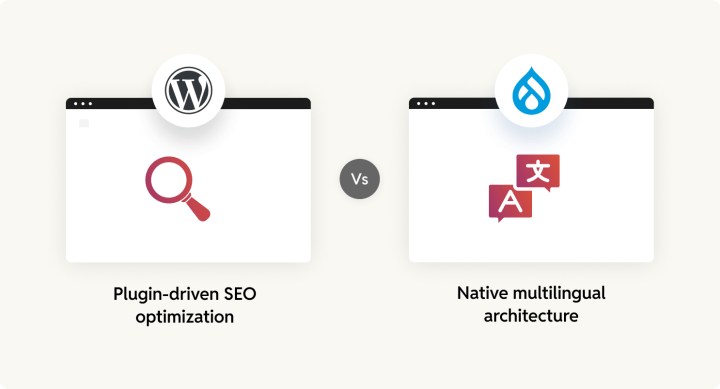
For SEO, both Drupal and WordPress will provide excellent results.
Drupal’s SEO strength lies in its URL lifecycle management, the kind of large-scale URL hygiene that WordPress achieves through premium plugins.
WordPress benefits from a fiercely competitive SEO plugin market. When two plugins with a combined 13 million installations compete for the same audience, your team gets real-time content analysis, schema markup, and structured data automation that improves with every release cycle.
On the multilingual front, Drupal has the advantage of providing this out of the box. Drupal ships four multilingual modules in core, supporting 100+ languages with field-level translation granularity at zero licensing cost.
Winner: WordPress. SEO plugin competition delivers stronger editorial tooling and faster optimization workflows. Premium plugins provide advanced multilingual capabilities.
Where Drupal holds ground: Native multilingual with field-level entity translation across 100+ languages, and more resilient URL management at scale.
👉 Read the full SEO and localization analysis for plugin-by-plugin comparisons, URL management workflows, and multilingual architecture detail.
Migration and portability
The New York Post, Rolling Stone, Vox Media, and News Corp all moved to WordPress. Documented enterprise migrations from WordPress to Drupal are exceptionally rare in public records.
WordPress backs this up with exit freedom. The Data Liberation project, dozens of competing hosts, and mature site-transfer tooling mean your organization can leave any vendor without a rebuild. Drupal carries the same open-source license, but custom module dependencies and a concentrated three-provider hosting market make switching costlier. The D7 end-of-life experience showed what that looks like in January 2025, with 37–40% of Drupal sites still running it because of the narrow pool of agencies available to assist.
At rtCamp, migration is central to what we do.
Winner: WordPress. Documented migration volume, vendor independence, and active investment in portability.
Where Drupal holds ground: The core Migrate API is a genuinely powerful ETL framework with incremental processing and rollback capabilities.
👉 Read the full migration and portability analysis for tooling comparisons, enterprise migration case studies, and the Data Liberation project roadmap.
Accessibility and responsive design
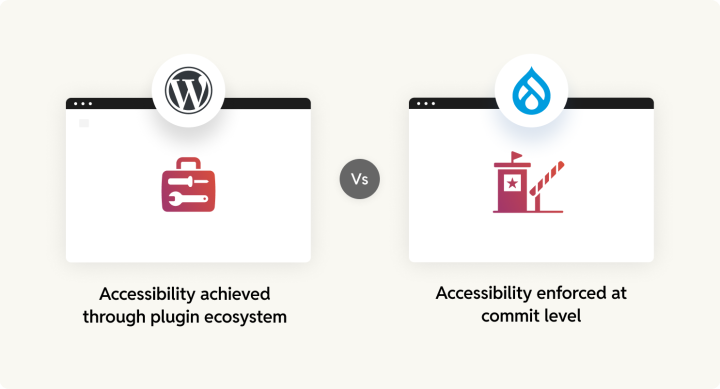
This is one of the criteria where Drupal earns a clear win. While both platforms target WCAG 2.2 AA, neither is fully conformant.
Drupal gates every core commit through automated accessibility tests. If they fail, the change is blocked. Major releases have been delayed over unresolved barriers. That level of enforcement is gives Drupal the edge on the accessibility front.
As for WordPress, the Accessibility Team ships 33+ fixes per release cycle. Plugins like WP Accessibility and Equalize Digital provide scanning and remediation. Roughly 100 themes carry the “Accessibility Ready” tag.
At rtCamp, we have consistently met enterprise compliance requirements by combining WordPress’s plugin ecosystem with rigorous implementation discipline.
As for responsiveness, WordPress ships automatic responsive images (srcset) since 4.4, fluid typography since 6.1, and AVIF since 6.8.
Winner: Drupal. A formal accessibility gate, mandatory alt text in core, and NFB-validated themes make Drupal stronger where the platform itself must enforce compliance.
Where WordPress holds ground: Zero-config responsive features, a broader accessible theme library, and strong plugin-based remediation with disciplined implementation.
👉 Read the full accessibility and responsive design analysis for WCAG conformance detail, plugin comparisons, and responsive design architecture.
Final takeaway: Drupal vs WordPress for enterprise media platforms
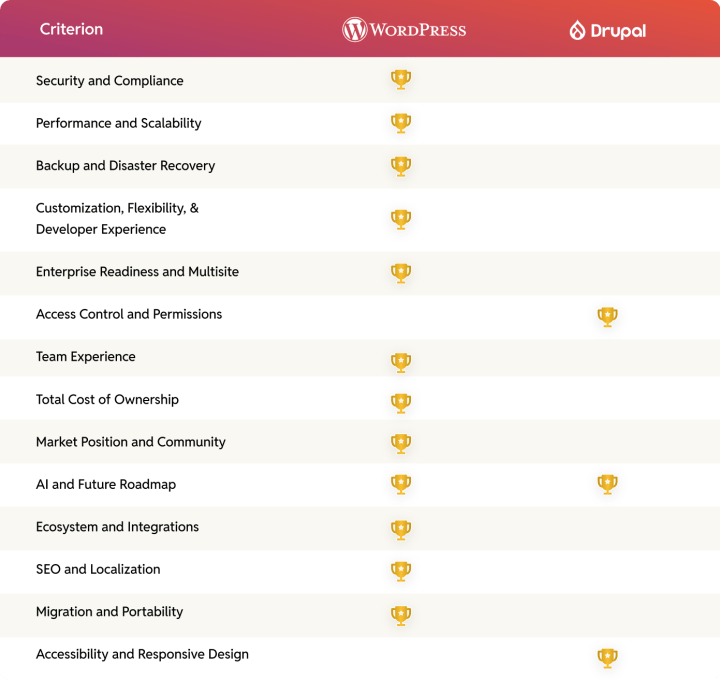
Across 14 criteria, the WordPress vs Drupal comparison yields a consistent pattern in our comparative analysis. WordPress wins in 11 categories, and Drupal wins in 2 (access control and accessibility governance). These are areas of genuine advantage for Drupal. The AI comparison is a tie for both Drupal and WordPress.
Where Drupal earns its place
Drupal’s wins are convincing in certain areas. Core Content Moderation delivers editorial governance WordPress achieves through plugins. A formal accessibility gate blocks regressions by design.
Drupal holds clear advantages in native multilingual capabilities (100+ languages at zero cost), cache tag CDN invalidation, config-as-code, and the Migrate API.
Why WordPress is the stronger choice
The advantage with WordPress is the compounding effect of lower costs, broader talent, faster editorial workflows, and proven scale operating simultaneously.
WordPress VIP’s FedRAMP-authorized, Kubernetes-native infrastructure with Parse.ly Content Intelligence transforms WordPress from a publishing tool into a content operations platform. Seven-plus competing enterprise hosts create pricing pressure and exit flexibility that Drupal’s three-provider ecosystem cannot match.
Use Drupal if…
- Your platform requires deeply specialized content governance for a heavily regulated environment.
- You have a well-resourced Drupal team with no recruitment pressure.
- You operate across dozens of languages and need zero-cost multilingual as a foundational feature.
- You require Acquia’s integrated DXP for personalization and multi-channel orchestration.
Use WordPress if…
- You run an enterprise media platform where editorial speed and time-to-market drive business outcomes.
- You need to scale sites without proportionally scaling teams.
- You want lower five-year TCO through automatic updates and fewer custom rewrites.
- Your hiring depends on a large, accessible talent pool. You need proven scalability from billion-request spikes to Fortune 500 multisite portfolios.
What we have seen across 300+ CMS migrations
At rtCamp, we are a WordPress VIP Gold Agency Partner. Our engineers have contributed to consecutive versions of WordPress core for over a decade, and our teams have carried out 300+ CMS migrations.
If your team is exploring a move from Drupal, our Drupal to WordPress migration guide covers the technical path, content mapping, risk assessment, and post-migration validation relevant for enterprise teams.
We also offer a done-for-you Drupal to WordPress migration service. If you are seeking a fully managed solution to move your enterprise Drupal platform to WordPress, this could be a strong fit.
Frequently Asked Questions
Is Drupal better than WordPress?
It depends on what you need. Drupal is better at fine-grained user permissions, built-in multilingual publishing, and complex content structures. WordPress is better at editorial speed, hiring, cost, and plugin availability. For enterprise media organizations, WordPress wins across more categories, but if your primary need is strict content governance across departments, Drupal earns its place.
Which is more secure, Drupal or WordPress?
Both Drupal and WordPress are secure at the core. Drupal makes it harder for developers to introduce certain types of vulnerabilities. WordPress patches itself automatically and has a much larger security plugin market. In 2025, only 6 out of 11,334 WordPress vulnerabilities were in the core itself (Patchstack). On both platforms, the risk comes from third-party plugins and modules, not the CMS.
Why are companies migrating from Drupal to WordPress?
Three reasons keep coming up. Drupal developers are harder to find and cost more. Upgrading between major Drupal versions often means rebuilding the site from scratch, and content teams on Drupal regularly need a developer to make changes that WordPress editors can handle on their own. NASA, the New York Post, Rolling Stone, and News Corp all made the same move.
Is WordPress easier to maintain long-term than Drupal?
Yes. WordPress applies security updates automatically. It does not force you to rebuild when a new major version arrives. Monthly maintenance typically takes 2–5 hours. Drupal enterprise sites need 10–40+ hours for the same period. Over five years, that difference adds up in the form of both cost and engineering time.
Which has better community support in 2026?
WordPress, by a wide margin. In 2025, WordPress held 81 events across 39 countries with over 100,000 attendees. DrupalCon North America drew 1,288. The volume of WordPress tutorials, forum answers, and available plugins is many times larger. Drupal’s community is smaller but deeply knowledgeable, and its $1.5M AI Initiative shows that it does have committed corporate backers.
Can WordPress do everything Drupal can with the right plugins?
Most things, yes. WordPress plugins cover custom user roles, editorial workflows, content modeling, and headless delivery. Two areas where Drupal still leads are its built-in system for defining complex content relationships without relying on third-party plugins and the Group module for keeping different departments’ content completely separate. For the majority of enterprise needs, WordPress with a well-planned plugin setup gets you there.


