










Arc XP to WordPress migration: A complete guide
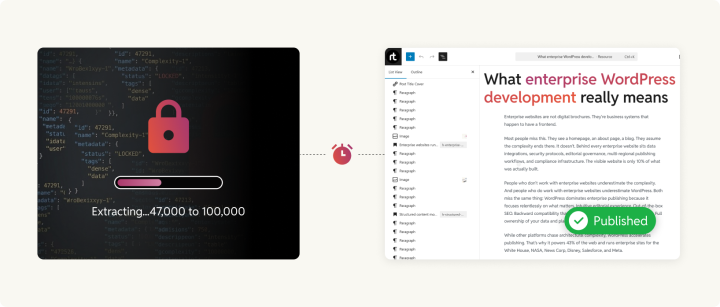
The hardest part of leaving Arc XP isn’t choosing what comes next. It’s getting your own content out. There’s no export button, no bulk download, and no Migration Center that works in reverse. There’s an API, rate-limited to 30 requests per minute, a CDN that serves every image through authenticated URLs tied to your organization’s account.
That’s what publishers tell us first: “We can’t get our content out.” This guide is the answer to that problem. We’ve drawn on our experience across 300+ CMS migrations to document every phase: Business Case, Discovery, Frontend and Content Migration, Backend Systems, QA, and Launch.
We don’t cover every config file and API call here. What we cover is the methodology, the decisions that matter, and the mistakes we’ve learned to avoid.
The business case for leaving Arc XP
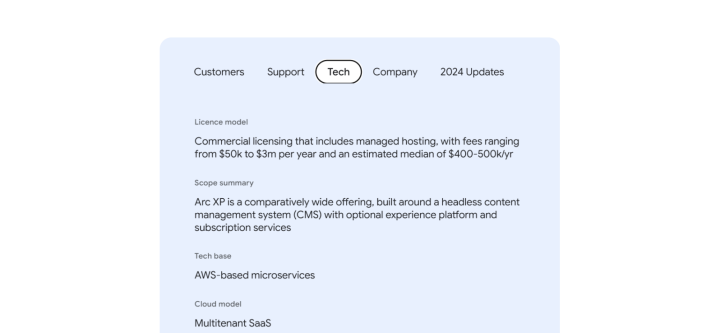
Arc XP pricing adds up fast. Companies pay anywhere from $100K to $4M+ annually, depending on seat count, bandwidth, and support tier. Factor in the specialized development team required to run what the Google News Initiative’s CMS assessment calls a “very developer-intensive” platform, and total cost of ownership climbs further.
WordPress VIP pricing starts at $25,000/year and scales based on monthly visitors, a fraction of an equivalent Arc XP deployment. Forrester’s Total Economic Impact study found that WordPress VIP delivers 415% ROI over three years, with a 40% reduction in total cost of ownership and 45% lower development costs.
And that’s just one of the enterprise WordPress hosting platforms in the ecosystem. You can choose from many more.
WordPress VIP is also the only WordPress platform with FedRAMP Moderate authorization, the U.S. government’s gold standard for cloud security. For publishers with government contracts, regulated content, or strict compliance requirements, this removes a significant barrier to adoption.
The cost gap is only part of the picture. The Washington Post has laid off 130+ Arc XP employees since 2023, and the GNI assessment flags “lingering uncertainty about future ownership.”
Meanwhile, WordPress powers 42.7% of the web, offers 61,000+free plugins and has 65+certified VIP agency partners. It draws from a developer talent pool measured in millions rather than hundreds. Arc XP has just 3 Gold Partners worldwide.
For a detailed comparison of Arc XP and WordPress across pricing, developer experience, ecosystem, and editorial capabilities, see our companion Arc XP vs WordPress piece.
Discovery and assessment
Discovery is where most agencies lose money, and most clients lose patience. It’s also where the entire migration is won or lost. Our team typically spends 20 hours on discovery & consultation with no financial obligation. Only after clients feel confident in our findings and approach do we move ahead. Every shortcut here shows up as scope creep later.
Feature parity: Arc XP and WordPress
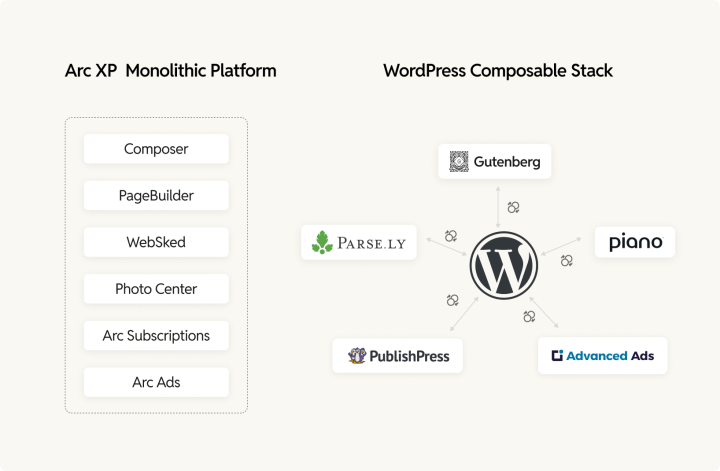
Arc XP and WordPress are fundamentally different platforms. ArcXP is more monolithic, whereas WordPress can be fully customized to mirror your needs with best-of-breed solutions. You can choose an equivalent solution to ArcXP features from more than 61,000 plugins, any number of SaaS integrations, or even build a custom solution with minimal effort.
This mapping table is the first thing our migration team produces, because every subsequent conversation depends on it:
| Arc XP feature | WordPress equivalents | Notes |
| Composer (content editor) | Gutenberg Block Editor (core, free), PublishPress Blocks (free + Pro), custom editor plugins | Native block editor with 90+ block types. Real-time collaborative editing in beta on WordPress VIP, targeting WordPress 7.0. PublishPress Blocks adds role-based block permissions for large newsrooms. Custom editor plugins can extend or reshape the editing experience to match any Composer workflow. |
| PageBuilder Fusion (React SSR) | Block themes + Full Site Editing (core, free), headless via SnapWP, custom Next.js + WPGraphQL | Traditional: block themes with theme.json design tokens. Headless: SnapWP (by rtCamp, experimental) for React SSR closest to Fusion’s architecture, or custom Next.js + WPGraphQL for maximum flexibility. |
| Feature Pack (frontend code repo) | WordPress theme (Git-managed) | A WordPress theme is the direct equivalent. Enterprise teams manage themes via Git with CI/CD. WordPress VIP enforces Git-based deployments by default. |
| Features (React components) | Gutenberg blocks, block libraries: Spectra (1M+ installs), Kadence Blocks, CoBlocks (400K+ installs), custom blocks via @wordpress/create-block | Off-the-shelf block libraries cover the most common components. Custom blocks built with React (same skillset as Arc XP Features) or PHP via custom block plugins. |
| Power Ups (editor extensions) | Custom Gutenberg blocks + SlotFill API, Meta Box (free + premium), Pods (free), custom plugins | The SlotFill API is the direct equivalent of Power Ups for extending the editor with sidebar panels, pre-publish checks, and metadata tools. Field plugins like Meta Box or Pods speed up development, or teams can build fully custom plugins tailored to their newsroom. |
| ANS (Arc Native Specification) | Posts + Custom Post Types, Meta Box (free + premium), Pods (free), Carbon Fields (free), Toolset Types (premium), custom tables | Platform-specific JSON schema vs. open database. Several mature plugins handle structured content modeling. Meta Box and Pods both support dedicated custom tables for performance at scale. Carbon Fields is a lightweight, code-first option. A fully custom schema using WordPress’s register_meta() and custom tables is also viable for teams with specific requirements. |
| Sections (content taxonomy) | Categories (core, free), custom taxonomies via register_taxonomy(), TaxoPress (free + premium), Custom Post Type UI (1M+ installs, free), custom taxonomy plugins | Register a custom section taxonomy to mirror Arc XP’s structure across multiple post types. Add term metadata (logos, colors, SEO data) via any field plugin or custom code. TaxoPress adds AI-powered auto-tagging. |
| WebSked (editorial workflow) | PublishPress Planner (free + Pro from $69/yr), Oasis Workflow (free + premium), CoSchedule ($29/user/mo), custom workflows | PublishPress provides a calendar, a Kanban board, custom statuses, and editorial comments. Oasis Workflow adds a visual drag-and-drop workflow designer for multi-step approvals. CoSchedule combines a calendar with social scheduling. Custom workflow plugins can replicate any WebSked behavior. |
| Photo Center (DAM) | WordPress Media Library (core, free), Cloudinary (SaaS, free tier + from $89/mo), Aprimo (enterprise DAM), Bynder (enterprise SaaS), WP Offload Media (free + premium), Real Media Library (premium), custom DAM integration | Cloudinary and Aprimo are WordPress VIP Certified Partners with AI-powered tagging, smart cropping, and CDN delivery. Bynder is a Gartner Magic Quadrant Leader with native WordPress integration. WP Offload Media moves assets to S3/GCS/DO Spaces. Real Media Library adds folder-based organization at enterprise scale. |
| Video Center | GoDAM (WordPress-native, free tier + paid plans from $7.50/mo), JW Player (SaaS), Brightcove (enterprise SaaS), Mux (API-first SaaS), Cloudflare Stream (SaaS), VideoPress (Jetpack), custom player | GoDAM (by rtCamp) offers cloud storage, automatic transcoding, adaptive bitrate streaming, global CDN with 118+ edge locations, interactive video layers (CTAs, forms, hotspots, polls), video analytics with heatmaps, and AI transcription. JW Player is purpose-built for news publishers with SSAI ad monetization and live + VOD. Brightcove offers the deepest enterprise features, including multi-DRM. Mux provides a good API and quality-of-experience analytics. |
| Ellipsis (content analytics) | Parse.ly (free with WordPress VIP), Chartbeat (premium SaaS), GA4 via Site Kit (free), Matomo (free self-hosted), custom dashboards | Parse.ly is bundled free with WordPress VIP and includes AI headline suggestions, smart linking, A/B testing, and Traffic Boost. Chartbeat is the alternative for non-VIP publishers with real-time editorial dashboards. Matomo provides full data ownership as a GA4 alternative. |
| Arc Subscriptions (paywall) | Piano (enterprise SaaS, WordPress VIP Partner), Leaky Paywall (from $199/mo), MemberPress (from $199.50/yr), Newspack (from $750/mo), Pelcro (free tier + from $450/mo), custom subscription system | Piano is used by WSJ, The Economist, and TechCrunch. Leaky Paywall is the best WordPress-native solution for news publishers. MemberPress leads in general membership. Newspack (Google-backed) bundles reader revenue with editorial tools. Password hashes cannot be exported from Arc XP, so plan for a lazy-auth bridge. |
| Arc Ads (ad management) | Google Ad Manager + Advanced Ads (free + Pro from €49/yr), Ad Inserter (free + Pro), Prebid.js (open-source header bidding), managed solutions (Raptive, Mediavine), custom ad integration | Advanced Ads was built for a 100M+ monthly impression network with GAM integration, A/B testing, lazy loading, and geo-targeting. Ad Inserter offers 16 code blocks with paragraph-level insertion. Prebid.js adds header bidding with 300+ demand partner adapters. |
| Clavis (personalization) | PersonalizeWP (free), If-So (free tier + from $139/yr), Dynamic Yield (enterprise SaaS), Sailthru (WordPress VIP Partner), Optimizely (enterprise SaaS), custom engine via REST API + ML services | PersonalizeWP is the best free option with native Gutenberg integration and GDPR-compliant on-server data. For full AI-driven behavioral recommendations closest to Clavis, Dynamic Yield or Sailthru are the enterprise picks. Custom engines can use AWS Personalize or Google Recommendations AI. |
| Content API | REST API (core, free) + WPGraphQL (30,000+ active installs, now an Automattic Canonical Plugin), custom endpoints | WPGraphQL enables single-query nested data fetching vs. multiple REST calls. Extensions exist for all major field plugins (Meta Box, Pods, Toolset). WPGraphQL Smart Cache (free) adds network-level caching with automatic invalidation. Most enterprise teams use both: GraphQL for headless frontends, REST for integrations and webhooks. Custom REST endpoints via register_rest_route() are also common. |
| Redirects (1,000 limit per environment) | WPCOM Legacy Redirector (free, designed for VIP), Redirection (free, no hard cap), Safe Redirect Manager by 10up (free, VIP-approved), Yoast SEO Premium redirects, server-level Nginx/Apache rules, Cloudflare Bulk Redirects, custom redirect logic | Arc XP caps at 1,000 redirects per environment in its UI. WordPress has no such limit. WPCOM Legacy Redirector uses MD5-indexed lookups for fast performance with thousands of redirects. Cloudflare supports millions on Enterprise plans. Server-level rules and custom redirect handlers have zero PHP overhead. |
| Arc Commerce | WooCommerce (free core) + WooCommerce Subscriptions ($239/yr), Shopify via Buy Button or Storefront API, Saleor (open-source headless), custom commerce | WooCommerce powers 2.9M+ sites and is owned by Automattic. Combined with Subscriptions + Memberships, it creates a complete reader revenue stack. Shopify integrates via the headless Storefront API for publishers wanting minimal commerce complexity. Saleor is GraphQL-native for headless builds. |
The overall picture: WordPress hits the majority of Arc XP’s features out of the box. The remaining features involve custom development, primarily for Power Up equivalents and any deep personalization and workflow logic. For most publishers, the WordPress stack ends up more capable because each component is best-of-breed rather than bundled.
Content audit: Deciding what migrates
Not all content should migrate. A migration is an opportunity to make deliberate decisions. We categorize content into three buckets:
Migrate
Active content driving traffic, revenue, or brand value. Everything published in the last 2–3 years typically falls here, plus evergreen content, regardless of age.
Archive
Old content with minimal traffic but potential SEO or reference value. Migrate but deprioritize. Consider a simplified template for archived content.
Deprecate
Content that’s outdated, duplicate, broken, or no longer aligned with editorial standards. Implement 410 Gone responses or 301 redirects to better content.
Pre-migration setup
An Arc XP to WordPress migration is only as smooth as its preparation. Our team has a saying: the most expensive mistake in a migration is the one you make before any code is written.
Environment and API access
Set up development, staging, and production WordPress environments before any content extraction begins. If targeting WordPress VIP, use VIP’s built-in staging environments and VIP CLI for local development. Otherwise, Docker-based setups ensure every developer runs identical configurations.
The critical pre-migration task most teams underestimate is API access. Arc XP’s default Content API rate limit of 30 requests per minute makes large extractions painfully slow. At that speed, extracting 100,000 stories takes ~55 hours (over 2 days). A site with 500,000 stories is looking at roughly 11.5 days of continuous extraction. While you can request a rate limit increase from Arc XP support, there’s no self-service option, and approvals aren’t instant.
Content freeze planning
Between your initial bulk extraction and go-live, your editorial team keeps publishing on Arc XP. A “delta migration” captures this new content, but it requires a content freeze window where no new publishing happens during the final sync.
A newsroom that publishes 24/7 will tell you a 4-hour freeze is impossible. It’s not. But you need to tell them 6 weeks in advance, not 6 days. Our team always plans the freeze window early: overnight or early morning, 2–6 hours maximum, with the editorial team fully briefed on scheduling workarounds.
URL mapping decisions
This is the bridge between your Arc XP site and WordPress. Arc XP typically generates URLs in the pattern /{section}/{YYYY}/{MM}/{DD}/{slug}/. The simplest approach: match this exactly in WordPress with the custom permalink /%category%/%year%/%month%/%day%/%postname%/.
Zero redirects needed for existing content. Lowest risk to SEO.
If you adopt a new URL structure, every old URL needs a 301 redirect to its new equivalent. Valid if your current URL structure is inconsistent, but it means more effort.
Frontend migration
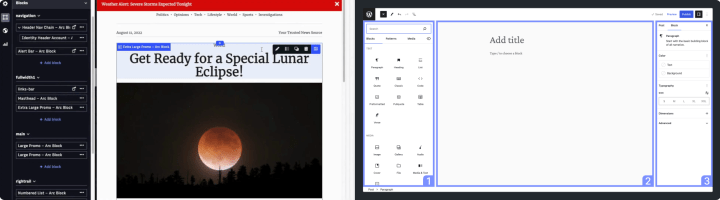
Arc XP renders pages through PageBuilder Fusion, a React-based server-side rendering engine where developers build Feature Packs of components. WordPress gives you three paths forward. This is the single most consequential technical decision in the migration.
Three architecture options
| Factor | Block theme | Headless (SnapWP + WPGraphQL) | Hybrid |
| Best for | Editorial autonomy, simplicity | React teams, decoupled architecture | Mixed needs |
| Developer skills | PHP, WordPress block API | React, Next.js, GraphQL | Both |
| Editorial experience | Full visual editing, no developer needed for layouts | Admin-only editing, frontend requires deploys | Varies by page type |
| Build time | 4–6 weeks | 6–10 weeks | 8–12 weeks |
| Maintenance burden | Low | Medium-high | High |
| Developer availability | Abundant (WordPress + PHP) | Moderate (React + WordPress headless) | Narrow (both skill sets) |
We recommend block themes for most publishers, and we say this as a team that builds headless WordPress sites regularly. The maintenance burden of headless is real, and most newsrooms don’t need it. The Gutenberg Block Editor with Full Site Editing gives editors layout control that Arc XP’s PageBuilder never offered.
Choose headless only if your team has strong React expertise and a specific technical reason to preserve the decoupled model. Choose hybrid only if you have concrete requirements that block themes alone cannot serve (live scoreboards, real-time data visualizations, interactive dashboards).
For multi-brand publishers running multiple sites from a single platform, WordPress VIP provides a centralized multisite hub in the VIP Dashboard for managing code, access, plugins, and themes across sites. At rtCamp, we built OnePress specifically for this use case — it lets multi-brand organizations and large publishers manage a network of sites with shared code, design systems, centralized governance, and independent editorial control per site.
Design system migration
Your Arc XP frontend uses CSS variables, custom fonts, color palettes, and spacing tokens defined in your Feature Pack’s theme configuration. All of this maps to WordPress’s theme.json file, which defines your entire design system in a structured format that editors can access through the block editor’s style controls without touching CSS.
Component migration
Most Arc XP components map directly to WordPress core blocks (text, images, galleries, videos, quotes, lists, headings, embeds). The custom work is in Power Ups: your organization’s unique editor plugins. A news publisher might have Power Ups for live blog entries, election results widgets, or interactive timelines. Each needs a custom Gutenberg block built with the WordPress Block API, which is React-based and structurally similar to Arc XP features.
Content and SEO migration
This is the technical core of the migration and the phase where the most revenue is at risk. A single missed redirect pattern can cost thousands in organic traffic.
ANS extraction: getting your content out
Every piece of content in Arc XP is stored in ANS (Arc Native Specification), a platform-specific JSON content model designed by The Washington Post. The schema is technically open-source on GitHub, but the platform that reads and writes it is not. There is no bulk export tool. Arc XP’s Migration Center is designed exclusively for importing content into Arc XP, not out of it. It’s the kind of subtle vendor lock-in we don’t appreciate, but you are coming to WordPress anyway. You should never face this again.
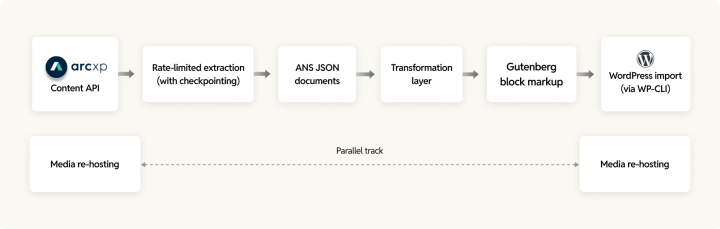
Extraction requires scripts that pull content from the Content API with rate limit handling, pagination, and checkpointing (so extraction can resume after interruption). Our content migration team builds extraction with a “never lose progress” philosophy. If the script crashes at story 47,000 of 100,000, it picks up at 47,001.
Transforming ANS to WordPress
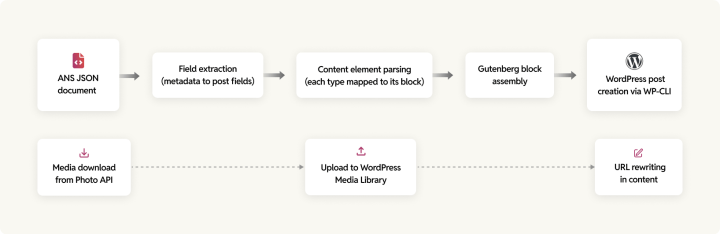
The transformation converts ANS documents into WordPress posts with Gutenberg block markup. Every ANS document has metadata fields that map to WordPress post fields:
| ANS field | WordPress field | Notes |
| headlines.basic | post_title | Direct mapping |
| subheadlines.basic | post_excerpt | Article dek/subheadline |
| content_elements[] | post_content | Assembled Gutenberg block markup |
| promo_items.basic | Featured image | Download via Photo API, upload to WordPress |
| credits.by[] | Author assignment | Map to WordPress users or Co-Authors Plus |
| taxonomy.primary_section | Primary category | Map Arc XP section to WordPress category |
| taxonomy.tags[] | Post tags | Direct mapping |
| display_date | post_date | The date shown to readers |
| canonical_url | Permalink | Match existing URL or configure redirect |
| additional_properties | Custom fields (post meta) | Map per your organization’s specific usage |
Each element in the ANS content_elements[] array maps to a specific Gutenberg block. Text becomes <!-- wp:paragraph -->, headers become <!-- wp:heading -->, images become <!-- wp:image --> (after downloading and re-hosting), and so on through galleries, videos, lists, quotes, embeds, and tables.
Media migration: The hidden timeline killer
Content extraction gets all the attention. Media migration is what actually blows the timeline. A publisher with 100,000 stories might have 300,000–500,000 images. At an average of 500KB per original, that’s 150–250GB of image data to download and re-host.
The critical detail: Arc XP serves all images through authenticated CDN URLs with on-the-fly transformation. These URLs include authentication tokens generated using your organization’s secret key. The moment your account is deactivated, every image URL returns a 403. You must download every original file via the Photo API and re-host elsewhere. There is no shortcut.
For each image, preserve the caption, credits, alt text, subtitle, and focal point data. Upload to the WordPress Media Library with proper metadata and rewrite all in-content references from Arc XP CDN URLs to new WordPress URLs.
SEO preservation
Preserving your existing site’s SEO is one of our migration’s primary goals. We do this via matching Arc XP’s URL pattern in WordPress wherever possible.
Here’s Arc XP’s typical URL pattern: /{section}/{YYYY}/{MM}/{DD}/{slug}/.
And here’s how it matches WordPress custom permalink pattern: /%category%/%year%/%month%/%day%/%postname%/.
This achieves a near-exact URL match, eliminating the need for bulk redirects.
For URLs that can’t be matched, we generate a comprehensive redirect map (old URL → new URL → 301 redirect type) and implement it at the appropriate layer: WordPress VIP built-in redirects, server-level rules for 10,000+ redirects, or CDN-level redirects for edge handling.
We map all SEO metadata from Arc XP to your WordPress SEO plugin (Yoast SEO or Rank Math): meta titles, descriptions, canonical URLs, robots directives, Open Graph metadata, Twitter Card metadata, and structured data.
Backend and functionality migration
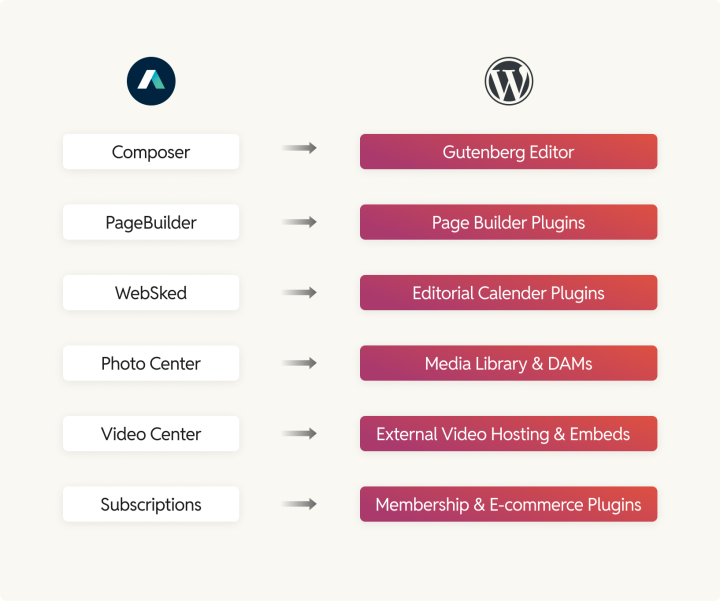
Arc XP bundles subscriptions, identity, analytics, ad management, editorial workflows, and syndication into one platform. On WordPress, you assemble a best-of-breed stack where each component is selected, replaced, and scaled independently or in sync with the rest of your stack.
Integration migration
Most backend integrations fall into two categories: drop-in replacements and custom work.
Drop-in replacements transfer cleanly because they live outside the CMS. Analytics (Google Analytics 4, Parse.ly), advertising (Google Ad Manager), and email platforms (e.g., Mailchimp) are largely CMS-independent. The migration involves re-implementing tracking tags and ad slots in WordPress templates, not rebuilding the integrations themselves.
Custom work is needed for Arc XP-specific integrations: IFX Functions (Arc XP’s serverless framework) that need equivalent WordPress hooks or REST endpoints, Exchange syndication feeds that need RSS or custom feed configuration, and any deep integrations with Arc XP’s proprietary APIs.
For publishers on WordPress VIP, Parse.ly replaces Ellipsis and is typically an upgrade: real-time content performance dashboards built for editorial teams, a content recommendations API, and direct integration with Gutenberg so editors can see article performance without leaving the editor.
Subscription and paywall migration
Subscription migration is where the money lives. A botched payment processor cutover doesn’t just cause technical debt. It causes revenue loss measured in hours. We run parallel billing systems during every subscription migration for exactly this reason.
The key challenges:
Identity migration
Password hashes cannot be exported from Arc XP’s identity system. Subscribers need a password reset flow or a custom “lazy authentication” bridge that transparently migrates credentials on first login.
Paywall rules
Document the paywall logic (metered, hard, hybrid, or dynamic) and recreate in Piano (enterprise) or Leaky Paywall (publisher-focused). Both are WordPress VIP partners.
Payment processor coordination
Payment method tokens typically cannot be transferred between platforms. Subscribers may need to re-enter payment details, which requires careful communication to minimize churn.
Editorial workflow migration
Map WebSked stages (Pitched, Watching, Not Watching, Saving, Used, Withdrawn) to PublishPress custom statuses. Most editorial workflow needs transfer cleanly, but complex multi-desk newsroom workflows may require custom status configurations and permission rules.
Testing and quality assurance (QA)
A migration isn’t done when the code is deployed. It’s done when every piece of content renders correctly, every integration fires, every redirect lands, and performance meets your benchmarks.
Every project manager wants to compress QA timelines. Every migration that goes badly compresses QA. Our QA team has never regretted spending an extra week testing. Rushed launches can be expensive.
Content verification
This is migration-specific QA that standard software testing doesn’t cover. Build automated comparison scripts that check every migrated piece against its source ANS document: title match, body content hash comparison, featured image presence, category and tag assignment, author assignment, dates, and permalink correctness. Run these checks against 100% of migrated content. Automated validation at scale is the only way to catch systemic transformation bugs.
Then manual verification: 100% review of your top 50–100 highest-traffic pages. 10% random sample of the remaining content. 100% review of content with complex formatting (multiple embedded images, galleries, videos, custom embeds).
Performance testing
Run Lighthouse audits on every major template. Target benchmarks:
| Template | Target LCP | Target INP | Target CLS |
| Homepage | < 2.5s | < 200ms | < 0.1 |
| Article page | < 2.5s | < 200ms | < 0.1 |
| Section front | < 2.5s | < 200ms | < 0.1 |
Load test at 1.5–2x your peak traffic. If your site handles 10,000 concurrent users at peak, test to 15,000–20,000. Monitor server response times, error rates (target: < 0.1%), CPU and memory utilization, and cache hit rates. WordPress should match or exceed Arc XP performance. If it doesn’t, optimize before launch.
SEO verification
Test every redirect pattern, not just a sample. Verify all 301 status codes (not 302s or 307s). Check for redirect chains (A → B → C should be A → C). Confirm canonical tags, XML sitemaps, robots.txt, structured data validation, and Open Graph rendering. A single batch of missed redirects on high-traffic URLs can take months of organic recovery to fix.
User acceptance testing
Each stakeholder group tests what matters to their role.
Editorial team
Content editing workflow, block editor usability, media management, scheduling.
Marketing
Landing pages, forms, analytics access.
Technical
Admin functionality, deployment workflow.
Get a formal sign-off from each group before proceeding to launch.
Launch and post-migration
The best migrations we’ve done were the ones where launch day was boring. No drama, no war room panic. Just DNS changes and coffee. That’s what good preparation buys you.
Go-live sequence
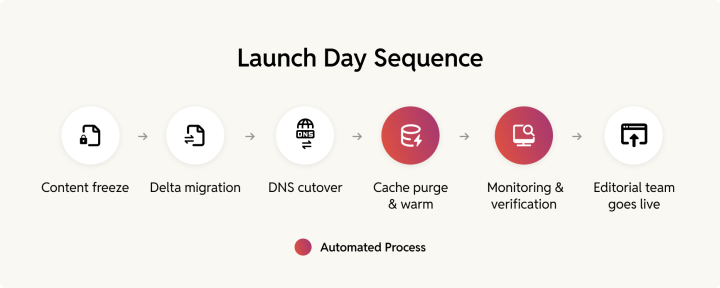
Schedule the launch during your lowest-traffic window. For most publishers, this is 2:00–6:00 AM in your primary audience’s timezone. The sequence:
- Final backup of both Arc XP and WordPress production environments
- Content freeze on Arc XP, final delta migration running
- DNS cutover (TTL should have been lowered to 300 seconds at least 24–48 hours before launch)
- SSL verification, CDN cache purge, and warm-up (request your top 50–100 URLs)
- Submit updated XML sitemap to Google Search Console
- Verify critical pages, key user flows, and monitoring dashboards
Keep Arc XP running. Don’t decommission the Arc XP environment on launch day. Keep it accessible as a read-only reference and rollback target for at least 1–2 weeks after go-live.
Rollback plan
A rollback plan isn’t pessimism. It’s professional risk management. Define specific, measurable triggers before launch day: site-wide 500 errors lasting more than 15 minutes, subscriber authentication or payment processing non-functional, sustained error rate > 5% for more than 30 minutes.
Designate one person with final authority to call a rollback. Committee decisions under pressure waste critical minutes. If critical issues aren’t resolved within 2 hours of launch, trigger the rollback. It’s better to regroup and relaunch than to limp through a degraded experience.
The first 30 days
Week 1 is about catching what QA missed. Monitor uptime, response times, error rates, 404 errors (each one is a missed redirect), Search Console indexing status, and editorial team feedback daily. Fix P1 issues within hours.
Weeks 2–4: shift to optimization. Compare organic traffic against pre-migration baselines. Expected pattern: minor dip in weeks 1–2, recovery to baseline by weeks 4–6, potential improvement by month 3 due to better performance and increased SEO flexibility. Track Core Web Vitals from CrUX data (real-user metrics, not lab data), ad revenue and impression counts, subscriber retention rate, and editorial publishing velocity.
Once WordPress has been stable for 30–60 days and all post-migration issues are resolved: check for any latest data that still needs export from Arc XP, cancel or downgrade the contract (review your terms for notice periods), archive credentials and documentation, and celebrate. You’re off the platform.
How rtCamp can help
We’re a WordPress VIP Gold Agency Partner with 300+ CMS migrations under our belt. Our team has contributed to 34 consecutive WordPress releases.
Working with publishers is one of our strengths. We’ve migrated them from AEM, Drupal, Kentico, Sitecore, and other proprietary platforms to WordPress. Naturally, we build and maintain enterprise WordPress sites for organizations that publish at scale, including ADWEEK, News Corp, Private Media, and Grist.
Here’s how you can engage with us:
- Free consultation: 20 hours of scoping at no cost. You’ll get an assessment of your Arc XP setup, a preliminary timeline and cost estimate, an architecture recommendation, and an honest assessment of whether migration makes sense for your situation right now.
- Paid discovery: A 2–3 week deep dive producing a complete migration blueprint. The report is yours to execute in-house, with rtCamp, or with any preferred partner.
- Full migration service: End-to-end migration from discovery through 30 days of post-launch support. Dedicated project team scaled to your project’s complexity.
- Staff augmentation: WordPress engineers embedded in your team for organizations executing in-house with expert support.
Frequently asked questions
How long does an Arc XP to WordPress migration take?
Timeline depends on content volume, feature complexity, and whether you’re migrating subscriptions.
- Small publishers (10K–50K content pieces): 10–14 weeks
- Mid-size (50K–200K): 16–22 weeks
- Large (200K+, complex integrations, subscriptions): 22–30+ weeks
- Subscription and paywall migration adds 4–6 weeks
Will you lose SEO rankings?
With proper URL preservation and a redirect strategy, SEO impact is minimal. Most organizations experience a minor dip in organic traffic during weeks 1–2, recover to baseline by weeks 4–6, and see improvement within 3 months due to better performance and increased SEO flexibility on WordPress.
Can we keep our current design?
Yes. We recreate your existing design in WordPress, typically improving load times and Core Web Vitals in the process. Migration can also include a design refresh or a complete redesign.
What if something goes wrong at launch?
Every migration includes a documented and tested rollback plan. We keep Arc XP running as a fallback during the transition period. If critical issues arise, DNS reverts to Arc XP within minutes.
On this page


Leave a Reply