










Optimizely to WordPress migration guide
An Optimizely to WordPress migration is in reality an exercise in migrating the DXP(Digital Experience Platform) rather than the content management system. It is a decision to move from Optimizely One’s packaged suite; (CMS, CMP, Web Experimentation, Feature Experimentation, Personalization, ODP, DAM, Commerce) to a composable digital experience stack built on WordPress as the content core, with best-of-breed tools serving each capability independently.
The case for migrating rests on three concerns: cost, control, and talent. Optimizely One’s full DXP stack costs $200,000–$400,000+ annually in licensing alone, requires .NET/C# specialists with platform-specific knowledge, and ties you to a global partner ecosystem of only five Premier Platinum Partners.
A composable WordPress stack gives you each DXP capability from a purpose-built vendor, on open contracts, supported by the world’s largest CMS developer ecosystem. For example, The Forrester Total Economic Impact study commissioned by Automattic found that organizations using WordPress VIP realize a 415% ROI over three years, driven by lower development costs, faster delivery, and reduced maintenance overhead.
The hard part of this migration is getting your content out of Optimizely, untangling the DXP integrations, and rebuilding the personalization and experimentation stack on a composable foundation. This guide documents how to do that reliably.
At a glance
| Section | Key Topics & Workstreams |
| The business case | Breakdown of Optimizely One TCO, renewal triggers (Opal AI), and the talent/partner ecosystem gap. |
| What you are actually migrating | Mapping the 5 parallel workstreams: Content, Experimentation, Personalization/CDP, DAM, and Commerce. |
| Discovery & assessment | Technical Translation: Mapping PageData to CPTs, Blocks to Gutenberg, and Visitor Groups to PersonalizeWP. |
| Pre-migration setup | The Extraction Problem: Content Delivery API strategy, media blob extraction, and integration mapping. |
| Technical execution | Transformation: XhtmlString to Gutenberg blocks, Frontend architecture (FSE vs. Headless), and Search/Analytics setup. |
| Testing & QA | Automated content verification, DXP capability testing, SEO/URL mapping, and Core Web Vitals targets. |
| Launch & rollback | Go-live sequence, DNS cutover, 2-hour rollback triggers, and post-migration monitoring (First 30 Days). |
| Decommissioning | Contract notice periods, archiving legacy credentials, and final Optimizely shutdown. |
| Timelines & scoping | Phased Estimates: From 12 weeks (Content only) to 36+ weeks (Full DXP/Commerce). |
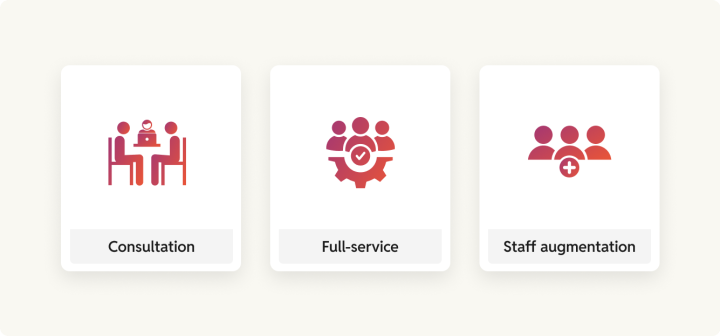
| Partner expertise | rtCamp’s Gold Agency services, OnePress governance, and engagement models (Consultation to Staff Aug). |
The business case
What Optimizely One actually costs enterprise buyers
Optimizely does not disclose pricing figures. All contracts are custom, annual, and negotiated behind a sales call. Based on procurement data from Vendr and third-party analysis, the enterprise picture has the following stack:
- Content Management System (CMS)
- Content Marketing Platform (CMP)
- Web Experimentation
- Feature Experimentation
- Personalization
- Optimizely Data Platform (ODP)
- Commerce
- Content and Product Recommendations
- Analytics
- Opal
Each is licensed separately, based on traffic, usage, and activated modules. For enterprise organizations running the full or near-full suite:
- Web Experimentation Scale tier: 40–60% above the Business tier, driven by impression-based usage overages
- Data Platform (ODP): $120,000–$180,000/year base, frequently running 35–50% over due to integration costs and data processing overages, according to Vendr
- Full DXP suite: costs $200,000–$400,000+ annually
WordPress operates on a different cost model entirely:
- The open-source core is free.
- At the enterprise tier, you choose from competing managed hosting providers: WordPress VIP (from $25K/year, trusted by Meta, Salesforce, News Corp, and the White House), Pagely (serving Fortune 500 brands like Cisco and Experian), Pantheon, Kinsta, and others with total annual platform costs running 3–5x lower than Optimizely One’s licensing baseline.
- Pricing stays transparent and negotiable, and you’re never vendor-locked: your codebase, content, and data remain yours.
- The same logic applies to talent; you draw from a global pool of millions of WordPress developers, compared to a certified Optimizely partner ecosystem of just five Premier Platinum Partners worldwide. Agencies like rtCamp can place world-class WordPress engineers within days.
rtCamp migrated Videojet from Adobe CQ5 to WordPress VIP and Manheim from AEM to WordPress; both enterprise organizations making the same DXP economics calculation. In each case, the migration unlocked a competitive developer market and removed the single-vendor implementation lock that packaged DXPs like Optimizely create.
C2 Group, a Gold Optimizely partner, notes that license fees and implementation costs are the two major expense centers for complex DXP deployments. With that in view, implementation and ongoing developer costs often exceed the license fee itself.
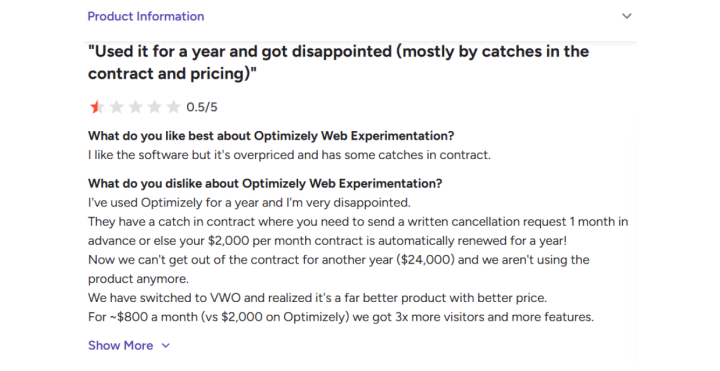
Every contract is annual-only. Auto-renewal clauses are standard. A user reported being locked into an additional year after missing the written cancellation deadline.
Only 5 Premier Platinum Partners exist globally; Rightpoint cites this publicly about itself. For enterprise buyers managing complex DXP programs, that limited partner ecosystem directly affects implementation quality, ongoing support options, and the ability to staff certified expertise over time.
Why the DXP economics shift at renewal
Optimizely reached $400M ARR in 2024 and holds Leader status in the Gartner Magic Quadrant for Digital Experience Platforms for the sixth consecutive year. The platform is indeed capable. The challenge enterprise teams face at renewal is not capability; it is the economics of the integrated suite model.
A DXP license gives you the brand on the setup, but you still need to invest in hosting, developers, certified partners, and integrations before you can publish anything. A composable WordPress stack replaces the DXP license with open-source infrastructure and routes each capability to a purpose-built vendor, drawing from a developer talent pool that packaged DXP ecosystems cannot match.
Specific renewal triggers rtCamp sees consistently across enterprise migrations:
Opal AI credit billing
Activated May 7, 2025, across CMS, CMP, Web Experimentation, Feature Experimentation, Personalization, and ODP, adding a consumption-based billing layer on top of the base license.
ODP activation gaps
Real-time personalization through ODP requires full integration between CMS Visitor Groups and ODP real-time segments (data latency <90 seconds). Teams that have not fully activated this integration are paying for a CDP they are using as basic segmentation (Optimizely ODP + CMS docs)
Experimentation platform independence
Web Experimentation runs via a JavaScript snippet on any platform. The suite argument weakens when the experimentation tool can be sourced independently.
Talent cost
.NET/C# developers with Optimizely certification command salary premiums and take months to replace. The WordPress developer pool is orders of magnitude larger.
What you are migrating in reality
A full Optimizely One DXP migration is not one project. There are five parallel workstreams that must be planned independently and sequenced carefully.
| Workstream | Optimizely Component | Composable Equivalent |
| Content platform | CMS (PaaS 12 or SaaS) | WordPress VIP (enterprise-grade hosting) and CMS used by Meta, Salesforce, and News Corp |
| Content operations | Content Marketing Platform (CMP) | CoSchedule for editorial planning and campaign calendars or Asana for teams already running project management there |
| Experimentation (A/B testing) | Web + Feature Experimentation | VWO (Visual Website Optimizer) for full A/B testing and heatmaps or Statsig for feature flag-based experimentation |
| Personalization + customer data | ODP + Visitor Groups + Personalization | Salesforce CDP or Segment for audience data, with Dynamic Yield handling on-page personalization inside WordPress |
| DAM | Optimizely DAM | GoDAM/Cloudinary |
| eCommerce | Configured / Customized Commerce | WooCommerce powers 28% of all online stores globally with Stripe or PayPal for payments and subscriptions. |
| Analytics | Warehouse-native (NetSpring) | Google Analytics 4 (GA4) + Parse.ly for editorial insights, both included with WordPress VIP |
| Search | Search & Navigation (Find) | Algolia, the search engine behind Stripe, Slack, and Medium, or the WordPress VIP-recommended ElasticPress |
| Editorial workflows | CMS workflows + CMP | PublishPress for multi-step editorial approvals and content calendars |
The strategic decision you make before any technical work starts
Experimentation and personalization tools are platform-independent by nature. Web Experimentation runs via a JavaScript snippet on any CMS. Feature experimentation is SDK-based. You can retain these Optimizely contracts while migrating the content platform, then consolidate at the next renewal cycle. This phasing cuts launch risk significantly and lets you decouple the content migration from the harder DXP workstreams.
Discovery and assessment
Feature parity: Optimizely DXP to composable WordPress stack
| Optimizely Feature | WordPress Replacement | Notes |
| CMS Page Types (PageData) | Custom Post Types(core, free) | Direct structural mapping. CPTs with Advanced Custom Fields(ACF) or Meta Box fields replicate page type properties. |
| CMS Block Types (BlockData) | Gutenberg Blocks (core, free) | React-based; same JS skill set as Optimizely block development. |
| Experience Types + Visual Builder | Full Site Editing + Block Themes (core, free) | Full Site Editing gives editors full layout control with no coding required. |
| XHTMLString (rich text) | post_content / Gutenberg rich text | Direct equivalent. HTML stored and rendered natively. |
| Content Areas | ACF Flexible Content (free, Pro from $49/yr) | The most widely used WordPress field builder, with 2M+ active installs. |
| Visitor Groups (rule-based personalization) | PersonalizeWP (free) | Rule-based segmentation by device, location, visit count, and referrer. |
| ODP—Customer Data Platform | Salesforce CDP or Segment, connected to WordPress via REST API | Both are industry-standard CDPs that connect to WordPress without platform lock-in. |
| Real-time behavioral personalization | Dynamic Yield or Ninetailed, layered onto WordPress | Dynamic Yield is used by McDonald’s, IKEA, and Sephora. Ninetailed is built for headless WordPress. |
| Web Experimentation (A/B Testing) | VWO: Visual Website Optimizer | VWO runs on any website via a single JavaScript tag, with no CMS dependency. |
| Feature Experimentation (feature flags) | LaunchDarkly or Statsig | Both are platform-independent and integrate via SDK, with no WordPress-specific setup required. |
| Personalization (ML-based content targeting) | Dynamic Yield / Salesforce Interaction Studio / Ninetailed (headless-native) | Replaces Optimizely’s ML personalization layer. Integrates via API or JavaScript. |
| Content Recommendations | Parse.ly (bundled with WordPress VIP) | Parse.ly provides real-time content recommendations and smart internal linking, natively integrated with the WordPress editor. |
| Content Marketing Platform (CMP) | Coschedule or Asana | CoSchedule is built for editorial teams managing content calendars and campaign workflows. |
| Digital Asset Management (DAM) | Cloudinary (WordPress VIP Certified Partner, free tier + $89/mo+)/Bynder | Cloudinary handles AI tagging, smart cropping, and CDN delivery. Bynder is a Gartner Magic Quadrant Leader with a native WordPress integration. |
| Search & Navigation (Find) | Algolia or ElasticPress (WordPress VIP recommended) | Algolia powers search for Stripe, Slack, and Medium. ElasticPress is the VIP-recommended self-hosted alternative. |
| Configured Commerce | WooCommerce (free) + WooCommerce Subscriptions ($239/yr) | WooCommerce powers 28% of all online stores globally. |
| Warehouse-native Analytics (NetSpring) | Parse.ly + GA4 or Mixpanel + data warehouse | GA4 connects to BigQuery or Snowflake for warehouse-level analysis. Parse.ly covers editorial performance. |
| Optimizely Graph (GraphQL content delivery) | WPGraphQL (free, 30k+ installs) + REST API (core, free) | WPGraphQL enables single-query nested data fetching. Smart Cache adds network-level cache invalidation. |
| Multisite management | WordPress Multisite (core, free) / rtCamp OnePress | OnePress manages multi-brand site networks with centralized governance and independent editorial control per site. |
| SEO | Yoast SEO, (free, Premium $99/yr) / Rank Math (free, Pro $59/yr) | Yoast is installed on 13M+ WordPress sites and handles meta tags, structured data, and XML sitemaps automatically. |
| Editorial Workflows | PublishPress (free, Pro from $69/yr) | Multi-step approval, custom statuses, editorial calendar. |
The personalization decision: Plan this first
This deserves its analysis before any technical planning begins. Optimizely’s personalization architecture has two layers: Visitor Groups (rule-based, built into CMS, no ODP required) and ODP-driven real-time segments (behavioral, cross-channel, data latency <90 seconds).
On WordPress:
- Rule-based personalization (device, location, visit count, referrer): PersonalizeWP or If-So replicate Visitor Group logic directly
- ODP-level real-time behavioral personalization: It requires a CDP (Segment, mParticle, or Salesforce CDP) feeding audience data to WordPress via REST API, then a personalization layer (Dynamic Yield, Ninetailed, or custom Gutenberg block variant logic) rendering variant content. This is integration architecture, not just a plugin swap, and it must be designed before the content migration starts
WordPress VIP’s own guidance is explicit: personalization is not a feature you toggle on; it is an operating model. DXPs often fail as the weak link in personalization programs because rigid workflows cannot adapt to changing content or data structures. A composable approach lets you bring the right CDP and the right personalization engine independently.
Content audit
The migration is via three main buckets:
- Migrate: Everything from the last 2–3 years. All evergreen content, regardless of age. Any URL with measurable organic traffic in GA4.
- Archive: Old content with minimal traffic but SEO or reference value. Migrate with a simplified template. Consider an /archive/ URL prefix.
- Deprecate: Outdated, duplicate, broken, or off-brand. Use 410 Gone, or 301 to the best-fit current page.
Run the inventory in a spreadsheet before starting extraction. Columns: URL, page type, traffic (last 90 days from GA4), last published date, migration bucket, priority (1–3).
Pre-migration setup
The extraction problem
Optimizely’s export is built for environment transfers within Optimizely. Per Optimizely’s own documentation, personalized content and visitor group assignments cannot be imported into CMS SaaS from traditional CMS, and experiments are excluded from exports entirely.
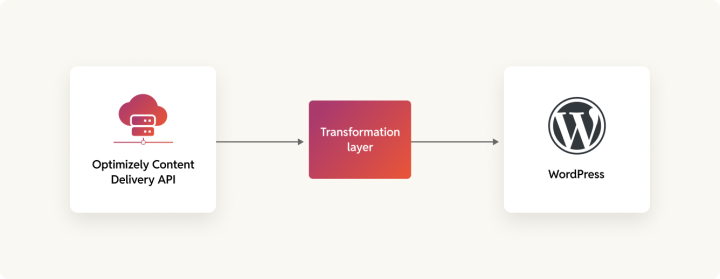
According to Tung Tang from Perficient, the practical extraction path to WordPress is the Content Delivery API.Before building scripts:
- The Content Delivery API must be installed and configured on the source site; it is not on by default in all PaaS installations.
- Build pagination and checkpointing into extraction scripts so a failure at page 4,700 of 10,000 resumes at 4,701, not the start
- Run extraction outside office hours; sustained API load against production affects site performance
- At a conservative 300 pages/hour, 10,000 pages takes ~33 hours; 50,000 pages takes ~7 days; 100,000 pages takes ~14 days; start early.
Media migration: The timeline risk
Content extraction gets the attention. Media migration is what blows the timeline.
Optimizely stores media in blob storage (Azure Blob by default for cloud, filesystem for self-hosted PaaS). Assets are served through Optimizely’s routing layer and are not always accessible at unauthenticated public URLs.
For self-hosted PaaS, media may be accessible via filesystem or FTP. For cloud or DXP-managed environments, extract through the Content Delivery API (each media item is a content node with a download URL) or directly from blob storage with credentials.
For every file, preserve alt text, captions, and focal point data if stored as custom properties, copyright, or credit fields. These sit on Optimizely’s ImageData or VideoData types and do not migrate automatically.
A site with 20,000 pages typically has 60,000–150,000 media files. At 800 KB average per original, 60,000 images is ~48 GB to download, process, and re-host. Plan 3–5 days minimum for media extraction, separate from content extraction. After migration, every in-content reference to Optimizely CDN URLs must be rewritten to new WordPress/Cloudinary URLs; they will return 404 after decommission.
Integration mapping
Map every active integration against two categories before any build work starts.
- Platform-independent (retain or re-implement with no CMS coupling):
Web Experimentation, Feature Experimentation, GA4, CRM, email platforms, ad networks, CDN. These run via JavaScript or REST APIs outside the CMS; they need only re-implementation in WordPress templates.
2. Optimizely-proprietary (need explicit replacement planning):
- ODP segment feeds replace with Salesforce CDP or Segment connected via REST API
- Optimizely Find replaces with Algolia or ElasticPress
- Optimizely Graph is replaced with WPGraphQL
- Scheduled background jobs rebuild using WordPress Cron or Action Scheduler
- Exchange syndication feeds rebuild as custom REST endpoints.
URL mapping
Optimizely builds hierarchical URLs from the page tree; each node’s Name in the URL property builds the path, typically /{section}/{subsection}/{page-slug}.
Matching the existing URL structure is the lowest risk: configure WordPress permalinks to replicate the pattern; zero redirects are needed. Only adopt a new URL structure if the current one is genuinely broken, and plan a 301 for every old URL.
Content freeze
Plan the content freeze window 6 weeks in advance, not 6 days. Schedule it overnight or early morning, 2–4 hours maximum. Pre-stage time-sensitive content for scheduled publication immediately after the window ends.
The migration
Content transformation
| Optimizely Property | WordPress Field | Notes |
| PageData.Name | post_title | Direct |
| PageData.URLSegment | post_name (slug) | Direct |
| PageData.StartPublish | post_date | Watch timezones |
| PageData.StopPublish | Post expiry plugin or custom field | Map if scheduling is active |
| XhtmlString | post_content (Gutenberg blocks) | Parse HTML into block markup |
| ContentReference (featured image) | Featured image | Download, re-upload to Media Library |
| ContentArea | post_content or ACF Flexible Content | Each block type requires its own Gutenberg block |
| Custom string property | ACF text field / post meta | register_post_meta() or ACF |
| Custom ContentReference | ACF Post Object or custom relationship | Map GUID to new WordPress post ID post-import |
| Visitor Group assignments | Cannot auto-migrate; recreate as PersonalizeWP rules or CDP audience rules. | Visitor group logic must be manually mapped to the new personalization layer |
| ODP segment links | Replace with CDP → WordPress API pipeline | Requires new integration architecture, not a content field migration |
| Language versions | Polylang or WPML | Requires explicit translation plugin setup |
XhtmlString to Gutenberg blocks
Structured HTML transforms deterministically: <p> → <!-- wp:paragraph -->, headings → <!-- wp:heading -->, images → <!-- wp:image --> after re-hosting, lists → <!-- wp:list -->, blockquotes → <!-- wp:quote -->, iframes → <!-- wp:html -->.
ContentArea blocks require individual transformation logic per Optimizely block type. The migration script cannot transform these until the custom Gutenberg blocks exist in WordPress; content migration and frontend build are interdependent.
Frontend architecture
| Factor | Block Theme (FSE) | Headless (Next.js + WPGraphQL) | Hybrid |
| Best for | Most teams; editorial autonomy | React-heavy teams with decoupled frontend requirements | Specific mixed requirements |
| Skills required | PHP, WordPress Block API | React, Next.js, GraphQL | Both |
| Editorial experience | Full visual editing | Admin-only; layout changes require deploys | Varies |
| Build time | 6–8 weeks | 10–14 weeks | 12–18 weeks |
| Ongoing maintenance | Low | Medium-high | High |
| Developer availability | Abundant globally | Abundant globally | Moderate |
Block themes are the right choice for most teams. The Gutenberg Block Editor with Full Site Editing gives editors layout control that equals or exceeds Optimizely’s Visual Builder, without the .NET requirement. WordPress VIP supports headless and hybrid models from the same content backend for teams with specific decoupled requirements.
rtCamp has delivered all three architecture patterns at enterprise scale. Grist runs on a custom WordPress build with Parse.ly integration for content syndication and analytics. OpenWeb uses a fully decoupled WordPress and Gatsby architecture. Waldo’s Friends runs a decoupled e-commerce solution on WordPress. rtCamp scopes the architecture to the editorial team’s technical capacity, not the most complex option available.
Rebuilding the DXP capability stack
Experimentation
The easiest workstream. Web Experimentation and Feature Experimentation run platform-independently via JavaScript snippets and SDK. The simplest path: keep Optimizely experimentation contracts running during the migration, evaluate consolidation at the next renewal.
Personalization
Requires the most upfront planning. Map current Visitor Group rules and ODP segment logic before migration starts. For rule-based visitor groups, recreate in PersonalizeWP or If-So. For ODP-driven real-time segments: architect the CDP → WordPress pipeline first—connect your CDP (Segment, mParticle, Salesforce) to WordPress via REST API, then layer in personalization rendering (Dynamic Yield, Ninetailed, or custom Gutenberg block variant logic). Build this integration in parallel with the content migration.
Analytics
WordPress VIP bundles Parse.ly for real-time content dashboards, smart linking, content recommendations, and a recommendations API, natively integrated with the Gutenberg editor. For warehouse-native analytics (replacing Optimizely’s NetSpring), connect Parse.ly or GA4 to your data warehouse (Snowflake, BigQuery) for experimentation-level analysis.
DAM
Export all media from Optimizely DAM before decommissioning. Cloudinary (WordPress VIP Certified Partner) provides the closest feature match: AI-powered tagging, smart cropping, CDN delivery, format transformation. Go Bynder offers a native WordPress integration for organizations with enterprise DAM requirements.
Search
Optimizely Search & Navigation (Find) is Elasticsearch-based. ElasticPress is the WordPress VIP-recommended replacement—it connects WordPress to Elasticsearch or the ElasticPress SaaS, with near-identical indexing capabilities. Algolia is the alternative for teams wanting hosted search with ML-ranked results.
Integration re-implementation
Platform-independent
Implement in WordPress templates without custom development:
- GA4: Site Kit plugin (free) or header script
- Google Ad Manager: Advanced Ads (free + Pro)
- Email platforms (Mailchimp, HubSpot, Klaviyo): WordPress plugins with free tiers
- CDN (Cloudflare, Fastly): DNS-level, no CMS change
Custom development required
- Scheduled jobs (IScheduledJob): rebuild as WordPress Cron via wp_schedule_event() or Action Scheduler
- Custom property editors: rebuild as Gutenberg block controls or ACF field types
- Exchange / syndication feeds: rebuild as custom REST endpoints or RSS customization
- ODP event tracking: replace with your CDP’s JavaScript SDK (Segment, mParticle, or Salesforce)
Syndication feeds and custom REST endpoints are a specialty. rtCamp collaborated with The Indian Express to facilitate a multi-workstream editorial infrastructure for 80M+ monthly users. In the automotive sector, rtCamp has migrated enterprise platforms, afterward, consolidated digital web assets via OnePress. Here’s feedback from Cox Automotive:
Testing and QA
Every project manager wants to compress QA. Every migration that went badly compressed it. Budget a full QA phase before any launch conversation. For a DXP migration, this means testing the content platform and every integrated capability workstream.
Content verification
Build automated comparison scripts that validate every migrated item against its Optimizely source: title match, body content (hash comparison), featured image URL, taxonomy assignment, author, dates, and permalink. Run against 100% of migrated content.
Then manual review: 100% of your top 50–100 traffic pages, 10% random sample of the rest, and 100% of anything with complex formatting—embedded media, custom blocks, tables, forms.
DXP capability testing
Beyond content, validate each workstream before launch:
Personalization
Test each Visitor group/CDP audience rule end-to-end—correct variant renders for the right audience, fallback renders when no match
Experimentation
Confirm experiment scripts fire correctly on WordPress templates, variant assignment works, analytics events fire
Search
Full re-index on ElasticPress/Algolia; validate query results, facets, and autocomplete against Optimizely Find behavior
DAM
Confirm all in-content media references resolve to new Cloudinary/Media Library URLs; zero broken image requests
Analytics
Parse.ly and GA4 events firing on all page types; data flowing to data warehouse
Performance targets
| Template | Target LCP | Target INP | Target CLS |
| Homepage | < 2.5s | < 200ms | < 0.1 |
| Standard page | < 2.5s | < 200ms | < 0.1 |
| Archive / listing | < 2.5s | < 200ms | < 0.1 |
| Search results | < 3.0s | < 200ms | < 0.1 |
Load test at 1.5–2× peak traffic. Target error rate below 0.1%.
SEO verification
Test every redirect pattern, not a sample. Confirm the following:
- All redirects return 301 (not 302 or 307)
- No redirect chains (A→B→C should be A→C)
- Canonical tags correct.
- XML sitemaps submitted to Search Console, robots.txt allows all public content, structured data passes Google’s Rich Results Test, Open Graph renders correctly.
Sign-off
Written sign-off from each group before launch:
- Editorial (editing, block editor, media, scheduling)
- Marketing (personalization rules, experiment setup, analytics)
- IT/technical (admin, deployment, monitoring)
- Legal/compliance (cookies, GDPR, data handling).
Launch
Good preparation makes launch day boring. That is the goal.
Go-live sequence
Schedule during your lowest-traffic window—typically 2:00–5:00 AM in your primary audience’s timezone.
- Final backup of both Optimizely and WordPress production environments
- Content freeze on Optimizely
- Final delta migration—extract and import everything published since the bulk migration
- DNS TTL already at 300 seconds; initiate cutover to WordPress
- Verify SSL on the new WordPress hostname
- Purge CDN cache; warm by requesting your top 50–100 URLs
- Submit updated XML sitemap to Search Console
- Verify critical pages, personalization rules, experiment scripts, search, forms, and monitoring dashboards
Keep Optimizely running as a read-only reference and rollback target for at least 2 weeks.
Rollback plan
Define rollback triggers before launch day. Trigger rollback if: site-wide 500 errors persist for more than 15 minutes, error rate exceeds 5% of requests for more than 30 minutes, critical user flows (login, forms, transactions, personalized content) are broken, or LCP exceeds 8s site-wide and is not fixable within an hour.
One person should have final rollback authority, not a committee. If critical issues are not resolved within 2 hours of launch, roll back.
Post-migration: The first 30 days
Week 1: Catch what QA missed
- Monitor uptime and response times at 5-minute intervals.
- Check 404 logs daily.
- Watch Search Console for crawl errors.
- For each DXP capability: confirm personalization rules fire, experiment scripts log correctly, search returns expected quality.
- Fix P1 issues within hours.
Weeks 2–4: Shift to optimization
- Compare organic traffic against the pre-migration baseline week-over-week.
- Review Core Web Vitals in Search Console using CrUX data—real users, not lab scores.
- Track personalization conversion rates against the Optimizely baseline.
- Audit experiment sample sizes and statistical validity. Begin performance optimization if Core Web Vitals are off target.
Expected organic traffic pattern: minor dip in weeks 1–2 as Google recrawls, recovery to baseline by weeks 4–6, potential improvement by month 3. Significant drops beyond week 4 indicate a specific SEO issue, investigate rather than wait.
Decommissioning Optimizely
After 30–60 days of stable operation across all workstreams: export any remaining content not yet in WordPress, review contract notice periods per product (typically 30–90 days written notice, and each module may have independent terms), archive all credentials and API keys, archive export packages and extraction scripts, submit cancellation in writing per contract.
If retaining Optimizely Experimentation or CMP on independent contracts, only cancel the CMS, DAM, ODP, and DXP hosting contracts. Experimentation can and often should be retained until the next renewal cycle.
Timelines
| Migration Scope | Timeline | Key Constraint |
| Content platform only (CMS → WordPress, no DXP rebuilding) | 12–16 weeks | Content extraction and frontend build |
| Content + DAM + Search | 16–20 weeks | Media migration and search re-indexing |
| Content + personalization rebuild (CDP integration) | 20–28 weeks | CDP architecture and Visitor Group mapping |
| Full DXP (all workstreams, including commerce) | 28–36+ weeks | Integration re-architecture and parallel workstream testing |
| Add: multi-language (3+ languages) | +4–6 weeks | Translation plugin setup and content sync |
| Add: commerce / subscription migration | +6–10 weeks | Payment processor coordination, identity bridge |
How rtCamp can help
We are a WordPress VIP Gold Agency Partner with 300+ CMS and DXP migrations completed and contributions to 34 consecutive WordPress core releases. We have successfully moved enterprise organizations off AEM, Drupal, Sitecore, Kentico, Arc XP, and Optimizely to WordPress.
We built OnePress, a multi-brand governance platform for organizations managing networks of sites on WordPress, and GoDAM for enterprise media management.
Frequently Asked Questions
How long does an Optimizely to WordPress migration take?
The timeline depends on the scope. A content-only migration (CMS to WordPress, no DXP rebuilding) runs 12-16 weeks. Adding DAM and search adds 4-6 weeks. Rebuilding personalization with a CDP integration adds another 4-8 weeks, moreover. A full DXP migration covering all workstreams, including commerce, runs 28-36+ weeks. Multi-language and subscription migration each add further time.
Can Optimizely experimentation be kept running during the migration?
Yes, and this is the recommended approach. Optimizely Web Experimentation runs via a JavaScript snippet that is independent of the CMS. Feature experimentation runs via SDK. Both continue operating on the new WordPress frontend without modification. Most organizations retain their Optimizely experimentation contracts through migration and evaluate consolidation at the next renewal cycle, after validating replacement tooling.
What happens to personalization and visitor groups when migrating to WordPress?
Visitor Group assignments cannot be automatically exported from Optimizely. Rule-based visitor group logic (device, location, visit count, referrer) must be manually recreated using PersonalizeWP or If-So on WordPress. ODP-driven real-time behavioral personalization requires architecting a new CDP pipeline, typically Segment, mParticle, or Salesforce CDP feeding into a personalization layer such as Dynamic Yield or Ninetailed. This workstream requires the most planning and must be designed before content extraction begins.
Is content portability from Optimizely CMS difficult?
Content extraction uses the Content Delivery API, which must be installed and configured on the source site and is not enabled by default on all PaaS installations. At a conservative extraction rate of 300 pages per hour, a 50,000-page site takes approximately seven days to extract. Media migration adds significant time: a site with 20,000 pages typically carries 60,000-150,000 media files, all of which require downloading, re-hosting, and CDN URL rewriting before decommissioning.
Does migrating from Optimizely to WordPress affect SEO?
A migration does not need to harm organic search performance if redirects are handled correctly. Matching the existing URL structure eliminates redirect risk entirely. If URL structure changes, every old URL requires a 301 redirect, with no chains. Organic traffic typically dips in weeks one and two as Google recrawls, recovers to baseline by weeks four to six, and often improves by month three. Drops persisting beyond week four indicate a specific technical issue to investigate, not a normal pattern.
On this page


Leave a Reply