










10 critical questions to ask before hiring WordPress migration experts
When you’re planning to migrate your website to WordPress, the real risk isn’t in the platform — WordPress is already the leading choice for enterprises — it’s in finding the right WordPress migration experts to lead the process.
Every agency promises a “seamless migration,” but beneath those claims lie the real differentiators: their people, their process, and their experience — the elements that truly define expert WordPress migration services.
The right questions can help you uncover those differences.
This guide brings together ten critical questions to help you evaluate potential migration partners — questions shaped by what we’ve learned from hundreds of enterprise migrations.
1. Can you detail your end-to-end migration process, from initial audit to post-launch support?
This question forces a WordPress migration agency to prove they have a structured plan. Without a defined process, your project is vulnerable to delays, scope creep, and budget overruns. You need a partner who can provide a predictable path from start to finish.
Look for them to describe a multi-stage approach that includes:
- Discovery and audit: A deep dive into your current site to find potential issues before they become problems.
- Strategic planning: The creation of a detailed migration blueprint, covering content, technical architecture, and a plan to protect your SEO.
- Development and implementation: All work should happen in a safe, isolated staging environment, not on your live site.
- Quality assurance and testing: A rigorous testing plan to validate performance, security, and functionality before launch.
- Go-live: A documented deployment plan. It must include steps to minimize downtime and a rehearsed rollback procedure just in case.
- Post-launch support: A defined warranty period to ensure the agency sticks around to monitor performance and fix any issues after the launch.
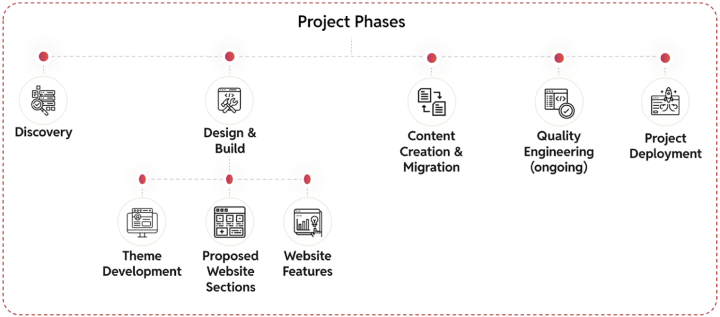
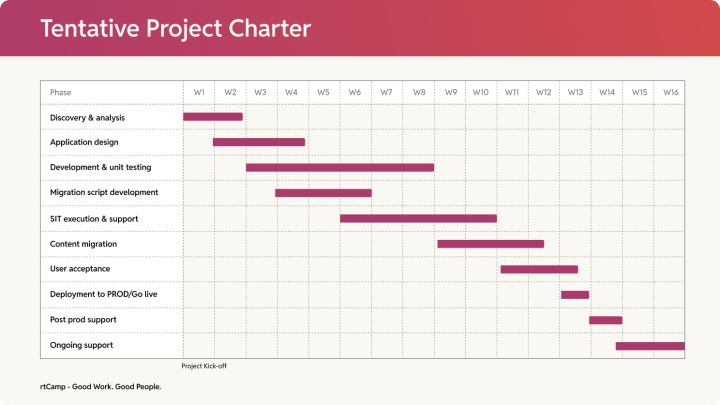
We follow a documented process for all our migrations. It is the same foundation that has helped us move sites from HubSpot CMS, Drupal, and Sitecore to WordPress. You can find this process illustrated openly in our migration handbooks.
2. Who will be on our migration team, and what are their specific roles and expertise?
This question helps determine whether an agency has a dedicated team structured for enterprise-level projects or relies on assembling teams from various sources, including freelancers, which could lead to overcommitment.
For enterprise migrations, success depends on having specialized roles. You cannot rely on a single group of developers. That’s the key to preventing communication breakdowns and missed deadlines.
A credible migration partner should be able to name and explain the roles that make their project predictable:
- Solution architect: Designs the migration blueprint, ensuring alignment with technical and business goals.
- Project manager: Takes care of governance, communication, and timelines across all teams.
- Backend & frontend engineers: They manage data migration scripts, custom development for the required functionalities, platform integrations, and UI implementation.
- SEO specialist: Oversees URL mapping, redirect implementation, and post-launch search visibility monitoring.
- QA specialists: Validate functionality, performance, and data integrity across all environments.
- DevOps engineer: Manages infrastructure, deployment pipelines, and security protocols.
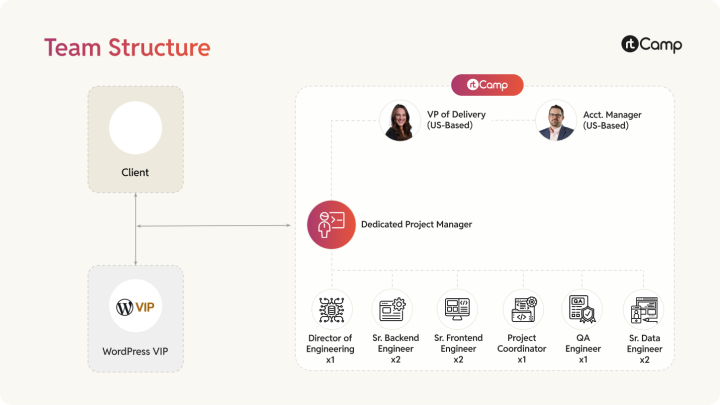
Depending on the project, some of these roles may not be required, while others may be necessary. For example, our Drupal to WordPress Migration handbook outlines exactly how we structure teams so everything works as planned.
3. What is your strategy for preserving our SEO equity?
This question tests how deeply your partner understands the search ecosystem, beyond just redirects and metadata.
A drop in organic traffic post-migration is a common and costly failure, so their answer will show whether they treat SEO as a critical, integrated part of the plan. Look for a structured approach that covers:
- Pre-migration SEO audit: Benchmark current rankings, traffic, and Core Web Vitals.
- URL mapping & redirect strategy: A plan for 301 redirects to prevent lost authority.
- Metadata & schema migration: Ensure all structured data is correctly transferred and validated.
- Content & internal link validation: Verify all content and update internal links.
- Analytics & search console continuity: Ensure tracking codes are correctly implemented.
- Post-launch monitoring: Proactively monitor crawl errors, indexation, and rankings.
We treat SEO equity as a measurable asset throughout the migration lifecycle. In fact, we’ve written a complete handbook on how we manage SEO equity during CMS migrations.
All of our migration projects’ Statements of Work (SOWs) define how we handle SEO equity. Typically, this involves:
- Using the Yoast SEO tool: This pluggable WordPress solution will be utilized to provide necessary SEO tools out of the box.
- Title Tag and Meta Description management: Yoast offers options to set templates for titles and meta descriptions, allowing you to define variables such as the post name or site name for a site-wide default.
- Redirect management: Yoast provides robust redirect management supporting widely used redirects such as 301 (Moved permanently), 302 (Found), 307 (Temporary redirect), and 410 (Content deleted). Alternatively, the Safe Redirect Manager plugin or other VIP-suggested tools can be used for managing large-scale redirections on the WordPress.com VIP platform.
- Sitemap management: Yoast includes an option to generate an XML sitemap that is automatically updated as content is added or removed, and can be managed by the Client team.
- Additional tools: These include keyword optimization, a readability check, internal linking suggestions, and content insights.
- On-page SEO tactics: The development plan will use HTML markup to implement best practices, specifically the proper setup of rel=previous and rel=next on Tag, Author, and Category pages, and the proper declaration of self-referencing rel=canonical for each page.
4. How do you handle complex data and custom functionality?
This question tells you if your migration partner truly understands feature and data parity.
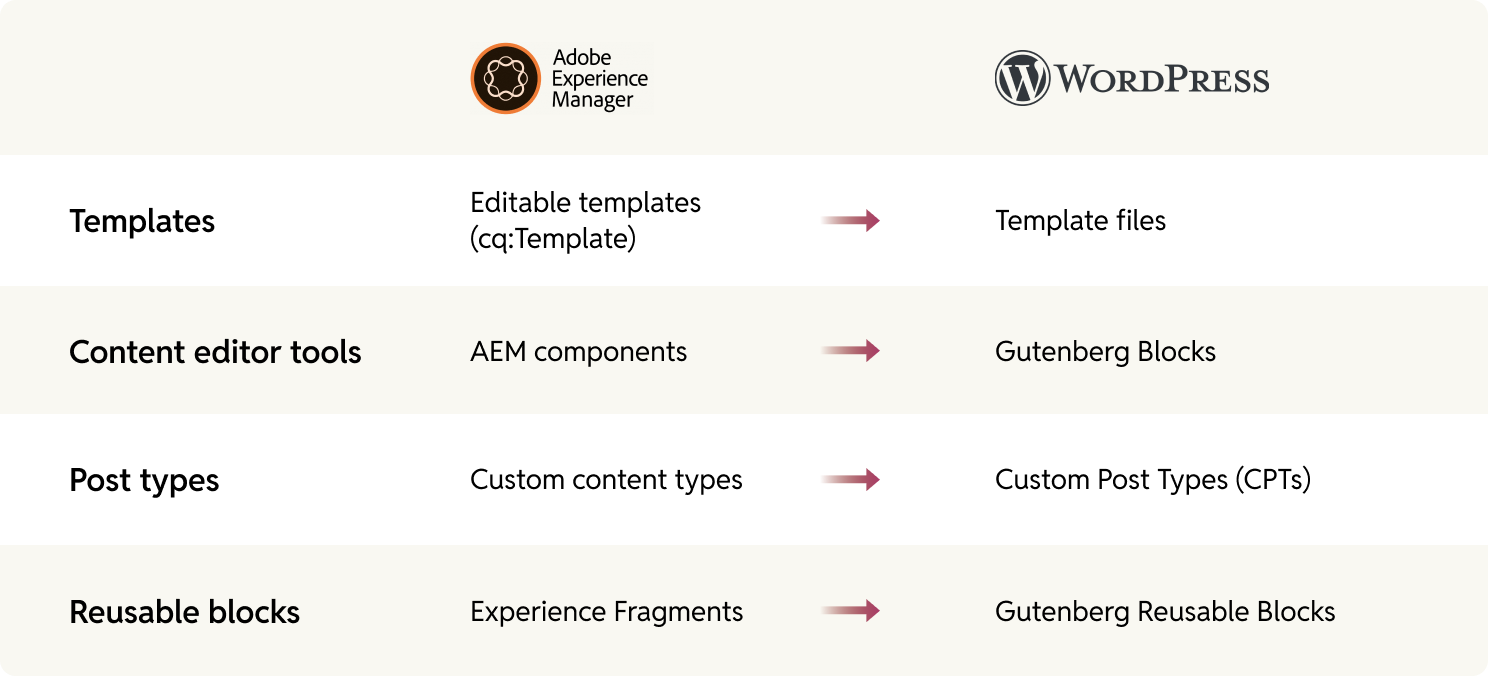
When migrating from a platform like AEM or Drupal, not everything has a one-to-one replacement, and without a clear plan, custom features can be lost or broken. The right partner will “move” your content and ensure your new WordPress setup carries forward every essential capability of your existing platform.
We address this early in the discovery phase. Every piece of content, feature, and functionality in your current CMS is carefully mapped, evaluated, and documented with its planned WordPress equivalent. Nothing is left to assumption!
5. How do you ensure the new WordPress site meets or exceeds existing performance benchmarks?
This question helps you gauge whether your partner treats performance as a deliverable rather than a nice-to-have.
A migration should be an upgrade, but without a clear plan, your new site could end up slower than your old one.
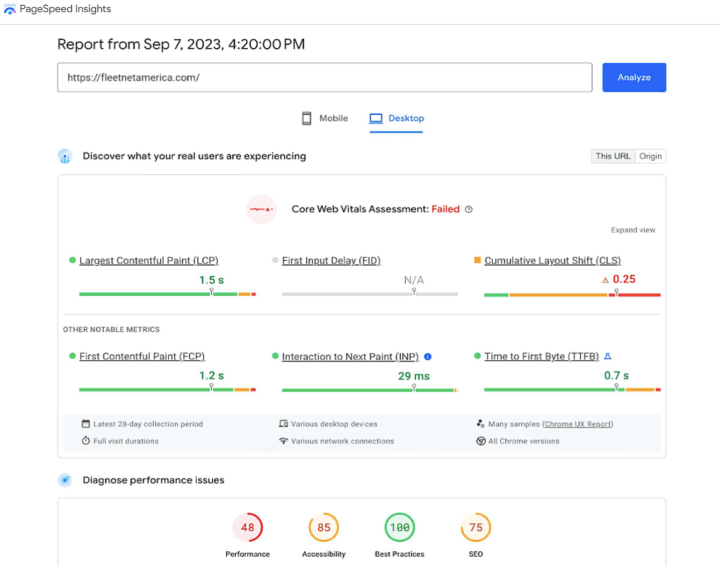
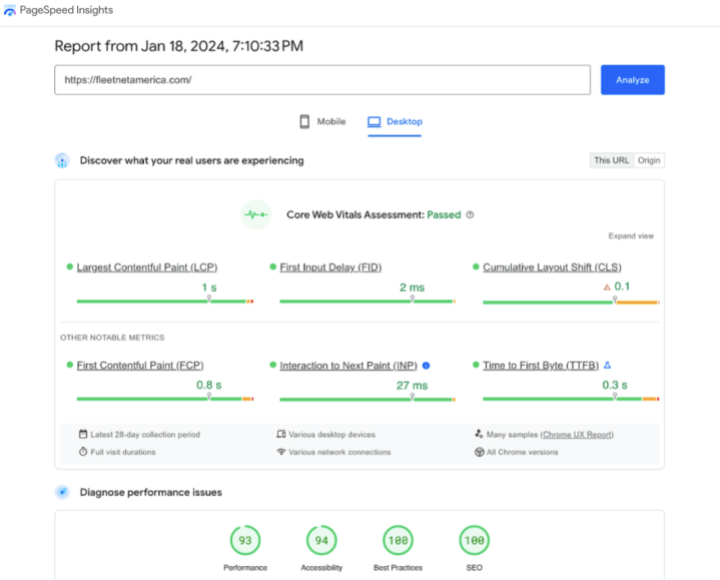
A capable migration partner will benchmark your current setup, document key metrics such as page load times and Core Web Vitals, and then design the new WordPress environment to meet — and ideally exceed — those numbers.
In one such migration we did for FleetNet America, moving from Drupal to WordPress, Core Web Vitals improved by nearly 2x — underscoring how a performance-first migration approach can strengthen both SEO and user experience.
6. How do you ensure security during and after the migration?
This question tests whether the agency has a systematic approach to risk management.
A CMS migration is a moment of heightened vulnerability, spanning multiple environments, teams, and vendors, during which security boundaries can blur. A mature answer should outline their protocols for protecting your data both during and after the migration:
- During migration: Isolate each environment, and make access role-based and time-bound. Credentials must be encrypted, and data transfers logged and verified. The agency must have a clear rollback plan and specific protocols for handling sensitive data, like Personally Identifiable Information (PII) and user content.
- After migration: They should outline how ongoing protection will work, including continuous patching, vulnerability scanning, infrastructure monitoring, and more.
If your organization already follows a specific security framework, this is also where you check alignment. Your RFP likely covers this, but it’s helpful to ask:
- How they’ll accommodate your existing layers, such as SSO, MFA, network segmentation, or restricted deployment workflows.
- If they’ve implemented similar setups before.
If necessary, rtCamp signs an IT End User Agreement with your enterprise, ensuring that our engineers’ user accounts are created within your organisation using your domain. These accounts are later deleted after the migration is completed.
7. What is your plan for minimizing downtime, and what is your rollback procedure if issues arise?
This question tells you whether your migration partner can execute predictably under pressure.
An enterprise launch is a coordinated, high-stakes event, not an experiment. A messy launch can lead to extended downtime, so a good answer should sound calm, specific, and experienced.
Ask whether they have a documented go-live plan that covers:
- Validation checks
- Rollback triggers
- Post-launch monitoring
The right partner will know that minimizing downtime is about process discipline, readiness, and rehearsed recovery steps that make go-lives feel routine, not risky.
For example, when migrating to a WordPress multisite network, we have found that launching sites sequentially rather than all at once reduces overall content freeze time.
8. What does your post-migration support and warranty period include?
This question clarifies an agency’s post-launch commitment and accountability.
The project isn’t over when the site goes live, but some agencies disappear once the final invoice is paid. Think of this phase like a warranty, a defined period during which the migration partner remains accountable for what they’ve delivered.
You’re looking for clarity on:
- What does the support window cover?
- How long does it last?
- How are any arising issues handled?
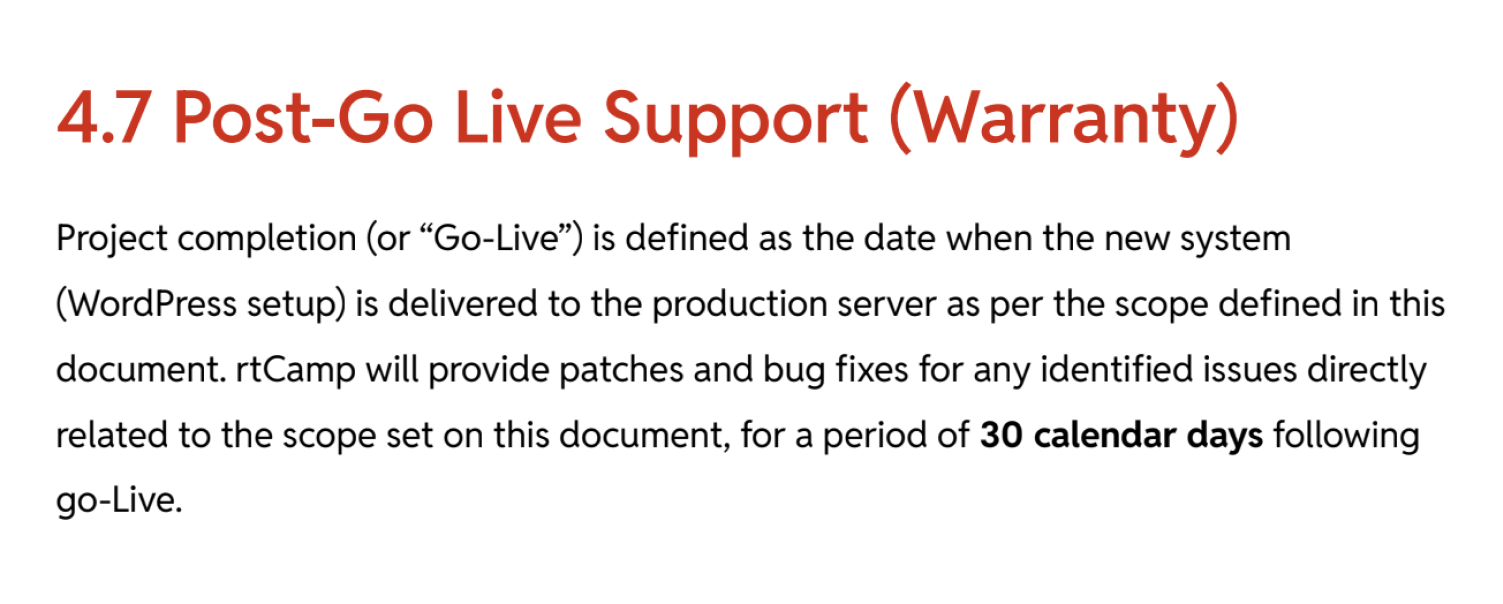
All our migration services include a post-launch assurance phase (Hypercare), where our teams stay engaged to validate performance, proactively address issues, and ensure your transition to WordPress is truly complete.
9. How do you structure your pricing, and what is included in the project scope?
This question tests whether a partner’s commercial model reflects transparency and accountability.
Vague or open-ended pricing is a major red flag that often signals weak scoping and can lead to budget overruns. A mature agency will be upfront about what’s covered and what’s not. You should also look for transparency in scope definition:
- Are discovery, QA, and post-launch support explicitly included?
- What about third-party integrations, performance optimization, or security hardening?
- How do they handle requests that surface mid-project?
Here are some examples of cost-increasing mid-project requests you have to look out for:
- New features/functionality: Get every feature and functionality you want written in the contract. If not, that can escalate costs. For example, adding a personalization feature because the need for it wasn’t identified in the plan.
- Additional integrations: For instance, integrating with an external marketing analytics tool because the need for API endpoints was overlooked during scoping.
- Performance/technical debt: Optimizing a poorly performing site was required after unforeseen technical issues, such as a bloated codebase, were discovered during the project.
- Hidden scope items: Migrating three separate microsites increased costs because details like multiple microsites significantly expanded the project’s scope.
- Post-launch support/maintenance: A faster transition to a support contract was needed because more rapid scoping could have prevented this post-launch issue.
- Design/asset changes: Replacing a complex homepage with a high-performance alternative was required because heavy design assets negatively impacted site performance.
- Off-hours work: Forcing a final deployment on a Saturday night led to higher costs because delays in client approvals required late/weekend production pushes.
We structure every migration project around a clearly defined scope shaped by an in-depth discovery phase. Our Statement of Work (SOW) is precise and well-defined, with room for any additional requirements you may have after the project starts.
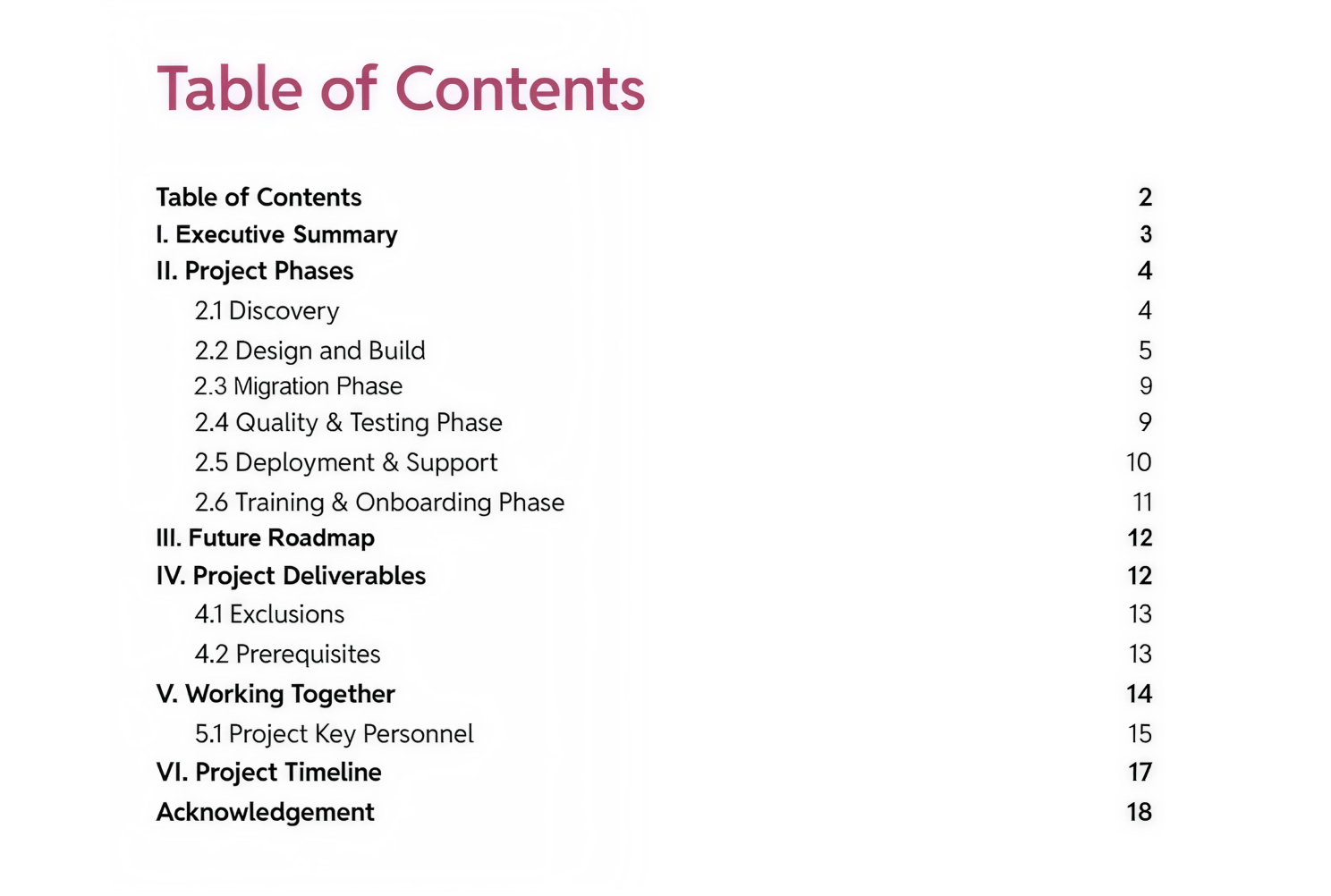
When you work with us, you’ll get estimates that are transparent, milestone-based, and aligned to outcomes, so you always know what’s being delivered, when, and why.
10. Can you provide case studies or references for migrations of a similar scale and complexity?
This question is the ultimate test of an agency’s experience and tells you whether it’s transferable to your reality. An agency might talk a good game but lack real-world experience with projects of your scale and complexity.
What matters is whether the problems they’ve solved reflect the kind of challenges your migration involves. This process includes managing complex integrations, handling large content inventories, and operating under strict security frameworks.
At rtCamp, we provide clear proof of our experience across a wide range of platforms. We’ve handled over 300 migrations, and our work includes:
- From AEM to WordPress: For clients like Manheim and Dealertrack, we migrated their sites with zero downtime. We empowered their marketing teams to become developer-independent, reducing landing page time-to-market by over 50%.
- From Drupal to WordPress: In our migration for FleetNet America, we completed the project in just a few weeks and delivered a nearly 2x improvement in Core Web Vitals, strengthening both their SEO and user experience.
- From Custom & Legacy CMS: We’ve migrated clients like Dealer Spike from ASP.NET and Everyday Carry from a custom CMS, proving our ability to map and preserve complex, non-standard data structures.
Put these questions to work
Each of these ten questions offers a different lens into how an expert WordPress migration agency thinks, plans, and delivers. Together, they help you see whether your new partner is truly a WordPress migration expert.
Next time you’re on a call with a potential WordPress website migration partner, use this list and listen for specific, documented answers. Don’t ever settle for vague assurances!
Want to see how rtCamp answers each one for your specific migration?
On this page


Leave a Reply