










TL;DR Our marketing data was spread across several platforms, and getting a single answer meant opening tabs and stitching exports together. We built the Marketing MCP Gateway, one secure connector that brings all of that data into Claude for the whole team. There is nothing to install, no passwords to share, and only rtCamp accounts can sign in. A question that spans several sources now takes one prompt instead of half an hour of tab-switching.
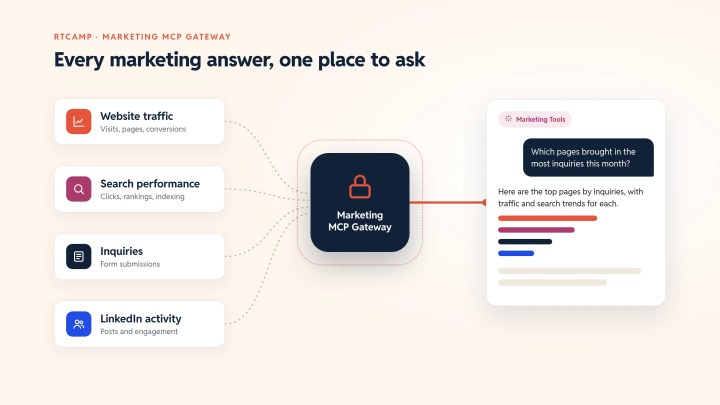
Bringing all our marketing data into Claude
Almost every marketing question we care about crosses more than one source.
Which blog posts brought in the most traffic last month, and did any of them turn into inquiries? That needs traffic numbers, search performance and the form fills on rtcamp.com, each sitting in a different place.
Who engaged with our latest LinkedIn push? That’s yet another source.
Each platform answers its own slice well. None of them answers the whole question. So someone has to export a CSV, open another dashboard, match dates by hand and paste it all into a doc. By the time the answer is ready, the meeting it was meant for has already happened.
AI assistants like Claude can do this stitching through the Model Context Protocol (MCP), which lets Claude pull data directly and reason over it. A few of us had this working on our own laptops, but that setup didn’t scale to a team.
- Everyone had to install and configure each connection locally. One missed comma in a config file and nothing worked.
- Everyone needed their own copy of the access keys. Keys ended up spread across laptops, with no clean way to revoke them.
- It only worked in Claude Desktop. Claude on the web and Cowork run in the cloud and can’t reach a program on someone’s laptop.
- Nothing stopped the AI from making changes. Some of those connections could delete form entries or send messages. A vaguely worded request like “clean up the old test leads” could easily be read by the AI as “delete these entries,” which could potentially be an irreversible action.
We wanted the convenience without the sprawl.
How the Gateway works
The Marketing MCP Gateway is a small server that sits between Claude and our marketing data.
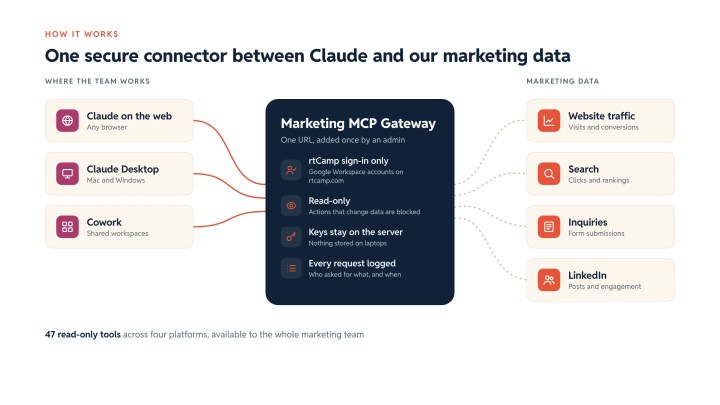
In total, the team gets 47 read-only tools across four platforms through a single connector: website analytics, search performance, website inquiries, and LinkedIn data. An admin adds it to Claude once. After that, every teammate switches it on in their settings and starts asking questions in Claude on the web, in Desktop or in Browser.
The questions our team now asks
The real change is in the questions people ask, with all four platforms connected, our team gets answers without digging through a bunch of different tools.
These are the kinds of prompts the team runs every week.
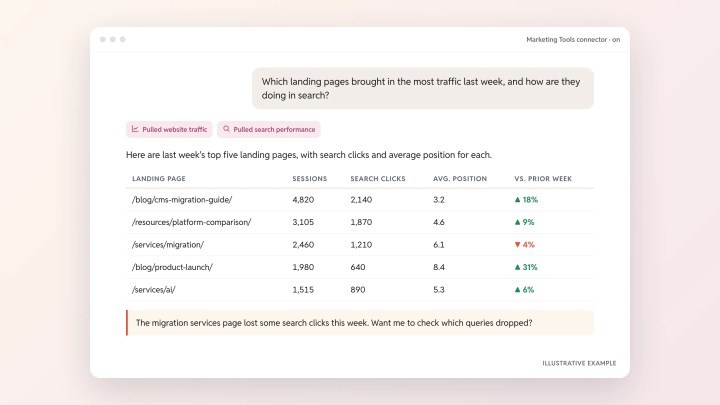
- “Which landing pages brought in the most traffic last week, and how are they doing in search?”
- “How many inquiries did we get this month compared to last month, and which pages did those visitors land on first?”
- “Who engaged with our LinkedIn posts in October, and which companies do they work at?”
Claude works out where to look, pulls the data from each source and returns one combined answer. If that answer raises a follow-up, you ask it in the same thread.
Keeping it safe for everyone
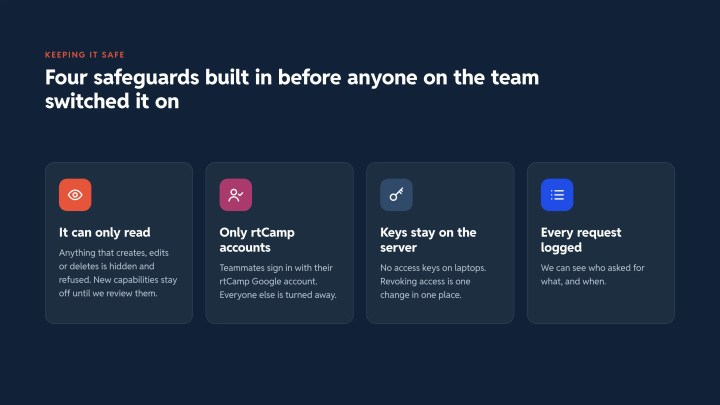
Putting all of our marketing data behind one connector only works if that connector is safe to hand to the whole team. We built that in from the start.
It can only read
For every platform, we keep an explicit list of actions that only read data. Anything that creates, edits or deletes is hidden from Claude and refused if called.
If a platform adds a new capability tomorrow, it stays hidden until we review it and switch it on ourselves. The gateway never gains new powers by accident.
Only rtCamp accounts get in
Teammates sign in with their rtCamp Google account before the connector works. The gateway checks the verified account and rejects personal accounts and domains from other sources. Sessions refresh automatically, so people sign in once and get on with their work.
Access keys stay on the server
Access keys live only on the gateway. No teammate ever sees them, and none are stored on laptops. Revoking access means changing one setting in one place.
Every request is logged
The gateway records who asked for what. If someone wants to know who pulled form entries last Tuesday, we have the answer.
What changed for the team
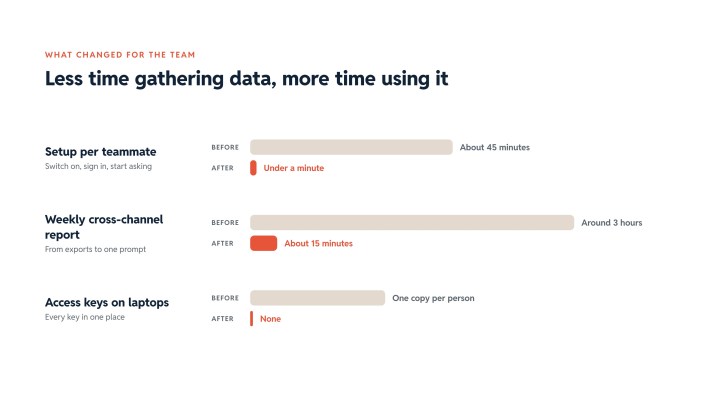
- Setup time per teammate went from about 45 minutes to under a minute. Switch on the connector, sign in, start asking.
- A weekly cross-channel report that took around 3 hours to assemble now takes about 15 minutes.
- The whole marketing team now uses Claude with live marketing data, up from the handful of people who had managed the local setup.
- No access keys on laptops. Every key is in one place, and access can be revoked in seconds.
The time saved is only part of it. The bigger gain is that people now ask questions in a single Claude conversation rather than spend an afternoon pulling data from multiple sources.
Adding more sources over time
Our marketing stack will keep changing, and the gateway is built for that. Adding a new source takes a few lines of configuration, including which read-only actions the team may use. The next source we add will appear for every teammate the next time they open Claude, with nothing to reinstall and no new keys to share.
What this says about how we work with AI
It’s tempting to think of AI adoption as picking the right model. In our experience, the harder and more valuable work is connecting AI to the systems where your data actually lives, with the right guardrails, in a way the whole team can use from day one.
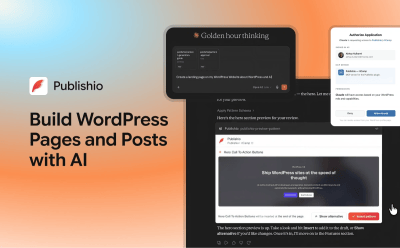
That’s the thinking behind our lead qualification system, our visitor scoring automation and Publishio, our open-source MCP plugin for publishing to WordPress from Claude and ChatGPT. The Marketing MCP Gateway applies the same idea to our own marketing team.
What matters most is the decisions around the AI. What it can see, what it can never touch, and who gets access.
Exploring AI for your team?
Every organization has its own mix of tools, data, and goals. We help teams plan and adopt AI in ways that fit how they already work. Get in touch and let’s talk about where to start.
On this page

Leave a Reply