










Choose the right WordPress migration service: Key criteria, Red flags, and Checklist
A WordPress migration isn’t like moving houses. It’s more like moving a bank’s vault, redesigning the building, and retraining the staff. And oh, you have to do all this while the bank remains open.
When you migrate correctly, you set up your business for a decade of growth. When you fumble it, the consequences are severe.
This transition is also your best chance to fix years of architectural compromises and technical debt. It’s also the easiest time to create new, costly mistakes that’ll haunt you for years.
This guide will give you the criteria, questions, and checklists you need to pick the right WordPress migration service. Let’s get on track towards that!
Why choosing the right WordPress migration agency matters
A website migration affects every part of your digital presence:
- You’ll see impacts on your site performance, SEO equity, data integrity, and marketing readiness.
- It usually changes your internal workflows, and your content team’s user experience.
- A poorly executed migration can lead to a loss in organic traffic (i.e., lost revenue), and tech issues that will hold your team back.
- You risk permanent data loss and a broken user experience, all of which can erode customer trust (and send them straight to your competitors).
This guide is built on a simple premise. There are two types of migration providers:
- The “Mover”: This service provider treats your site like a stack of boxes. They rely on automated tools and bulk migration plugins to “export/import” your data. This approach is often cheap and fast. For any site with real complexity, this method becomes dangerously unpredictable.
- The “Architect”: They are an engineering partner. An architect will treat your migration as a strategic opportunity to rebuild your foundation, streamline content, and optimize performance. They’ll build a platform that is stable, scalable, and secure.
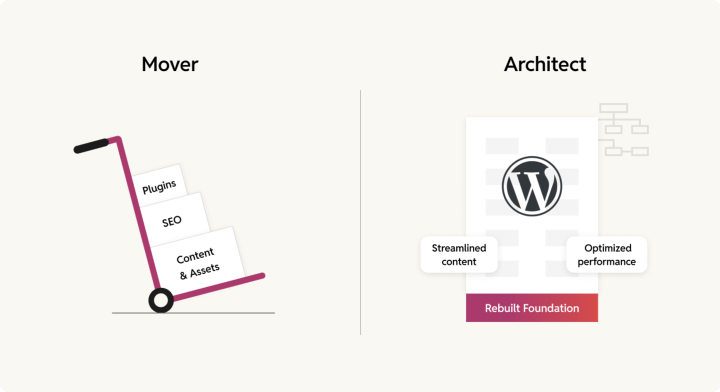
Here’s a quick comparison of what that difference means in practice:
| Feature | The “Mover” | The “Architect” |
| Process | Vague, relies on automated plugins. | Documented, multi-stage process (Discovery, QA, Testing, Hypercare, etc.) |
| Goal | A simple lift and shift of data, without address tech & content debt | A strategic rebuild to improve performance, SEO, and stability. |
| Team | Mostly junior developers, no dedicated QA. | Senior-led engineering team with dedicated QA and PMs. |
| Workflow | No version control, cowboy coding with no oversight. | Mature, Git-based workflow, with code reviews. |
| Outcome | High risk of data loss, SEO drops, and technical debt. | A stable, scalable, and secure platform built for growth. |
Learn how to tell the difference between a “mover” and an “architect” before you sign a contract. We’ll show you how!
Key evaluation criteria — Finding a skilled WordPress migration partner
The right migration partner isn’t just a vendor. They are a temporary extension of your own team. Your evaluation of them should be just as rigorous.
The following criteria separate the professionals from the pretenders.
A documented, battle-tested migration process
If you ask a WordPress migration company to describe their migration process and their answer sounds like they’ll just wing it, they’ll do the same with your website.
Winging it is excellent for jazz, but terrible for business-critical infrastructure.
A mature, repeatable process is the #1 indicator of predictability and accountability. If their process sounds vague, it’s not because it’s a closely-guarded trade secret. They’re just making it up as they go.
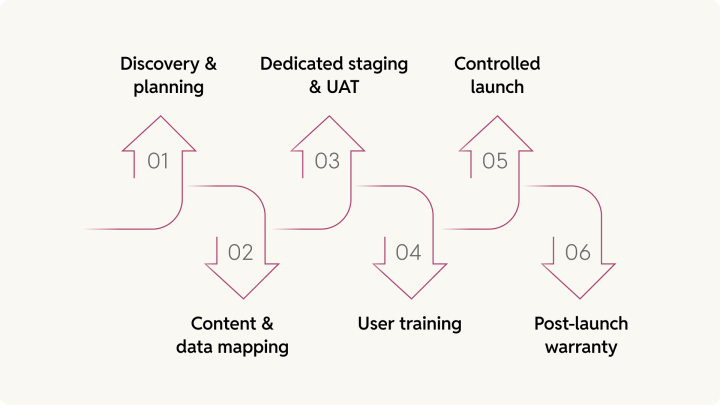
You should look for a multi-stage methodology that includes:
- Discovery & planning: The process must begin with a consultation and discovery phase. This phase should be more than a 15-minute sales call. A proper audit examines your existing setup, content architecture, integrations, and workflows. Critically, they must seek to understand why you are migrating, not just how.
- Content and data mapping: You need a clear plan for mapping old content types to new ones. This is especially critical for complex moves. For example, mapping Drupal nodes or Sitecore components to new WordPress custom post types.
- Dedicated staging & UAT: A sandboxed, shareable staging environment for User Acceptance Testing (UAT) is non-negotiable. This is where you and your team will validate the migration before it ever touches your live site.
- User training: The agency should provide a user manual and live/recorded training sessions. This ensures your team is ready to use the new custom WordPress stack immediately, not fumbling around post-launch.
- Controlled launch: The plan must detail the go-live process. It must focus on minimizing downtime and include a smooth switchover plan.
- Post-launch warranty: The engagement must not end at launch. You must look for a defined warranty or Hypercare period. This allows the new platform to stabilize under real-world editorial use and traffic conditions.
How rtCamp handles this:
We built our migration framework to deliver peace of mind. This battle-tested process covers everything from the first why call and deep discovery audit to iterative data checks, user training, QA and UAT, and a final go-ahead. Our engagements are not over at launch. We include a complimentary 30-day post-migration Hypercare period to ensure your new platform is stable and performant under real-world traffic.
Download our Sample Statement of Work (SoW) & Discovery Report
See how we do this IRL
Demonstrable experience with your kind of complexity
You don’t go to a go-kart mechanic to service a Formula 1 car. Just like you don’t go to agencies with no complex migration experience to migrate your enterprise platform.
Migrating a 5-page brochure site is not the same as migrating a 10,000-article, multilingual, multisite network. So, don’t just look for “WordPress migration experience.” Go beyond that, and see if they have “complex migration experience.”
How do you find that out? Your vendor’s portfolio is their resume. Look for:
- Specific case studies: Ask for examples like your project. Have they handled the specific complexities you are facing? This includes large content archives, multilingual setups, multi-brand or multisite networks, headless architectures, etc.
- Real client references: Testimonials on a website are nice. A reference you can speak to is proof. Ask to talk to a past client from a project of a similar scale. If they hesitate or refuse, that is a major red flag. An agency that values its relationships and is confident in its work will have clients happy to vouch for it.
Here’s a pro-tip for your vendor interview. Ask this question: “Tell me about challenges you’ve faced during a complex migration, and how you fixed it.”
If they say, “None of our migrations had any challenges,” or they don’t have any juicy answer, they’re either lying or they’ve only migrated their cousin’s blog.
A real WordPress migration expert will have interesting stories to tell. More importantly, they’ll be able to detail the risk mitigation plan and the engineering decisions they used to solve the problem.

How rtCamp handles this:
Our portfolio is built on complex, enterprise-scale migrations. We have completed over 300 migrations, specializing in moving large, complex ecosystems from platforms such as AEM, Drupal, Kentico, and other custom CMS to WordPress. We believe in transparency, and once we have established a rapport with you, we are happy to facilitate conversations with our past clients. This allows you to get a first-hand account of our process and results.
Experience with maintaining SEO equity
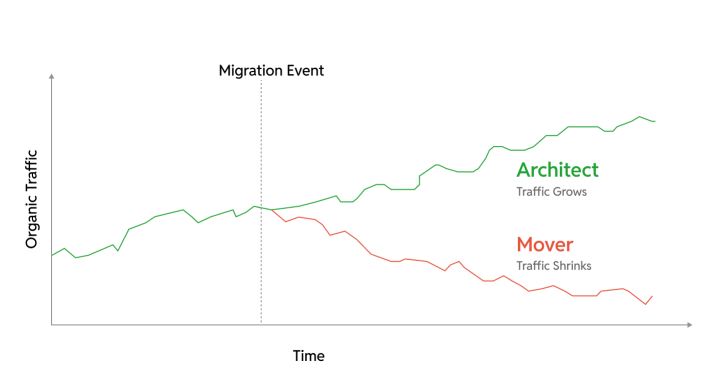
Any migration that drops your organic traffic by 50% is not a success. Setting you back years of hard work, when all you wanted was to move faster.
You must demand a dedicated SEO preservation plan. We wrote an entire guide on CMS SEO migration as it’s that critical. An expert migration partner’s plan will include:
- A pre-migration SEO audit to benchmark current traffic, rankings, Core Web Vitals, and backlinks.
- Comprehensive inventory of every single URL and metadata.
- Document all technical signals, such as canonicals, hreflang, and schema.
- Thorough 301 redirect mapping for all dead URLs to prevent 404 errors.
- A clear strategy for migrating all SEO metadata, canonicals, URL structures, and schema markups.
- Post-launch monitoring for crawl errors, traffic and ranking drops, and performance optimization.
How rtCamp handles this:
We treat your SEO equity as a business-critical asset. Our teams work with your SEO and content teams, together from day one, using industry-standard tools to build a comprehensive inventory of your equity.
You’ll find more details about it in our Sample Migration SOW, but here’s a quick rundown of how we protect your SEO:
- We deploy Yoast SEO as your control center: Title tags, meta descriptions, XML sitemaps, all managed through templates that scale across your entire site. Change your site name once, update 10,000 pages instantly. That’s the difference between a tool and a system.
- Redirects get handled like infrastructure, not Band-Aids: Whether you’re moving 100 URLs or 100,000, we use Yoast’s redirect manager (or Safe Redirect Manager for VIP-scale operations) to map every old URL to its new home. 301s for permanent moves. 410s when content’s truly gone. No broken links. No leaked authority.
- Your sitemap updates itself. Publish a post or remove a page, your XML sitemap will regenerate automatically. Google sees changes in real-time, not whenever someone remembers to manually update a file.
- The under-the-hood stuff matters too. We implement proper rel=canonical declarations so search engines know which version of your content is authoritative. We set up rel=previous and rel=next on paginated archives. Small details that prevent big problems like duplicate content penalties.
- Bonus tools you’ll actually use: Keyword optimization suggestions, readability scoring, internal linking recommendations. Think of them as guardrails that keep your content team from accidentally sabotaging their own work.
The result? Your migration doesn’t just preserve SEO equity. It often improves it by fixing technical debt that your old CMS couldn’t handle.
A performance-driven approach
A migration is the single best opportunity you have to build a high-performance foundation. Your partner must be an expert in both preserving what you have and improving it. Their strategy must go beyond plugins.
- Your goal should be to improve performance, not just maintain it.
- They must demonstrate expertise in Core Web Vitals. This isn’t a buzzword. It should be a testable deliverable.
- Their strategy must cover database tuning, server-level caching, and CDN configuration, and a deep understanding of enterprise hosting environments.
That last point is crucial, as your hosting is the foundation of your platform’s performance. It sets the absolute ceiling for your site’s performance, scalability, and security. Hence, your partner must be an expert in both code and infrastructure.
If an agency’s performance plan is only installing a $49 caching plugin, they’re trying to win an F1 race by putting a “go-fast” sticker on a bicycle.
Real performance is architected, not installed. The performance will come naturally and stay there, with the work put in.
How rtCamp handles this:
We built our reputation on enterprise performance, which we know is a partnership between code and infrastructure. As a WordPress VIP Gold Agency Partner and experts in enterprise platforms such as Pagely, Kinsta, Pantheon, and AWS, we treat hosting as a strategic decision, not an afterthought.
And we don’t just use performance tools, we also build them. Our Web Auditor tool identifies performance bottlenecks and simulates the impact of specific changes, before we even write any code.
This deep, engineering-first understanding of both code and infrastructure enables us to architect for performance at every level.
Expertise with custom & third-party integrations
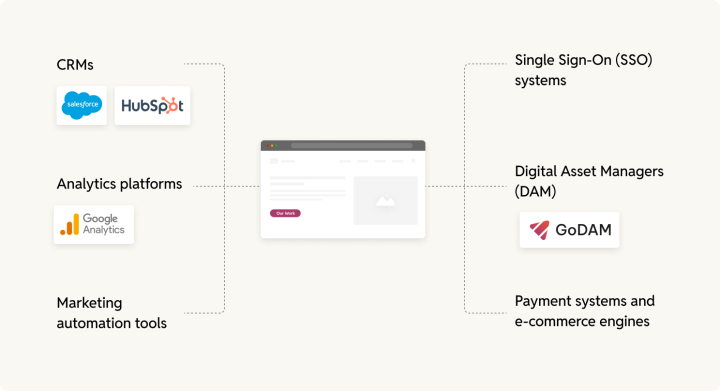
Your website is not an island. It’s more like a busy, chaotic downtown train station, connecting with multiple areas of your business — your CRM, SSO, analytics, etc. A migration must prioritize your integrations right from the planning phase, not after.
Your partner must have a plan for your entire tech stack, including:
- CRMs (like Salesforce or HubSpot)
- Analytics platforms (Google Analytics)
- Marketing automation tools
- Single Sign-On (SSO) systems
- Digital Asset Managers (DAM) (like our GoDAM)
- Payment systems and e-commerce engines
This is where plugin-based “movers” fail. They move the furniture but forget to connect the plumbing and electricity.
Ask your potential partner for a list of integrations they have worked with:
- What is your experience with our specific integrations?
- How do you handle custom API-based connections?
- What is your specific plan for integration testing before go-live?
- Do you have a plan for integration testing and maintenance after the migration?
How rtCamp handles this:
We build digital experiences, not just websites — they’re a part of it. Our migration teams include specialists in backend integration who map out and rebuild your connections to CRMs, marketing automation software, and e-commerce platforms. Our formal QA process includes dedicated integration testing to ensure that every API and data connection — from analytics to SSO — works flawlessly before launch.
For example, here’s a table of the most common AEM tools and integrations, along with their closest WordPress equivalents:
| Integration Category | Common AEM Tools | WordPress Solutions |
| Email Marketing | Adobe Campaign, Marketo Engage | HubSpot, Brevo, MailChimp for WP, MailPoet, etc. |
| Social Media | Hootsuite, AEM Core Components (Facebook, Pinterest, etc.) | Smash Balloon, ClickSocial, etc. |
| Forms Management | AEM Forms, Adobe Experience Platform, Adobe Acrobat Sign | Gravity Forms, Contact Form 7, Formidable Forms, etc. |
| Content Delivery (CDN) | Built-in AEM CDN, Cloudflare, | Cloudflare, AWS CloudFront, etc. |
| Payment Gateways | Stripe, PayPal, etc. | Almost the same integrations. Stripe, PayPal, WooPayments, etc. |
| Analytics | Adobe Analytics, Google Analytics, Adobe Audience Manager, Real-Time CDP | Google Analytics, Site Kit by Google, Jetpack Stats, Matomo |
| Advertising | Adobe Advertising Cloud | Google AdSense, various ad management plugins |
You may have more integrations. We’ll work closely with your team during the Discovery phase to chart all your integrations and suggest the closest WordPress alternative.
Transparent project management & communication
If communication is vague, slow, or unstructured during the sales stage, you can expect a project-killing nightmare. Get ready for vague updates, missed deadlines, and that sinking feeling in your stomach every Monday morning.
When looking for a WordPress migration agency, find someone who values transparency and provides clear, predictable communication channels.
Look for a structured communication framework:
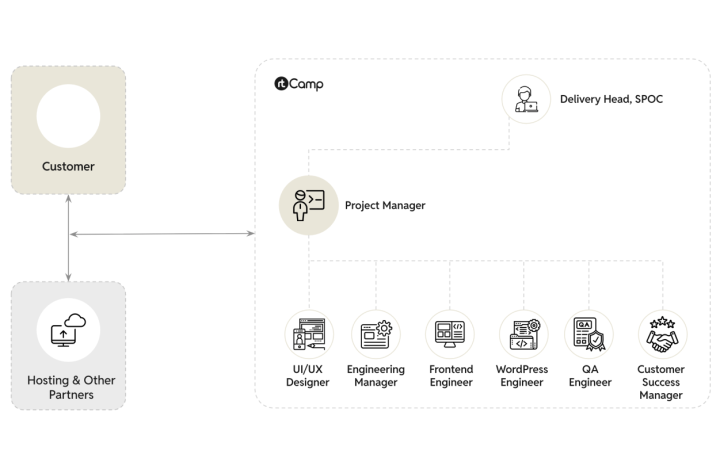
- A dedicated Project Manager and a dedicated Engineering Manager.
- Shared, real-time task boards like GitHub, Jira, or Trello.
- A regular, predictable meeting cadence. This could be weekly check-ins or Scrum-style standups.
- Do they have a clear documentation of how each of the project phases will look like?
How rtCamp handles this:
We have formally outlined how we ensure project success through proactive communication and clear responsibilities in our Client Handbook. Especially the ”when we deliver” section of the handbook, we lay out the team composition for your project, the tools we use, our development methodologies, the meeting cadence, the communication, escalation matrix, reporting, testing, and even billing.
A transparent, publicly accessible process lets you hold us accountable and know your migration project is in good hands.
The non-negotiables — Is their engineering good?
Once you have the basics covered, you have to look deeper into the technical skillset of WordPress migration company you are considering. This helps you separate the real architects from the “good-at-PowerPoint” crowd.
Lacking even one of these capabilities signals a low-maturity team—a surefire way to add risk and technical debt to your project.
Engineering leadership & team composition
Complex migrations are full of architectural decisions. A junior developer can execute a task. A senior engineer (with 5-10+ years of experience) makes the right decisions that prevent future disasters – they understand the “why” behind decisions, not just the “how”.
When you hire an expert WordPress agency, you’re paying for precisely such mindful judgments.
What to look for:
- The team roster: Ask who will be on your team. Demand that a senior technical lead or architect be assigned. Don’t accept just a “project manager” overseeing a team of junior developers.
- Deep architectural knowledge: The team must demonstrate an understanding of WordPress’s deep architecture — multisite networks, headless, REST APIs, database structures, and performance optimization.
- Code review practices: Ask about their internal code review process. You’ll see their culture of quality and mentorship, not just how they ship code.
If the ‘lead architect’ on your multi-million dollar site has 2 years of experience, you’re generously paying for their on-the-job training. It’s a gamble, and if you are into it, we have got better recommendations. 😉
How rtCamp handles this:
Senior WordPress engineers with deep expertise in enterprise WordPress development lead our migration teams. They’ve honed their knowledge through years of leading dozens of enterprise migrations. There’s no alternative to such experience.
We ensure every complex migration has appropriate technical leadership — a dedicated Project Manager for communication and a dedicated Engineering Manager to oversee architecture and code quality, ensuring senior-level judgment guides every decision.
A mature development workflow
A mature workflow is how you tell a professional migration team from a creative collective. Using professional tools means consistency and efficiency. A mature workflow also dramatically reduces risk.
What to look for:
- Clean, documented code: Undocumented code is a technical debt time bomb. It’s a gift that keeps on giving… invoices. Any code on your website should be sustainable and well-documented, with inline comments. It must follow best practices.
- No vendor lock-in: That’s the business benefit of clean, maintainable code. You’re paying them to build your asset. You must be able to maintain or extend the site independently or change vendors whenever you like. Make sure you are not being held hostage. Having been in the industry for years, we find vendor lock-in surprisingly more prevalent than we would like.
- Clear documentation: Ask if they provide technical project documentation and repository readmes.
How rtCamp handles this:
We’re engineers, not just developers. Our teams are required to maintain high coding standards to produce solutions that are safe, scalable, and optimized. A core deliverable of any project is the documentation.
We provide technical project documentation, inline code comments, and clear repository readmes to ensure your team has full ownership and understanding of the new asset, with zero vendor lock-in.
A clear process for version control
A lack of version control is a bright red flag. No longer is it a developer preference. You need it to get your project done efficiently on time. Trust us, you don’t want to play Who broke the build? game on a Friday afternoon.
Look for a Git-based workflow. It’s a non-negotiable Yes/No question. Do they use Git? Yes? You can talk further. No? Time to walk away.
How rtCamp handles this:
For us, version control isn’t optional. All of our projects use a Git-based workflow for code and reviews. Likewise, we teach it to all our developers. We use GitHub as our primary system for project management and task-tracking. This approach provides complete transparency, traceability for every line of code, and a robust safety net for the entire project.
A formal testing & QA methodology
A migration partner who ships code without a dedicated Quality Assurance (QA) buffer makes you their test department.
The risks of surface-level QA aren’t trivial. You face broken forms, 404 errors, lost analytics data, and cross-browser compatibility issues — all of which lead to a fractured user experience and lost revenue.
What to look for:
- A dedicated QA process: Ask them to describe their QA methodology. Is it a dedicated person or team? Do they write formal test cases? How do they prioritize what to test? Their answer should be more than “our developers test their own code.“
- A comprehensive test plan: A professional team will test for far more than “does it look okay.” Demand a plan that covers at least:
- Functionality testing: Do all forms, links, and CTAs work?
- Compatibility testing: Does it work in Safari, Chrome, and on mobile devices?
- Performance testing: Is it fast under load?
- Integrations testing: Does it still talk to your CRM and SSO?
- Accessibility testing:
These are but a few examples. The actual testing and QA plan should cover all your relevant use cases.
How rtCamp handles this:
We have a dedicated Quality Engineering (QE) department, and we assign specialists to every project. Our process combines automated and manual testing to ensure comprehensive coverage. We also deploy a clear testing prioritization model to ensure that changes that impact the business are addressed immediately.
rtCamp’s QE team writes and executes formal test plans that cover functionality, cross-browser compatibility, API integrity, security, compliance, and performance, ensuring you sleep better at night.
Clear technical architecture understanding
As discussed before, a migration partner must explain the why behind their choices. That comes with a deep technical understanding of WordPress.
You’re not just moving content during your migration, but redesigning your site’s new architecture.
What to look for:
- Solution-oriented vs. Template-oriented. Ask them why they would choose one solution over another.
- Can they articulate why they would choose a multisite setup over separate installs for your use case?
- Do they understand your traffic patterns and how to architect for scalability?
- Can they explain database optimization strategies beyond “we’ll clean it up“?
- Can they guide you on strategic hosting considerations?
- Do they understand how platforms like WordPress VIP differ from other managed hosts and which align with your scalability and compliance needs?
If their proposed architecture sounds like they’re just following a template, they are. You’ll get a cookie-cutter solution that doesn’t fit your unique business, and you’ll be dealing with the compromises for years.
How rtCamp handles this:
We don’t use templates. Our senior engineers design technical solutions tailored to your specific needs, from code to hosting infrastructure.
For our multi-brand enterprise clients, we often use our OnePress framework. It’s our open-source solution that solves the biggest architectural challenges: it creates a component-based architecture with a shared design system, centralizes content and plugins, and allows for cascading updates—all while letting individual brands maintain their unique identity. This is how we articulate a clear architectural why.
Security & compliance capabilities
For enterprise projects, security isn’t optional. It’s the lock on the bank vault you’re moving.
A migration provides the perfect time to introduce new vulnerabilities. Your WordPress website migration agency must demonstrate a proactive and comprehensive security posture.
A common misconception is that WordPress isn’t compliant out of the box. Well, WordPress caters to a wide range of audiences, from one-pager websites to White House & NASA. What could be an overkill for a personal blog needs to be table stakes for an enterprise website. That’s where the implementation expertise to build compliance comes into play.
What to look for:
- Platform-level security: Don’t just ask about plugins. Ask about the hosting platform. Does the agency have experience with platforms built for regulated industries? Look for expertise in core Infrastructure — DDoS protection, firewalls, encryption at rest & in transit, and containerization (which isolates your database and file systems from other clients).
- Compliance-specific knowledge:
- GDPR: Do they have a transparent process for data privacy, cookie consent, and implementing WordPress core’s “right to erasure” and “data export” tools? Can their host provide a DPA (Data Processing Agreement) and EU data residency?
- HIPAA: If you handle health data, do they immediately talk about a BAA (Business Associate Agreement)? If they don’t know what that is, end the call. Do they have a plan for access controls, audit logs, and ensuring PHI isn’t stored insecurely in WordPress?
- PCI-DSS: Do they understand that compliance comes from not storing card data, and instead using a secure, compliant payment gateway?
- FedRAMP: This is the gold standard for U.S. government projects. An agency familiar with FedRAMP Moderate ATO platforms (such as WordPress VIP) understands proper, provable security.
- Data handling: How will they protect your data during the migration? Look for encrypted data migration, secure access control, and file backups.
- Accessibility (WCAG): Can they build a site that meets the latest WCAG AA guidelines (2.2 as of writing this), as required by WordPress and many public-facing enterprises?
How rtCamp handles this:
We build solutions for the world’s most regulated industries, including government, finance, and healthcare. As a WordPress VIP Gold Agency Partner, our default recommendation for enterprise clients is a platform that meets the highest security standards.
We have in-depth knowledge of WordPress VIP’s architecture, which is the only WordPress platform to achieve FedRAMP Moderate ATO — making it trusted by U.S. federal agencies. Our architects design solutions that meet strict compliance needs, from GDPR’s data privacy requirements to HIPAA’s safeguards for PHI. We ensure the final platform has the necessary access controls, audit logs, and encryption to pass your audits.
Customizations: The right balance between plugins & custom code
Your migration partner shouldn’t build everything from scratch. There’s no need to “reinvent the wheel” all the time, leaving you with more unique code to maintain.
However, they shouldn’t install 50 random plugins for every feature either. That’s a recipe for a slow, insecure, and bloated website.
An expert architect will know the difference between them, as they’re plugged in to the WordPress…plugin ecosystem. They know when a well-vetted, high-quality plugin is the right tool for the job. This approach reduces your maintenance overhead and leverages the best of the open-source community.
You must ask them to justify their plugin choices based on:
- Code quality and performance
- Scalability
- Extensibility
- Security track record
- Plugin architecture (does it use standard hooks and filters?)
Their answer shouldn’t just be “it’s popular.” That’s not an engineering reason.
How rtCamp handles this:
We maintain an internal, vetted list of plugins and tools that our engineering teams trust. Our team looks beyond the features — does it meet our high standards for code quality, security, and scalability? As active contributors to the WordPress ecosystem, we know which plugins are built by reputable developers and which are a maintenance nightmare waiting to happen.
When we recommend a plugin, we’ll explain why it’s the right choice over a custom build. For multi-brand networks, our OnePress framework provides a synchronized plugin stack, enabling us to manage and deploy plugin updates safely across an entire portfolio from a single dashboard, ensuring consistency and security.
The only checklist you need before onboarding an expert WordPress migration agency
Use this checklist to score each item as Yes / No / Needs Clarification while speaking with different WordPress website migration agencies. The more No answers you get, the greater the risk you’re taking.
✅ Project experience & capability
| Criteria | rtCamp | Vendor 1 | Vendor 2 |
| Has completed migrations of websites similar in size or complexity? |  |  | |
| Can provide 2-3 live client references from similar projects? | | | |
| Assigns a Senior Engineer (5+ yrs) to lead the project? | | | |
| Has experience with Multisite / Multilingual / large content projects? | | | |
| Understands structured content (custom post types, taxonomies, patterns)? | | | |
✅ Process & workflow
| Criteria | rtCamp | Vendor 1 | Vendor 2 |
| Provides a clear methodology (Discovery ➝ Mapping ➝ Staging ➝ Launch)? | | | |
| Offers a dedicated Project Manager and Engineering Manager? | | | |
| Works in a dedicated staging environment (never on the live site)? | | | |
| Has a specific process to share timelines, milestones, and reports? | | | |
✅ SEO & content integrity
| Criteria | rtCamp | Vendor 1 | Vendor 2 |
| Provides a multi-phase SEO plan (Audit, Launch, Monitor)? | | | |
| Performs 1:1 URL mapping and 301 redirect planning? | | | |
| Preserves all metadata, schema, and structured data? | | | |
| Audits internal links to prevent broken links? | | | |
| Can show examples of past migrations with stable or improved SEO results? | | | |
✅ Performance & technical quality
| Criteria | rtCamp | Vendor 1 | Vendor 2 |
| Has a plan to improve performance (Core Web Vitals, Caching, CDN)? | | | |
| Uses Git-based version control for all code? | | | |
| Has a formal QA methodology with a dedicated team? | | | |
| Tests for performance, mobile, and accessibility (WCAG)? | | | |
| Can justify plugin choices vs. custom builds? | | | |
| Ensures all custom code is documented and owned by you? | | | |
✅ Integrations & systems support
| Criteria | rtCamp | Vendor 1 | Vendor 2 |
| Can articulate and defend their proposed technical architecture? | | | |
| Can document integration configurations for internal teams? | | | |
| Has a clear plan for security & compliance (GDPR, HIPAA, FedRAMP)? | | | |
| Can migrate or re-implement all third-party integrations (CRM, SSO, DAM)? | | | |
| Ensures analytics and tag manager continuity? | | | |
| Understands enterprise authentication and user permissions? | | | |
✅ Launch & post-migration
| Criteria | rtCamp | Vendor 1 | Vendor 2 |
| Provides a detailed, controlled go-live plan? | | | |
| Do they offer a post-launch warranty period? | | | |
| Monitors traffic, uptime, and SEO post-launch? | | | |
| Trains your internal teams on the new platform? | | | |
| Delivers complete technical and admin documentation? | | | |
Critical red flags to look for when choosing a WordPress migration agency
In conclusion, here are the glaring warning signs that should make you walk away from a potential vendor. When you notice them, it’s time to look elsewhere!
- No relevant portfolio: They cannot show you any enterprise clients or projects of similar complexity.
- No client references: They say their clients are too busy or it’s confidential. A confident agency has a list of happy clients ready to go. A nervous one… not so much.
- No clear process: Their migration plan is vague and doesn’t list all the steps from pre-migration to post-migration.
- Over-reliance on plugins: Their solution for every custom integration or performance issue is “There’s a plugin for that“.
- Vague communication: They respond slowly, give unclear answers, and don’t have a single dedicated point of contact (no clearly defined escalation matrix).
- No warranty: The engagement ends the second the site goes live, with no warranty period to fix post-launch bugs.
- Unclear code ownership: There is any ambiguity about who owns the custom code they write — the answer should be you, 100%.
An expert WordPress migration service is an investment, not an expense. A shoddy migration is an expensive mistake, measured in lost traffic and reputational damage. Explore our WordPress migration services and see how our engineering-led approach delivers peace of mind and a platform built for growth.
On this page


Leave a Reply