










The Gutenberg block editor shipped with WordPress 5.0, and required every block developer to work with JavaScript, React, and Node.js build tools, even for blocks that relied on server-side rendering.
WordPress 7.0 is set to change that with PHP-only block registration. A single PHP file with the autoRegister flag will now produce a fully working block without any JavaScript scaffolding.
Anatomy of a Gutenberg block and how to register it
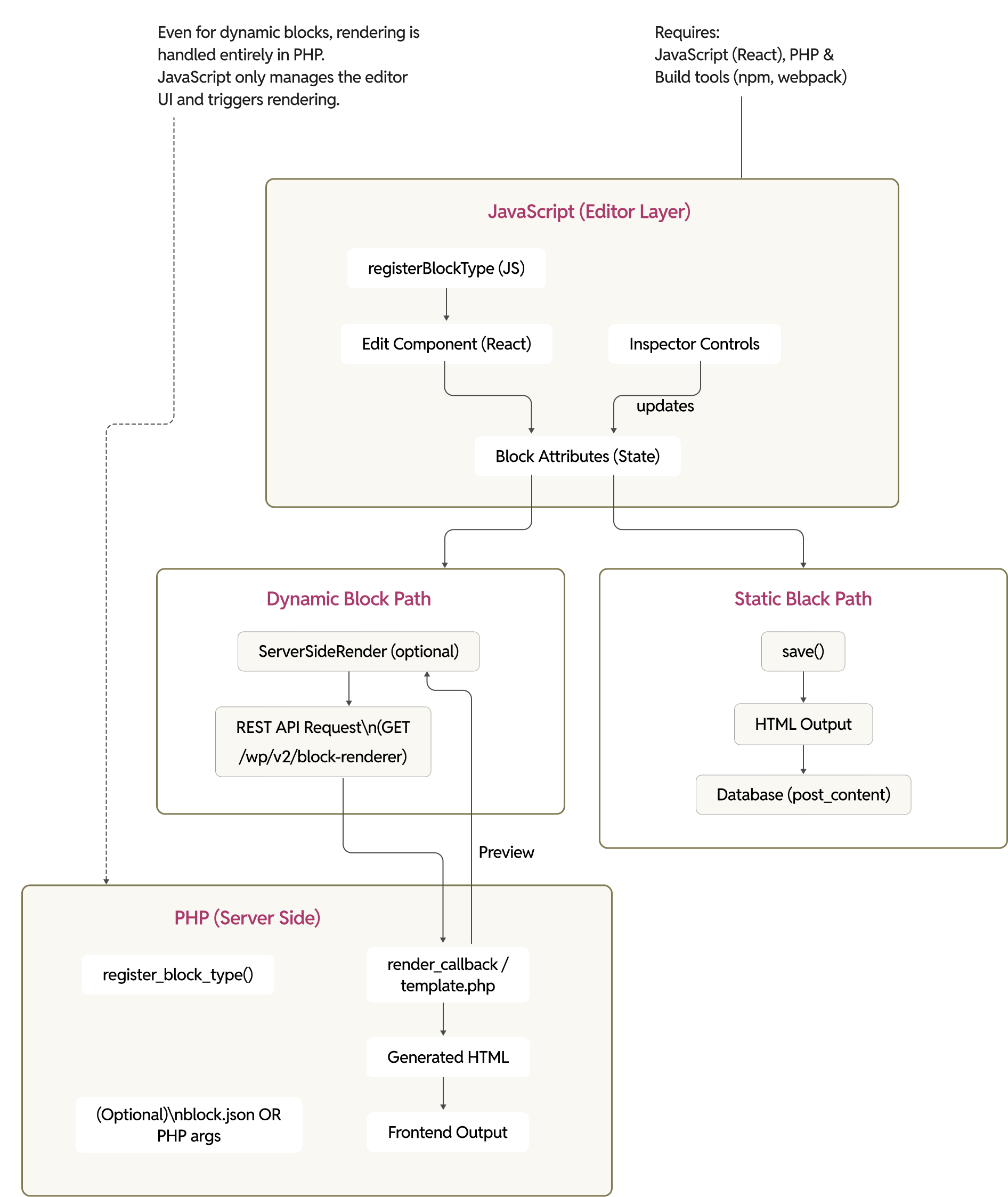
The traditional method of creating a Gutenberg block involves defining its metadata in a block.json file, which describes the block’s name, attributes, category, and other settings. Alongside this, developers write JavaScript to register the block using registerBlockType and define its behavior in the editor through React-based components.
Even when the rendering logic lives entirely in PHP, JavaScript is still required to scaffold the block in the editor. PHP also takes care of registering the block on the server and loading any required assets, making both layers tightly coupled in the development process.
A common example of this pattern can be seen in ACF blocks, where the block is defined declaratively and rendered using a PHP template:
			{
 "name": "namespace/team",
 "title": "Block Team",
 "description": "A custom block for displaying team members.",
 "style": [ "namespace-team-style" ],
 "category": "design",
 "icon": "portfolio",
 "keywords": ["team", "member", "person"],
 "acf": {
   "renderTemplate": "../../../../../block-templates/team.php"
 },
 "align": "full"
}
If no rich editor interaction is needed, blocks often rely on server-side rendering. The JavaScript layer simply acts as a wrapper that delegates rendering to PHP using the ServerSideRender component:
			import { ServerSideRender } from "@wordpress/editor";

export default function edit( props ) {
 return (
   <ServerSideRender
     block={ props.name }
     attributes={ props.attributes }
   />
 );
}
In this setup, JavaScript does not handle rendering itself. It only passes attributes to the server, where PHP generates the final output. Despite this, developers are still required to maintain the JavaScript layer, even when it adds little functional value.
What is PHP-only block registration?
It is precisely what it sounds like.
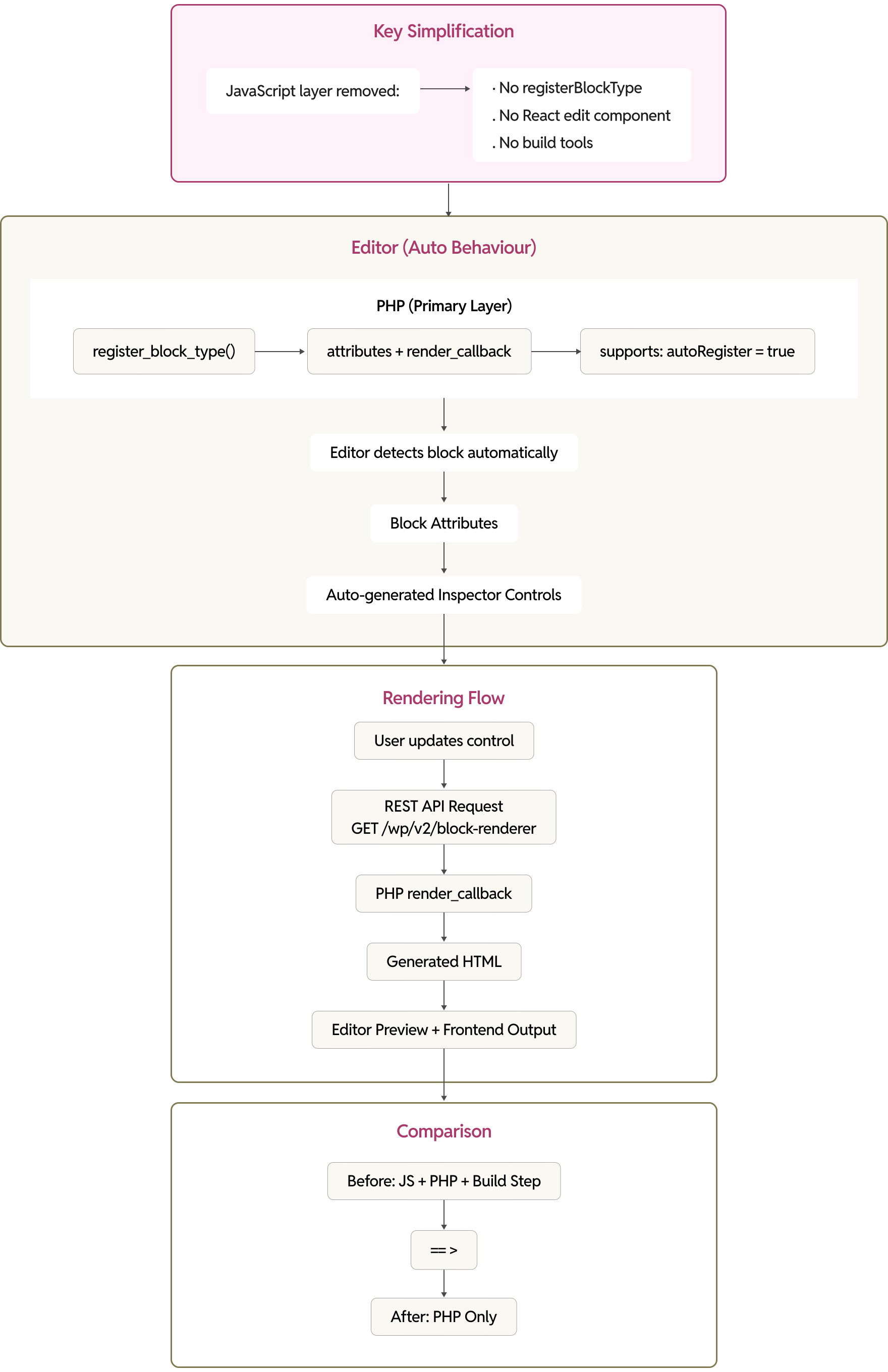
Adding autoRegister => true inside the supports array of register_block_type() is all it takes. WordPress picks up the block and exposes it in the editor automatically, with no JavaScript registration, build step, or block.json file required.
			add_action( 'init', function () {
    register_block_type(
        'my-plugin/example',
        array(
            'title'           => 'My Example Block',
            'attributes'      => array(
                'title'   => array(
                    'type'    => 'string',
                    'default' => 'Hello World',
                ),
                'count'   => array(
                    'type'    => 'integer',
                    'default' => 5,
                ),
                'enabled' => array(
                    'type'    => 'boolean',
                    'default' => true,
                ),
                'size'    => array(
                    'type'    => 'string',
                    'enum'    => array( 'small', 'medium', 'large' ),
                    'default' => 'medium',
                ),
            ),
            'render_callback' => function ( $attributes ) {
                return sprintf(
                    '%s: %d items (%s)</div>',
                    get_block_wrapper_attributes(),
                    esc_html( $attributes['title'] ),
                    $attributes['count'],
                    $attributes['size']
                );
            },
            'supports'        => array(
                'autoRegister' => true,
            ),
        )
    );
});
How it works under the hood
WordPress adds any block registered with autoRegister => true to a JavaScript global called autoRegisterBlocks in the editor settings. The editor picks up these blocks and renders them using ServerSideRender, which is the same component that dynamic blocks have always used for their preview.
When a user changes an attribute value in the Inspector Controls sidebar, the editor sends a REST API call to the server, executes the render_callback, and swaps in the updated HTML as the new preview.
WordPress also auto-generates Inspector Controls based on the attribute definitions. A string attribute produces a text input, an integer gives a number field, a boolean renders a toggle, and a string with an enum array becomes a select dropdown. Each attribute also accepts a label property, which WordPress uses as the human-readable name for the generated control.
You can also skip block.json entirely. All block metadata, which means the title, icon, category, description, keywords, is defined directly in the register_block_type() call.
Why this matters to developers
Zero build tooling required
The most obvious benefit is that the entire JavaScript build pipeline goes away. There is no need for Node.js, npm, @wordpress/scripts, Webpack, or Babel. You write a PHP file, activate the plugin, and you have a working block.
PHP developers are back in the game
WordPress has always been a PHP-first platform, and developers accustomed to the PHP-centric WordPress workflow will be happy to find themselves in familiar territory. Many of them stayed away from the block editor because it required React and a JavaScript toolchain.
Faster prototyping and development cycles
The development cycle for server-rendered blocks is set to become much shorter. Author boxes, CTA banners, testimonial displays, breadcrumbs, and dynamic data widgets can all be built by writing a function, registering it, and iterating directly in PHP.
Block supports work out of the box
PHP-only blocks fully support the standard block supports system. You can opt into color controls, spacing (margin, padding, gap), typography, borders, and more, just as you would with a JavaScript-registered block.
When block supports are enabled, get_block_wrapper_attributes() in the render callback automatically applies the corresponding CSS classes and inline styles to the wrapper element.
A migration path from shortcodes and legacy code
The GitHub issue (#71792) that proposed this feature listed a specific goal of helping WordPress sites and classic themes adopt blocks more easily, including as wrappers for legacy PHP functions or shortcodes.
Wrapping existing shortcode logic in a PHP-only block gives you a modern editor experience without rewriting anything in JavaScript.
Dynamic data, the natural way
Blocks that pull from databases, external APIs, user meta, or computed values are inherently server-side. An author box querying get_users(), a pricing table reading from custom post types, or a location block rendering based on user roles are all PHP-native problems. PHP-only blocks let you solve them in the most natural way.
The limitations: What you can’t do (yet)
This API is not meant to replace the existing client-side paradigm, nor is it ever meant to be as feature-rich.
Limited attribute control types
Auto-generated Inspector Controls only support four attribute types:
- string (renders a text input)
- integer/number (renders a number field)
- boolean (renders a toggle)
- enum (a string with an array of allowed values, renders a select dropdown).
There is no support for textarea, media/image uploads, color pickers beyond block supports, link fields, date pickers, or rich text editing within attributes.
Community feedback in the dev note comments has already called out the absence of at least textarea and media fields as notable gaps. More complex field types are being explored through a parallel “Block Fields” initiative meant for inclusion in WordPress 7.1.
No InnerBlocks support
PHP-only blocks cannot contain InnerBlocks, which are nested blocks inside the parent block. If your block needs to wrap or contain other blocks like a columns layout, an accordion with expandable panels, or a section container, you need the full JavaScript registration.
Server-side rendering only
The editor preview is rendered entirely via ServerSideRender, meaning every attribute change triggers a REST API round trip. This is fine for simple blocks, but it introduces noticeable latency for blocks with complex rendering logic. There is no rich, client-side editing experience, inline text editing, drag-and-drop rearrangement within the block, or real-time visual manipulation.
No Block Bindings (in 7.0)
Block Bindings, the system that lets block attributes pull values from external data sources like custom fields, is not fully supported for PHP-only blocks in the initial 7.0 release. The Gutenberg team discussed enabling it during the beta period but identified several UI issues. The decision was to disable bindings for PHP-only blocks in 7.0 and revisit for 7.1.
Not suitable for interactive blocks
Any block requiring client-side interactivity with tabs, accordions, carousels, form builders, interactive maps, or live search still needs JavaScript. PHP-only blocks are fundamentally display blocks.
If you need the Interactivity API or any kind of client-side state management in the editor, you’re in JavaScript territory.
The style attribute conflict
When you enable color, spacing, or typography block supports, WordPress automatically registers an implicit attribute named style (of type object) to persist design values. If you define your own attribute named style as a string, the REST API type checking will reject it. Avoid using style as a custom attribute name when block supports are enabled.
Where PHP-only blocks shine: Practical use cases
Blocks that do not require much interaction on the admin screen are a good fit for this approach. These are blocks that only need a few attributes updated in the sidebar and rely on ServerSideRender for their preview.
A breadcrumb block is a good example, where the traditional approach requires a block.json, an edit.js file, and a PHP file just to load the block.
			// Edit JS
import { __ } from "@wordpress/i18n";
import { ServerSideRender } from "@wordpress/editor";


/**
 * Main edit render function.
 *
 * @param {Object} props
 * @returns {JSX}
 */
export default function edit( props ) {

   return (
       <ServerSideRender block={ props.name } attributes={ props.attributes } />
   );
}
Rather than maintaining all these files, it can be easily replaced by:
			add_action( 'init', function () {

	register_block_type( 'namespace/breadcrumb', [
		'title'       => 'Breadcrumb',
		'description' => 'Displays breadcrumb navigation.',
		'category'    => 'widgets',
		'icon'        => 'menu',

		// No JS needed
		'supports'    => [
			'autoRegister' => true,
		],

		'render_callback' => function ( $attributes ) {

			// Example breadcrumb output
			return 'Home > Blog > Post</nav>';
		},
	] );

} );
Ideal use cases include:
- Author bio boxes that pull user meta and avatar data
- Call-to-action banners with configurable heading, subheading, button text, and URL
- Dynamic listing blocks for recent posts, events, or custom post types
- Testimonial and review blocks that read from custom fields
- Pricing tables with server-side content
- Breadcrumb navigation, and WordPress 7.0 itself will ship a new Breadcrumbs core block built this way
- Utility components for theme developers like section headers, dividers, and branded components
- Shortcode migration wrappers for legacy functionality
Looking ahead
PHP-only block registration does not replace JavaScript-based block development, because rich interactive editing experiences will always need client-side code.
It does, however, give PHP-focused developers a path to build server-rendered blocks without toolchain overhead, and it creates a clean migration route from legacy shortcodes into the block editor.
The WordPress team has also signaled plans to consolidate this approach with the Block Fields API, which already supports more complex field types like links, media, and rich text through an experimental configuration.
On this page

Leave a Reply