










Building scalable code with Abilities API
Part 1: Thinking in Abilities
The WordPress Abilities API shipped in version 6.9, ushering an entirely new way to write, reuse, and reliably share WordPress functionality across codebases. It’s only been a few short months, and dozens of plugins have already pushed custom Abilities to millions of WordPress sites, with more being added every day. Not all implementations are created equal, however, and we receive a lot of questions about when and how best to use the Abilities API.
In this series of posts, we’ll dive deep into the Abilities API and take a practical look not just at how to use it but how using it will help you write and integrate better, more maintainable – some might say “slop-proof” – code. We’ll cover:
- The basics of the Abilities API: what it is, how it works, and how to get started.
- When it makes sense to use the Abilities API, and when you would be better off with a different approach.
- Best practices for designing and implementing enterprise-grade Abilities, and some anti-patterns to avoid.
- Ways to reuse and compose multiple Abilities together, build dependable integrations, and make your codebase more robust to AI-and-human-generated slop.
Let’s get started.
A new way to think about functionality
To make the most of the Abilities API, it’s important to understand how it differs from traditional approaches to writing WordPress-flavored PHP, and the problem it was designed to solve. For many folks, this requires a shift in mindset: from thinking in terms of individual functions and classes, to thinking in terms of composable, reusable units of functionality that can be shared across codebases and integrated together in a reliable way.
We’ve previously discussed the many potential use cases the Abilities API solves, but the first and most important thing to understand is that Abilities are a functional primitive. Abilities are encapsulated units of functionality that are registered once and discoverable and reusable anywhere. Strict input and output contracts and enforced validation and permission-checking allow developers to reliably integrate 3rd-party abilities into their codebases without worrying about the underlying implementation.
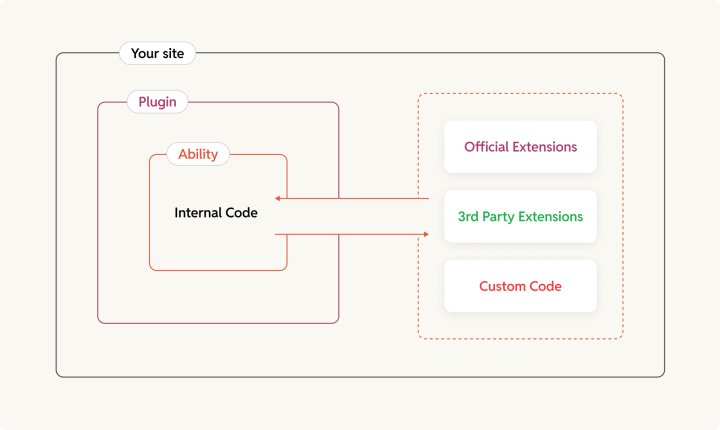
This sort of functional composability is new to WordPress. While philosophically similar to Action and Filter Hooks, it’s very different from the typical approach of maintaining a public API of functions and classes that other developers can call and extend directly. In an ecosystem where we could never rely on SemVer compatibility and the vast number of plugins presenting both WordPress’s greatest strength and biggest weakness, the Abilities API makes it easy to protect your codebase from upstream fragility, the same way Hooks made it easy to integrate with upstream behavior. The strict input and output schemas act as a wall: so long as the contract remains unchanged, your integration will continue to work. As long as the changes remain inside the ability, your codebase is immune. They can still break their own plugin, but at least they can’t break yours in the process.
The Great Wall of Schema
The benefits to the WordPress plugin ecosystem – where even a patch release can end up breaking dozens of extensions that integrate using traditional PHP APIs – should be obvious, but the Abilities API also provides benefits to keeping your own codebases maintainable and future-proof as well, by providing a low-effort way to enforce Domain-Driven Design principles (DDD).
In DDD, code is organized by “domain” – a specific area of functionality or business logic – rather than by technical concerns like “models”, “views”, and “controllers”. This makes it easier to reason about the code, and to make changes without worrying about unintended consequences in other parts of the codebase. This becomes increasingly important as your codebase grows and more developers are involved. And, as with most best practices, it also makes it easier for agentic contributors to contribute to your codebase, as they can work within the well-defined boundaries of a domain without needing to understand the entire codebase.
The Abilities API enforces these boundaries, helping your humans write self-contained code that can be maintained independently and preventing the hoards of agent swarms from turning your codebase into entropic mush. All you need to do is decide where to draw your boundaries, and trust the schema to do the rest.

This type of “pluggability” also makes it easy and more likely to reuse code, both within and across projects. When structured as reusable abilities, there’s little difference whether it’s you or a 3rd-party composing different functional units together.
The anatomy of an Ability
Let’s start by breaking down how to register a simple Ability, and go through the individual components.
For the sake of this article, let’s say we’re building a feature that creates a downloadable PDF for a given CPT post. Here’s a simplified example of what that Ability might look like:
			add_action( 'wp_abilities_api_init', 'rt_plugin_register_generate_pdf_ability' ); // Abilities MUST be registered on this hook.
function rt_plugin_register_generate_pdf_ability() {
  wp_register_ability(
    'rt-plugin/generate-pdf', // Ability name.
    [
      'label'       => __( 'Generate PDF', 'rt-plugin' ),
      'description' => __( 'Generates a downloadable PDF for a given WordPress object, or renders a full frontend view at a URI.', 'rt-plugin' ),

      'category'    => `rt-plugin-content-rendering`, // Registered elsewhere.

      'input_schema' => [
        'type'                 => 'object',
        'properties'           => [
          'uri' => [
            'description' => __( 'Relative URI to render as PDF (e.g. /my-post/ or /my-cpt/42/).', 'rt-plugin' ),
            'type'        => 'string',
          ],
        ],
        'required'             => [ 'uri' ],
        'additionalProperties' => false,
      ],

      'output_schema' => [
        'type'                 => 'object',
        'properties'           => [
          'pdf_url' => [
            'description' => __( 'Fully-qualified public URL to the generated PDF.', 'rt-plugin' ),
            'type'        => 'string',
            'format'      => 'uri',
          ],
        ],
        'required'             => [ 'pdf_url' ],
        'additionalProperties' => false,
      ],

      'permission_callback' => static function ( array $input ): bool|\WP_Error {
        $can_access_uri = Rt_Plugin\user_can_access_uri( get_current_user_id(), $input['uri'] );

        if ( is_wp_error( $can_access_uri ) ) {
          // The Abilities API will obscure this for
          return $can_access_uri;
        }

        return true === $can_access_uri || current_user_can( 'manage_options' ); // Let admins generate PDFs for any URI, even if they can't access it in the frontend.
      },

      'execute_callback' => static function ( array $input ): array|\WP_Error {
        $pdf = ( new Rt_Plugin\PDF_Generator() )->maybe_generate_from_uri( $input['uri'] );

        if ( is_wp_error( $pdf ) ) {
          return $pdf;
        }

        return [
          'pdf_url' => $pdf->to_url(),
        ];
      },
    ]
  );
}
Let’s break that down:
Name
The Ability Name is a unique identifier and what we use to interact with the ability. Ability names follow the pattern vendor/ability-name, where the vendor prefix is typically your plugin’s text domain or organization slug. We recommend using a self-documenting name in the form of <verb>-<noun> for the slug.
As of WordPress 7.0, Abilities are only allowed to have a single forward slash, however this is expected to supported in v7.1 and will allow for improved discovery and disclosure patterns via hierarchical or domain-based naming (e.g. rt-plugin/pdf/create or rt-plugin/content/render/pdf). Until then, we suggest you be as explicit as possible in the slug. For example, if our PDF Generation Ability is only for our Press Release Custom Post Type, we might name it rt-plugin/generate-pdf-for-press-release.
Label and Description
The label is a short, human-readable display name, and the description is a 1-2 sentence summary of what the ability does. Both of these fields are required and are used both by humans and machines to determine which ability to use. Extensions such as with the WordPress MCP Adapter plugin already use these to help LLMs choose the right tool for a given task, and they will likely play a role in semantic discovery in the Command Palette and other future tooling and integrations.
Category
The category is a required field. Sadly, the only purpose it currently serves is ensuring that every Ability will be assigned an Ability Category, if we converge around a flat taxonomic categorization of abilities.
We’ll talk about this some more in a future article, but for now, all you need to know is:
- WordPress Core currently ships with two Ability Categories:
site: Defined as “Abilities that retrieve or modify site information and settings.”user: Defined as “Abilities that retrieve or modify user information and settings.” If your ability fits into one of those buckets, use those. If they don’t you need to register your own.
- Ability Categories are not namespaced, but still must be unique. To avoid conflicts with other plugins or even WordPress itself, we strongly recommend you use a hyphenated prefix based on your plugin slug (e.g.
rt-plugin-content-rendering). - Ability Categories must be registered on their own
wp_abilities_api_categories_inithook which runs before Abilities are registered. This is what that looks like:
			add_action( 'wp_abilities_api_categories_init', static function() {
  wp_register_ability_category(
    'rt-plugin-content-rendering', // The unique name.
    __( 'Content Rendering', 'rt-plugin' ), // The human-readable label.
    __( 'Abilities related to rendering content into different formats, such as PDF generation or AMP rendering.', 'rt-plugin' ) // The description.
  );
} );
Input and Output Schemas

As mentioned above, the schemas are the most important part of an Ability, as they define the explicit – and enforceable – boundaries between the code inside the ability and the code that relies on it. The input_schema defines the shape of the data the ability can receive, and the output_schema ensures you get the exact shape of data back that you expect.
Schemas are defined using WordPress’s flavor of JSON Schema Draft 4 and they are strictly enforced by the Abilities API. For now they face some unfortunate coupling with the WordPress REST API infrastructure, but we expect that to be resolved in the future.
There’s a lot of consideration that goes into quality API design, so care and intent should be spent on designing your schemas well. In a future article, we’ll cover best practices for both `input_schema` and `output_schema`, how to avoid breaking changes while iterating and anti-patterns like versioning.
Permission Callback
The permission callback runs before the Ability executes, and determines whether the current request is allowed to proceed. It should be a boolean indicating whether the user can run the ability, or a WP_Error if there was an error during permission-checking.
The rule is to check capabilities, not roles. current_user_can( 'edit_post', $post_id ) is better than in_array( 'administrator', $user->roles ) as capabilities respect context, filters, and multisite configurations in ways that raw role checks do not. The more specific you can be with your permission check, the easier it is to scale and reuse it without leaking access.
For example, if our PDF Generation ability was only targeting press releases, then we’d want to make sure that the user can view the specific press release – either because they’re publicly published, or because the caller has permissions to view that pending/private/draft post. Assume our hypothetical Rt_Plugin\user_can_access_uri() function first determines the object type and ID from the URI so it can run the appropriate capability check for what it’s to generate a PDF for.
Execute Callback
The execute callback contains your business logic. It receives the $input array (validated by the schema), and must return an output matching the output_schema, or a WP_Error.
We can instantiate new classes and run application logic here, even call other abilities. We’ll share some codebase structuring patterns that embrace the Abilities-first composition in a future article. In the meantime, remember to sanitize your data before you use it and escape any data before you return it, just like you would in any part of your codebase. We also recommend you do your best to keep things stateless, as the fewer side effects you have the less likely any changes you make will cause breakage downstream, and we’ll discuss scalable state management and encapsulation patterns in the future as well.
Ability Metadata
Ability Metadata provides additional information that can be used programmatically by tools and integrators to determine discoverability and behavior.
Out of the box, the Abilities API supports the following meta fields:
(array) annotations: An array of semantic behavioral characteristics:(?bool) readonly: Whether the ability modifies data or has side effects. Readonly abilities are safer to call from agents and other untrusted contexts, as they won’t cause breakage if called multiple times or with the wrong input. If an ability is marked readonly, integrators should feel confident calling it.(?bool) destructive: Whether the ability can make irreversible changes to data. Destructive abilities are riskier to call from agents and other untrusted contexts, as they could cause breakage if called with the wrong input or unintentionally.(?bool) idempotent: Whether the ability can be called multiple times with the same input without causing unintended consequences. Idempotent abilities are safer to call from agents and other untrusted contexts, as they won’t cause breakage if called multiple times or with the wrong input.
(bool) show_in_rest: Whether the ability should be automatically exposed as a REST API endpoint. This is false by default, but if set to true, the Abilities API will create a REST endpoint for this ability at/wp-json/wp/v2/abilities/{ability-name}.
Other plugins can add their own metadata that they can use for their own purposes. For example, the MCP Adapter plugin adds the mpc.public and mcp.type meta fields to decide whether an Ability should be auto-exposed via MCP ( most shouldn’t ) and whether it should be used as a tool, resource, or prompt.
Calling Abilities
Once registered, interacting with abilities are straightforward. Let’s take look with some annotated example code.
			// First, check if the ability exists.
if ( ! wp_has_ability( 'rt-plugin/generate-pdf' ) ) {
  // Handle the case where the ability isn't available. Maybe show an error message in the UI, or fall back to a legacy PDF generation method, or autoheal to a different available ability with a matching signature. E.g.
  return \WP_Error(
    'ability_not_found',
    sprintf(
      __( 'Could not locate the `rt-plugin/generate-pdf` ability. Check if the plugin is active or use a different ability. Recommended abilities: %s', 'rt-plugin' ),
      My_Plugin\find_similar_abilities( 'rt-plugin/generate-pdf' )
    )
  );
}

// Then get the ability instance.
$ability = wp_get_ability( 'rt-plugin/generate-pdf' );
At this point the Ability hasn't actually done anything yet, and it won't until you run $ability->execute( $some_input ):
$result = $ability->execute( [
  'uri' => '/press-release/42/', // The input schema requires a 'uri' field, so we have to provide that.
] );

if ( is_wp_error( $result ) ) {
  // Handle the error. For this example, we'll just pass it back up to the caller.
  return $result;
}

$pdf_url = esc_url_raw( $result['pdf_url'] );

// Do something with the result. In this case, we'll just validate and return the PDF URL.
if ( empty( $pdf_url ) || ! filter_var( $pdf_url, FILTER_VALIDATE_URL ) ) {
  return new \WP_Error(
    'invalid_response',
    __( 'The ability did not return a valid PDF URL.', 'rt-plugin' )
  );
}

return $pdf_url;
This allows you to do things like checking permissions outside of the lifecycle, validating input and output shapes to determine whether a plugin update is safe, or using metadata and composition to chain together multiple abilities before or after you execute them.
Let’s grow our example from a basic PDF Generation ability to a complex Generative UI workflow for a moment; we’ll be growing towards this over the course of this series so don’t worry to much about the composition right now:
			final class Render_Content_Ability {
  // ...

  /**
   * Register the ability on the `wp_abilities_api_init` hook.
   *
   * @internal
   */
  public function register_ability() {
    wp_register_ability(
      self::get_name(), // 'rt-plugin/render-content'
      [
        ...self::all_the_other_args(),
        'execute_callback'    => static function ( array $input ): array|\WP_Error {
          // Take freeform user input to see how they want their content.
          $user_intent = \Rt_Plugin\Semantic_Parser::parse( $input['user_input'] );

          // Pass the vectorized intent to the Abilities Manager to find the best abilities to fulfill the request.
          $available_abilities = \Rt_Plugin\Abilities_Manager::find_compatible_abilities( $user_intent['ui_type'] );

          if ( empty( $available_abilities ) ) {
            return new \WP_Error(
              'no_abilities_found',
              sprintf(
                __( 'No abilities were found to fill the user intent. %s', 'rt-plugin' ),
                $this->get_autoheal_suggestions( $user_intent['ui_type'], $user_intent['vector'], $available_abilities )
              )
            );
          }

          // Go through the available abilities until one works.
          foreach ( $available_abilities as $ability ) {
            if ( ! $this->has_compatible_output( $ability->get_output_schema(), $user_intent['vector'] ) ) {
              continue;
            }

            $ability_input = $this->prepare_input_for_ability( $user_intent, $ability->get_input_schema() );

            $result = $ability->execute( $ability_input );

            // We don't care about the specific errors, but if no abilities work, we want to capture them to help with our autoheal suggestions.
            if ( is_wp_error( $result ) ) {
              $this->logger->warning( sprintf( 'Ability %s failed with error: %s', $ability->get_name(), $result->get_error_message() ) );
              continue;
            }

            return $this->prepare_output_for_ui( $result, $user_intent['ui_type'] );
          }

          return new \WP_Error(
            'all_abilities_failed',
            sprintf(
              __( 'All abilities that matched the user intent failed to execute successfully. Recommended recovery: %s', 'rt-plugin' ),
              $this->get_autoheal_suggestions(
                $user_intent['ui_type'],
                // Better feedback results in better recommendations.
                \Rt_Plugin\Semantic_Parser::vectorize( array_merge( [
                  'user_input' => $user_intent['original_input'],
                  'warnings'   => $this->logger->get_warnings(),
                  'abilities'  => array_map( static fn( $ability ) => $ability->get_name(), $available_abilities ),
                ] ) ),
              )
            )
          );
        }
      ]
    );
  }
}
Now, our hypothetical ChatBot/Agentic CLI/Gutenberg Pattern can call ( $ability->execute( [ 'user_input' => 'Do you have a printable brochure I can show to my boss?' ] ) and the rt-plugin/render-content will determine the user intent, find any Abilities that are capable of generating the ideal UI for the request – in this case a Sales brochure, and return either a PDF of the composed content, or an error message that the harness can try and use to self-recover.
Next time: Building with Abilities
In this post, we went through the basics of the Abilities API, how abilities are registered and consumed, and how to start thinking of them as function primitives for building composable, reusable functionality. In the next post, we’ll get to the meat of Ability design. We’ll cover:
- What type of functionality makes a good Ability, and what doesn’t
- When to use Abilities versus other WordPress APIs, such as Hooks, REST API endpoints, or traditional OOP or functional PHP code, and how Abilities can complement those approaches
- How to design robust and maintainable Input and Output Schemas that will make your Abilities easy to integrate and resilient to change
Stay tuned!

