










WordPress powers 52% of the top 10k sites with a known CMS, making it all the more important to carefully plan enterprise WordPress hires.
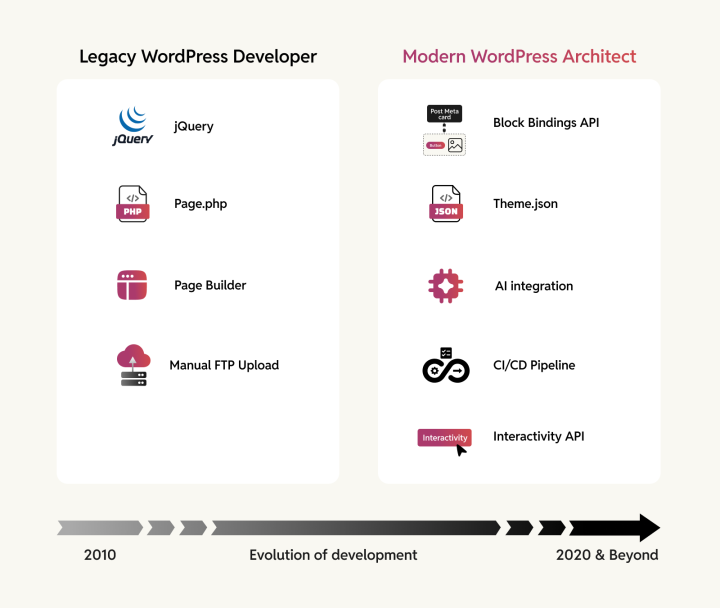
The European Accessibility Act passed its June 2025 enforcement deadline, making non-compliant sites a legal liability for any business serving EU customers. The Block Editor is no longer optional in 2026 and beyond. Each new year is bringing in fresh developments, and legacy maintainers will continue to lose ground to WordPress development experts who are constantly at the forefront.
This guide will help you ask the right questions when it comes to hiring those experts.
First, define what you need
Poor hiring decisions stem from unclear requirements. Before reviewing a single portfolio, document your platform’s lifecycle stage, internal capabilities, and compliance obligations.
What stage is your WordPress platform at?
The skill set for building a new site differs vastly from maintaining a legacy one. Each stage demands different expertise.
New builds
These require a developer who can architect a complete enterprise platform, and this involves much more than knowing how to implement a design.
The developer will need familiarity with the content architecture, in particular:
- Custom post types, taxonomies, and field structures that match how your organization works
- Editorial workflows with appropriate roles and permissions, integration strategy for your CRM, analytics, and marketing tools, and a hosting infrastructure suitable for your traffic
On the frontend, they will need fluency with theme.json, Block Patterns, and the Block Bindings API to build editing environments where content teams can update layouts on their own.
Following this approach will reduce long-term maintenance costs that would otherwise be incurred through custom PHP template builds.
Redesigns
Changing the site design calls for someone who can audit existing technical debt before proposing solutions. Redesign can fail when developers rebuild the frontend without addressing underlying architectural problems.
A specialist will evaluate your current plugin dependencies, database structure, and content architecture before writing a single line of code, then deliver a migration strategy that preserves SEO equity while modernizing the stack.
Scaling multisite or enterprise networks
Scaling requires an agency that runs WordPress Multisite as a governance framework. At scale, role definitions and database optimization are critical because a single misconfigured capability can expose numerous subsites to unauthorized access.
These specialists understand domain mapping, network-wide plugin activation strategies, and horizontal scaling patterns linked to infrastructure costs. Instead of paying for separate hosting, maintenance, and plugin licenses for each site, you share a single codebase and unified security monitoring across the entire network.
Performance optimization
Site performance calls for developers obsessed with Core Web Vitals and server response times. Google’s ranking algorithm weighs page experience signals, and slow sites lose 7% of conversions for every additional second of load time.
Performance specialists know how to implement Speculative Loading, configure object caching layers, and optimize the wp_options table.
Legacy maintenance
Maintaining a WordPress site needs someone comfortable digging through years of code changes. They should have an innate understanding of how WordPress functions.
Legacy codebases often contain deprecated parameters, function calls, and patterns that trigger fatal errors on current server environments. A specialist will use static analysis tools to identify breaking changes before they appear in production.
Do you need a headless build?
Most web-first projects don’t.
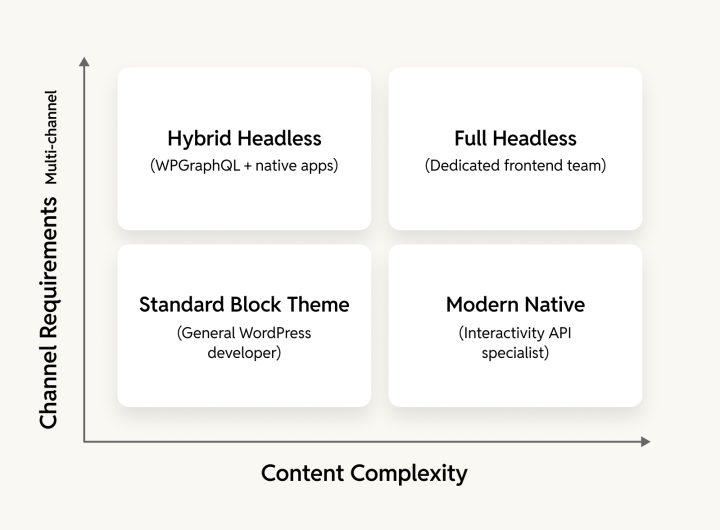
The Interactivity API (stable since WordPress 6.5) delivers the instant, reactive user experience of a single-page application while retaining the SEO and simplicity of server-side PHP. Speculative Loading in WordPress 6.8 enables near-instant page transitions without a decoupled stack.
Reserve headless for projects that strictly require multi-channel content distribution across mobile apps, kiosks, and smartwatches. If your primary channel is the web, hire a team of developers who understand native WordPress, not Next.js specialists who will over-engineer the solution.
OpenWeb: Sub-second headless when the use case demanded it
For projects requiring headless, we built OpenWeb’s Gatsby + WordPress architecture, achieving time-to-first-byte under 0.3 seconds and Interactive First Paint (IFP) under 1 second. We’ve also published a comprehensive Interactivity API implementation guide for projects where native WordPress delivers the same experience at a lower cost.
What resources do you need?
If you have an internal team lacking specific skills, you may need a block specialist to train your PHP developers on React and the Site Editor. If you lack internal resources entirely, you need a partner who can handle the complete software supply chain, including generating a Software Bill of Materials (SBOM) to track vulnerabilities in third-party plugins and npm packages.
What are your compliance obligations?
Since the European Accessibility Act deadline passed in June 2025, compliance is non-negotiable. The EAA effectively requires WCAG 2.1 Level AA through the harmonized standard EN 301 549. A “good enough” approach can attract penalties reaching €1 million in some EU countries.
Is AI integration on your roadmap?
WordPress 6.9 introduced the Abilities API, allowing developers to register site functions as machine-readable capabilities. AI agents can execute these capabilities via the Model Context Protocol, the Command Palette surfaces them as user actions, and automation platforms like Zapier and n8n can discover and trigger them through the REST API.
If your roadmap includes AI automation or workflow integrations, you need a developer who can implement secure Abilities API patterns with proper permission callbacks and input validation.
Note: The Model Context Protocol Adapter is a separate package that takes advantage of the Abilities API. It’s not bundled in WordPress Core.
Quick reference: Matching expertise to project stage
| Stage | What you need | Key expertise |
|---|---|---|
| New builds | Complete platform architecture | Content architecture, theme.json, Block Patterns, Block Bindings API, editorial workflows |
| Redesigns | Technical debt audit before solutions | Migration strategy, SEO equity preservation, database, and plugin evaluation |
| Scaling multisite | Governance framework thinking | Domain mapping, role definitions, horizontal scaling, network-wide plugin strategy |
| Performance optimization | Core Web Vitals obsession | Speculative Loading, object caching, wp_options auditing |
| Legacy maintenance | Compatibility expertise | Static analysis tools, modern PHP deprecation handling |
Questions to evaluate WordPress development partners
Whether you need a full agency partnership or dedicated experts to augment your team, these questions reveal technical know-how, process maturity, and ability to deliver enterprise-grade solutions.
Technical expertise and architecture
1. Can you walk me through your most recent enterprise WordPress builds?
Third-party page builders often represent technical debt for new enterprise builds. They signal an inability to work with WordPress’s native Full Site Editing, powered by its native Gutenberg editor.
What you want to see:
- Projects built with native block themes
theme.jsonfor global style management- Block Patterns to empower editors while maintaining brand consistency
Partners deeply invested in WordPress’s future will speak enthusiastically about the Gutenberg project, Block Editor and Full Site Editing. Those who still recommend Classic Editor workflows for new builds may be optimizing for their existing skill set rather than for your platform’s future.
Cox Automotive: 103% engagement lift
For Cox Automotive, we built a centralized Design Library of reusable Gutenberg blocks and patterns. The result was a 103% increase in visitor engagement, 100% more lead conversions, and 70-80% code reuse across seven brand sites. Our Block Editor development handbook documents the approach.
2. How do you balance building custom solutions with using native WordPress capabilities?
The Block Bindings API lets developers bind standard core blocks to custom data sources without writing new block code. The best developers exhibit architectural restraint, using Core APIs to inherit security and performance updates automatically rather than building custom blocks for every use case.
Watch out for awareness of Data Views, which was developed to replace the legacy WP_List_Table class.
3. How do you decide whether a project needs headless or can use native WordPress features?
A headless-only shop might over-engineer even a simple site. A PHP-only agency will fail to deliver modern interactivity.
Look for nuanced thinking, such as using the Interactivity API for standard interactive features because it’s lightweight and SEO-friendly, while reserving full headless architectures for complex, app-like experiences that require multi-channel distribution.
For high-traffic sites, look for mentions of Speculative Loading to achieve sub-second page loads without a separate frontend. Single-answer responses like “Always headless” or “Never decouple” reveal rigid thinking.
4. How do you keep codebases compatible with modern PHP and WordPress standards?
Each major PHP release deprecates patterns that were once common practice. Legacy coding styles can now trigger fatal errors or deprecation notices.
You will need evidence of:
- Static analysis tools (PHPCS with modern rulesets, PHPStan, Rector) in CI/CD pipelines
- In-depth understanding of WordPress sanitization functions (
sanitize_text_field,wp_kses) to prevent XSS attacks - Transition from PHP-heavy templates (
page.php) to HTML-based block templates withtheme.jsonfor CSS management
5. What’s your approach to performance optimization beyond basic caching plugins?
A bloated wp_options table will ruin performance. Many plugins leave behind autoloaded data even after deletion, loading it into RAM on every page request.
You want developers who can carry out routine checks of autoloaded options and are comfortable using WP-CLI to query for orphaned rows and transient data.
Team structure and continuity
6. Tell me about your team structure and how you handle transitions.
Years of experience are no longer an indication of competence. Ask about their escalation process, their familiarity with the latest programming tools, and what happens if a key developer becomes unavailable.
Dedicated project and engineering managers on every build
Every complex project has a dedicated Project Manager and Engineering Manager. Our WordPress staff augmentation practice provides vetted engineers trained on your specific tech stack.
7. How do you keep skills current as WordPress evolves? Do you contribute to the WordPress Core and the open-source ecosystem?
Major WordPress releases introduce new APIs and deprecate old patterns. Each major React update introduces breaking changes that affect the Block Editor.
General community involvement is valuable, but for technical validation, you need code contributions in the form of patches submitted, plugins maintained and Core issues resolved. Vague answers like “We keep up with trends” reveal a lack of systematic skill development.
34 consecutive Core releases
rtCamp has WordPress Core contributions in 34 consecutive releases. Our QA team contributed to the WordPress Core Playwright migration, migrating 25+ test cases. We launched a WordPress development course freely available to the community.
Delivery process and tooling
8. Have you worked with enterprise hosting platforms like WordPress VIP, Pantheon, or AWS?
Enterprise hosting platforms enforce Git-based deployment where production servers are read-only. You can’t auto-update plugins or generate CSS files on production.
You want a DevOps mindset with these points in place:
- CI/CD pipelines (deploying via Git)
- Offloading uploads to S3
- Object caching with Redis or Memcached
- Generating all assets during builds rather than at runtime
If their deployment experience is limited to clicking “Update” in wp-admin or they’ve only worked with shared hosting and FTP deployments, they’ll struggle with enterprise infrastructure environments.
VIP Gold Partner with 100% migration success rate
As a WordPress VIP Premier Agency Partner with 15 years of experience and a 100% migration success rate, we’ve led digital transformations for brands including Cox Automotive, Al Jazeera, and Grist Magazine on enterprise platforms including WordPress VIP, Pagely, Pantheon, and AWS.
9. How do you document features that aren’t visible in the code?
In block themes using the Block Bindings API, data connections are stored as attributes within block markup or theme.json, invisible during casual code reviews.
You need:
- A Data Architecture Map listing which block attributes are bound to which custom fields
- Documentation of registered abilities and permission callbacks (if using the Abilities API)
- Living documentation tools that parse
block.jsonandtheme.jsonto automatically generate style guides
Public Client Handbook: Zero vendor lock-in
Our public Client Handbook outlines our documentation standards, ensuring full ownership of your assets.
10. Do your demos include the backend editor experience?
With Full Site Editing in force, a frontend-only demo will be misleading. A site might look perfect to end users but could be a nightmare for editors with confusing block options, no guardrails, and unstable layouts.
For this reason, a weekly demo of the Site Editor will be necessary.
MBA newsletter editor: Full day’s work reduced to 10 minutes
For the Mortgage Bankers Association, we built a custom Gutenberg interface that reduced newsletter creation from a full day’s work to under 10 minutes. The solution sets an example of what’s possible with Gutenberg.
11. How do you catch bugs before production and ensure updates don’t break existing functionality?
Traditional PHPUnit tests cannot verify interactive blocks or Full Site Editing features. WordPress Core migrated to Playwright for end-to-end testing.
Look for Playwright integration in CI/CD, with visual regression tests (Playwright or BackstopJS) that take screenshots before and after updates. Updates should only hit production if visual tests pass.
You will also want a systematic debugging methodology, such as browser console analysis plus server-side tools like Query Monitor or Xdebug.
12. What does your collaboration workflow look like across distributed teams?
Email and spreadsheets are obsolete for technical delivery. Async-first is the most efficient model.
You will want:
- Modern ticketing systems (Linear, Jira) integrated with GitHub or GitLab
- Automated code review tools (SonarQube, CodeClimate) running in CI/CD
- Clear handover protocols with asynchronous video updates (Loom, Slack clips)
- Synchronous time reserved for complex architectural decisions, not routine updates
Project management scattered across email threads and Dropbox folders leads to missed deadlines.
Publicly documented workflows
Our Client Handbook publicly documents our development methodologies, communication protocols, escalation matrix, and reporting structure.
Security, compliance, and governance
13. How do you approach accessibility compliance from discovery through delivery?
Since the European Accessibility Act deadline passed, accessibility is a mandatory legal standard for e-commerce and digital services in the EU.
You will want:
- A structured discovery phase with an EAA gap analysis
- Native semantic compliance
- Testing with automated scanning (Axe, Pa11y) and manual auditing with screen readers (NVDA, VoiceOver)
Native accessibility for regulated industries
Our accessibility guide details our approach to semantic HTML, ARIA, and WCAG compliance. As a WordPress VIP partner, we use a platform that aligns with WCAG 2.2 AA guidelines.
14. How do you track vulnerabilities in third-party plugins and dependencies?
A WordPress site is a compilation of hundreds of third-party libraries that may contain hidden vulnerabilities. The EU Cyber Resilience Act will require Software Bills of Materials (SBOMs) for products with digital elements, with the main obligations taking effect in December 2027.
You will want partners that generate SBOMs during deployment and use scanning tools.
15. How do you secure a site before launch and protect it after?
Before launch, you must carry out third-party penetration testing, data minimization practices for GDPR/SOC 2, and a security-by-design approach.
But launch is just the beginning. Ask how they handle zero-day vulnerabilities. The window between a vulnerability announcement and the official patch is when you’re most exposed.
When we migrated KHM Travel Group to WordPress VIP, the pre-launch audit covered every plugin across a 2,000-site multisite network. We removed unused sites, hardened the codebase, and delivered a platform that was 35% lighter and loaded twice as fast.
We did the same for AlphaTarget, a financial services platform with strict compliance requirements. Our team did a full technical audit followed by a WordPress VIP migration to meet its enterprise-grade security obligations.
Enterprise-grade security for regulated industries
WordPress VIP, our default enterprise recommendation, is the only WordPress platform with FedRAMP Moderate ATO, trusted by U.S. federal agencies for government, finance, and healthcare projects.
Engagement flexibility
16. How flexible are your engagement models, from retainers to team scaling to pilot projects?
Enterprise WordPress isn’t a one-time build. Your site’s compliance status can change with a single plugin update. You may need an accessibility specialist for an audit sprint.
You will want:
- Retainers covering quarterly accessibility audits, SBOM vulnerability scanning, and PHP compatibility checks (not just “plugin updates”)
- Ability to augment the team with subject matter experts on an ad-hoc basis without full-time lock-in
- Willingness to undertake a small, paid pilot to assess code quality and adherence to modern standards
Fixed team sizes with no flexibility will mean you’ll either overpay for idle expertise or lack critical skills when needed.
Managed maintenance with proactive compliance
Our managed site maintenance services include performance optimization, security hardening, and compliance monitoring. Our Quality Engineering team ensures ongoing testing coverage.
Evaluation scorecard
Use this checklist to compare WordPress development partners. Score each criterion (1-5).
| Category | Criterion | Score (1-5) |
|---|---|---|
| Technical expertise and architecture | Native block theme case studies (not page builders) | |
| Block Bindings and Core API usage over custom code | ||
| Nuanced headless vs. native decision-making | ||
| Modern PHP compatibility (static analysis tools) | ||
| Performance optimization depth (wp_options, caching) | ||
| Team structure and continuity | Senior engineers with modern stack expertise | |
| Clear escalation matrix and transition protocols | ||
| WordPress Core or Gutenberg contributions | ||
| Systematic training program | ||
| AI governance policy (Human-in-the-Loop) | ||
| Delivery process and tooling | Enterprise hosting experience (VIP, Pantheon, AWS) | |
| Documentation standards (Data Architecture Maps, living docs) | ||
| Backend editor demos (not just frontend) | ||
| Automated testing in CI/CD (Playwright, visual regression) | ||
| Async-first communication protocols | ||
| Security, compliance, and governance | Accessibility gap analysis in onboarding (no overlays) | |
| SBOM generation and vulnerability tracking | ||
| Third-party security audits and virtual patching protocol | ||
| GDPR/SOC 2/FedRAMP readiness | ||
| Engagement flexibility | Compliance and governance retainer options | |
| Fractional roles and team scaling | ||
| Paid pilot engagement option | ||
| Total | ||
Making the decision
The cost of a bad WordPress hire is measured in accessibility non-compliance liability, supply chain security breaches, and crippling technical debt.
When you hire, you’re looking for someone more than just a PHP developer. You will need someone who can control your digital supply chain.
Staff augmentation and full project delivery since 2009
As a WordPress development agency with 16+ years of engineering excellence, rtCamp offers both dedicated WordPress staff augmentation service and full project delivery.
Frequently asked questions
How do I hire WordPress VIP experts?
Look for agencies with official WP VIP partnership status (indicating they’ve passed technical vetting), experience with their Git-based deploys, and familiarity with WP VIP-specific functions and restrictions. A true WP VIP expert will optimize for VIP’s object caching infrastructure and navigate their strict code review process.
When should I hire WordPress plugin developers?
Custom plugin development makes sense when no existing solution meets your requirements, when you need deep integration with proprietary systems, or when performance demands code optimized for your use case.
Hire developers who follow WordPress coding standards and demonstrate experience with both Classic Editor hooks and Block Editor extensions. They should build plugins that work within Full Site Editing, register custom blocks, and integrate with theme.json. Verify that they understand plugin security aspects like nonce verification, capability checks, and data sanitization, and can maintain plugins across WordPress Core updates.
Can you describe what expert WordPress development means?
Expert WordPress development prioritizes Core APIs over custom solutions: Block Bindings instead of custom blocks, Interactivity API instead of jQuery, theme.json for design system management.
Expert developers deliver sites that pass automated accessibility scans, include comprehensive documentation, generate Software Bills of Materials, and evolve with WordPress Core. The result is lower maintenance costs, easier knowledge transfer, and automatic inheritance of Core security and performance improvements.
On this page


Leave a Reply