










Strapi to WordPress migrations share a common point with every migration we carry out.
Across 300+ CMS migrations, including transitions from headless platforms like Strapi, we at rtCamp have learned that the essential work starts with content modeling, followed by validation. We do this even before a single record is transferred.
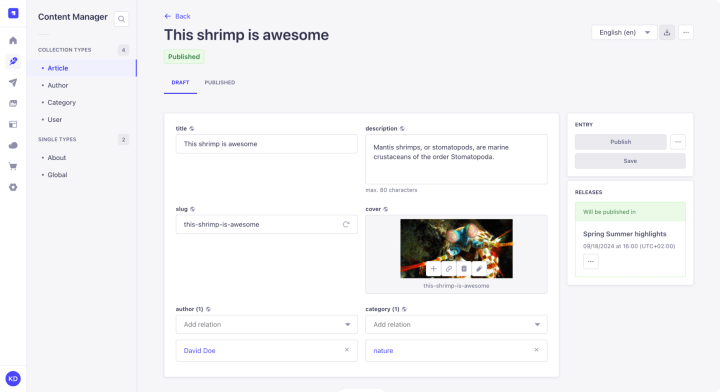
Strapi is a headless CMS built with a developer-centric approach. It provides only a content backend with auto-generated REST and GraphQL APIs, and developers wire it up to a frontend of their choice. Although this gives engineers enormous flexibility, editors and marketers face a steeper learning curve compared to WordPress.
This guide covers every phase of the migration process from Strapi to WordPress, from auditing your Strapi content architecture to post-launch monitoring.
Why organizations move from Strapi to WordPress
Three reasons are at the root of enterprise Strapi to WordPress migrations.
Editorial dependency on engineering
Strapi’s content interface is developer-built and developer-maintained. Editors cannot rearrange page layouts, create landing pages, or modify dynamic zones without contacting developers. WordPress, through its block editor and Full Site Editing, hands layout control directly to editors.
When our team at rtCamp migrated Dealertrack from AEM, another developer-centric CMS, to WordPress, we successfully helped their marketing team reduce landing page time-to-market by 50%.
Esntial Motors, a Cox Automotive subsidiary, ran its retailer sites on Strapi and relied on individual Google Sheets per retailer to collect content. The Esntial team manually validated and copy-pasted that data into Strapi’s admin, with no way for retailers to preview their pages. rtCamp built a WordPress-based data-collection layer alongside the existing Strapi infrastructure, using Gravity Forms for structured input across 600–700 fields, Alpine.js for live editable previews, and custom REST endpoints for Excel export. The solution scaled from 15 retailers to a planned 58+, and rtCamp scoped a full Strapi-to-WordPress migration as a follow-on phase.
Escalating platform cost for baseline enterprise features
Single sign-on, audit logging, and review workflows require Strapi’s paid Enterprise Edition, licensed per seat. WordPress delivers role-based access control, editorial workflows, and revision history in core.
Enterprise SSO, compliance, and SLA-backed support are available through WordPress VIP, an enterprise-ready hosting platform for WordPress.
Upgrade instability
Strapi’s major version transitions (v3 to v4, v4 to v5) have introduced breaking changes to content APIs, plugin architecture, and database schemas.
Each upgrade demands re-engineering and regression testing across your entire content pipeline. WordPress maintains backward compatibility as a core principle, with automatic security updates and a plugin ecosystem of 61,000+ plugins.
Timeline and scope
A standard enterprise migration for a moderately complex Strapi implementation runs 7 to 11 weeks across the following five phases:
- Discovery and audit (1–2 weeks)
- Architecture and planning (1–2 weeks)
- Development and configuration (2–4 weeks)
- Migration and testing (1–2 weeks)
- Launch with monitoring (1 week)
Large media operations with 50,000+ articles, deeply nested dynamic zones, and extensive inter-content relations can expect the upper end of that range.
Scope of migrations: The exercise will cover all collection types, single types, components, dynamic zones, media assets, user roles, taxonomy structures, SEO metadata, and URL redirects.
Out of scope for most engagements: Frontend redesign (unless moving from headless to hybrid), third-party application rebuilds, and historical content older than an agreed retention threshold.
Expected outcomes
Measure migration success against four benchmarks:
- Editorial speed should increase measurably. Track time from draft to publish before and after.
- Organic search traffic should remain as steady as before or improve within 90 days, with zero permanent loss of indexed pages.
Core Web Vitals should meet or exceed pre-migration baselines:
- LCP under 2.5 seconds
- INP under 200 milliseconds
- CLS under 0.1.
- Developer overhead on routine content tasks should drop significantly
Discovery and assessment
Audit your Strapi content architecture
- Start by documenting every content structure in your Strapi instance.
- Inspect the
schema.jsonfiles in./src/api/[api-name]/content-types/and./src/components/[category]/directories. - Catalog each collection type, single type, component, and dynamic zone.
- Record all inter-content relations and their cardinality: one-to-one, one-to-many, many-to-many.
- For each content type, document the entry count, field types, nested component depth, relation targets, and media field usage.
- Flag the structures that will require the most translation work, like deeply nested repeatable components, polymorphic dynamic zones with many allowed component types, and bidirectional many-to-many relations. These are the items that extend your migration timeline.
Map each Strapi concept to its WordPress equivalent:
| Strapi Concept | WordPress Equivalent |
| Collection Type | Custom Post Type (CPT) |
| Single Type | ACF Options Page or WordPress Page |
| Component | ACF Field Group |
| Repeatable Component | ACF Repeater Field |
| Dynamic Zone | ACF Flexible Content Field |
| Relation | ACF Relationship / Post Object Field |
| Enumeration | ACF Select / Radio Button |
| Strapi Categories | WordPress Custom Taxonomy |
| UID (slug) | Post slug (post_name) |
Frontend rebuild planning
Determine whether you’re moving to traditional WordPress, headless WordPress, or a hybrid setup. If your current Strapi frontend is a React or Next.js application consuming Strapi’s REST or GraphQL API, you can preserve that architecture by pointing it at WordPress’s REST API or WPGraphQL instead.
If you’re moving to a traditional WordPress frontend, plan your theme architecture. Identify every page template in your current frontend, map reusable components, and define the block library your editors will need. Assess navigation structure and mobile requirements against your current implementation.
Functionality and integration audit
Document every integration your Strapi instance affects, from authentication providers, payment gateways, analytics platforms, marketing automation tools, search services, and CDN configurations.
Record the API it uses for each integration, the data it exchanges, and the WordPress plugin or custom solution that will replace it.
Audit your Strapi plugins. Cross-reference each one against the WordPress plugin ecosystem to identify direct equivalents, near-matches requiring configuration, and challenges requiring custom development. At an enterprise scale of 50,000 articles, pay particular attention to search indexing (Elasticsearch or Algolia integrations), image processing pipelines, and content distribution workflows.
When we assessed Esntial Motors’ retailer onboarding workflow, we found four issues rooted not in Strapi itself, but in the manual process the client had built around it.
- Content moved from spreadsheets to Strapi entirely by hand. A custom authenticated REST endpoint exported form entries as multi-sheet Excel workbooks.
- Retailers submitted content through individual Google Sheets. Gravity Forms replaced this process, extended with custom algorithms to generate unique retailer URLs.
- The Esntial team manually verified all incoming data. A two-tier validation system caught errors at per-page and per-field levels.
- Retailers had no way to see how their content would appear on the final site. Alpine.js powered live frontend previews that let retailers edit content in place.
Content inventory checklist
Use this as your discovery framework:

All collection types documented with entry counts

All single types documented
All components and repeatable components cataloged
All dynamic zones mapped with allowed component types
All relations documented with relationship type (one-to-one, one-to-many, many-to-many)
Media asset count and storage location confirmed (local, S3, Cloudinary)
User roles and permissions documented
All third-party integrations mapped with API dependencies
SEO metadata fields identified per content type
URL structure documented per collection type
Planning
Migration approach
A large media organization with tens of thousands of articles will need an automated migration. The recommended approach is a custom Node.js script that fetches content from Strapi’s REST API and pushes it to WordPress’s REST API in sequential passes: content extraction, media upload with ID mapping, taxonomy creation, content transformation (particularly dynamic zones to ACF Flexible Content), and a final pass to resolve relationship fields.
At rtCamp, we built a WordPress companion site for Esntial Motors to collect retailer data while the primary website stayed on Strapi. The companion site doubled as a proof of concept, and rtCamp scoped the full migration as a subsequent phase. This incremental approach reduces risk while building internal confidence before you commit to a full transition.
Resource allocation
A migration at this scale typically requires a project manager, a lead migration engineer, a WordPress backend developer, a frontend developer (if rebuilding the presentation layer), an SEO specialist, and a QA engineer. Your editors will need dedicated time for user acceptance testing, spread over two weeks for content review and workflow validation.
Assign a technical lead on your side who knows the Strapi content model intimately, since their role will be crucial during discovery and field mapping.
Risk analysis
Four risks are specific to Strapi-to-WordPress migrations at enterprise scale.
SEO equity loss
SEO equity loss is the highest-impact risk for a media company whose revenue depends on organic traffic. Every URL that returns a 404 instead of a 301 redirect costs you indexed pages, link equity, and ranking position.
The mitigation approach? Export every Strapi slug, cross-reference with Google Search Console and analytics data, build a complete redirect map before writing a single line of migration code, and validate every redirect on staging.
Dynamic zone data loss
Strapi’s dynamic zones allow editors to mix and reorder component blocks in flexible content areas. Mapping these to ACF Flexible Content fields requires translating each component’s __component property to an acf_fc_layout value, with every sub-field aligned. To mitigate this dynamic zone data loss, build a test suite that compares rendered output on both platforms for every dynamic zone component type.
Media reference breakage
On enterprise media sites with embedded images, inline media URLs are scattered throughout rich text content. After import, any remaining Strapi media URLs will point to a server you will eventually decommission.
To mitigate chances of breakage, run the command wp search-replace across all post content after migration and verify with a full-site crawl.
Editorial workflow disruption
Your editors will have familiarized themselves with Strapi’s interface over time. If they’re seeing WordPress for the first time on launch day, productivity will drop. To avoid this, provision WordPress staging access to editorial leads at least three weeks before cutover and get them familiarized with the new environment.
Success metrics
Define these before migration begins, with baselines captured from your current Strapi environment:
- Time-from-draft-to-publish (editorial velocity)
- Organic search traffic (weekly, tracked for 90 days post-migration)
- Indexed page count in Google Search Console
- Core Web Vitals: LCP, INP, CLS
- 404 error rate (daily for the first two weeks, weekly thereafter)
- Developer hours spent on routine content requests (monthly)
If your team is assessing the complexity of this migration against the cost of staying on Strapi, a scoping conversation can clarify the timeline, resource requirements, and risk profile for your specific content architecture. Book a free discovery consultation.
Pre-migration
Technical setup
Back up your Strapi environment
Before any data is migrated, create backups across three layers.
Database: Export a full dump using your database engine’s native backup tool (PostgreSQL or MySQL). Additionally, run Strapi’s built-in CLI export to produce a structured archive of all entities, relations, and schemas.
Media: Copy all uploaded assets from local storage, or sync from your cloud provider (S3, Cloudinary) and verify file counts against your content inventory.
Code and configuration: Archive your source directory, config files, and package manifests. These preserve your content model definitions and plugin configurations for reference throughout the migration.
Staging environment
Provision a WordPress VIP staging instance with the same plugin stack, theme, and configuration you intend to run in production. Every migration script runs against staging first. Iterate until every validation check passes before touching production.
Keep your Strapi instance running in parallel throughout the migration and for a minimum of 30 days after cutover.
Important: Lower DNS TTL to 300 seconds before the switch so you can roll back within five minutes if needed. Snapshot the WordPress staging environment before each migration run to enable rapid restore to the last known good state.
Content preparation
SEO preservation groundwork
This is the single most revenue-critical step for a media company. Do it before any content is migrated.
- Export every URL from your Strapi instance by querying the REST API for slugs across every collection type.
- Crawl the live site with Screaming Frog to capture the full URL inventory, including pages discovered only through internal linking.
- Cross-reference with Google Search Console performance data and Google Analytics to identify your highest-traffic, highest-revenue pages.
- Build a redirect mapping spreadsheet with columns for: old URL, new WordPress permalink, redirect type (301 for all permanent moves), traffic priority ranking, and notes.
- Configure WordPress permalinks to match your Strapi URL structure wherever possible
- Map all SEO metadata from Strapi fields to their Yoast SEO equivalents: meta titles, meta descriptions, canonical URLs, Open Graph tags, and structured data. If your Strapi content model stores SEO data in a reusable component, that component’s fields become your field mapping reference for the migration script.
Pre-migration checklist
Database backup completed and verified with a test restore
Media backup completed with file count verification
Code and configuration archived
WordPress VIP staging environment provisioned and configured
Plugin stack installed: ACF Pro, CPT UI, WP All Import Pro, Yoast SEO, Redirection
Custom post types registered matching Strapi collection types
ACF field groups created matching Strapi component structures
Strapi instance confirmed running in parallel with rollback plan documented
DNS TTL lowered to 300 seconds
Complete URL inventory exported from Strapi
Screaming Frog crawl completed on live site
Redirect mapping spreadsheet built with priority rankings
SEO metadata field mapping documented (Strapi fields → Yoast fields)
Google Search Console baseline data exported
Core Web Vitals baseline captured
Migration execution
WordPress configuration
- Register custom post types matching each Strapi collection type, with REST API visibility enabled for both API access and Gutenberg compatibility.
- Create ACF field groups that mirror your Strapi component structures: Flexible Content fields for dynamic zones, Repeater fields for repeatable components, and Relationship or Post Object fields for inter-content relations. Set all ACF field groups to expose via REST API to enable programmatic import.
- Install the core plugin stack: ACF Pro for custom fields, CPT UI for post type and taxonomy registration (or register via code), WP All Import Pro with the ACF Add-On for supplementary imports, Yoast SEO for metadata and sitemaps, and the Redirection plugin for 301 redirect management.
Content migration
Run the migration script against your staging environment. The script fetches content from Strapi’s REST API, transforms it to match your WordPress field structures, and pushes it via the WordPress REST API.
Two areas demand particular attention.
Dynamic zones are the hardest translation problem. Each component type allowed in a Strapi dynamic zone becomes a layout in the corresponding ACF Flexible Content field. During transformation, the script maps each component’s __component property (e.g., sections.hero) to an acf_fc_layout value (e.g., hero), with every sub-field aligned to the layout’s field keys. Build automated tests that compare rendered output for every component type across both platforms.
Media migration at scale requires sequential processing. Upload each asset to WordPress individually, building a Strapi media ID to WordPress attachment ID mapping as you go. After content import, run a full search-and-replace across all post content to update any embedded Strapi media URLs. Verify with a crawl that no old media references remain.
Testing
Testing runs in three layers.
Functional testing
Compare record counts per content type between Strapi and WordPress. Randomly sample 10–20% of entries for field-level accuracy. Verify that all media renders, all relations resolve, and all ACF Flexible Content blocks match their Strapi originals.
Performance testing
Benchmark Core Web Vitals against your pre-migration baselines. Target LCP under 2.5 seconds, INP under 200 milliseconds, and CLS under 0.1. Run load tests simulating peak traffic patterns for your publication. Test mobile performance separately.
User acceptance testing
Give your editorial team access to the staging environment at least three weeks before the planned cutover. Have editors create, edit, and publish content using their actual workflows. Collect structured feedback on every hurdle to resolve issues before go-live.
Launch
Pre-launch checklist
All migration scripts have run successfully on staging with zero errors
Record counts match between Strapi and WordPress for every content type
10–20% random sample of entries verified for field-level accuracy
All 301 redirects tested on staging using curl -I to confirm correct status codes and Location headers
No redirect chains (A→B→C) or redirect loops detected
SSL certificate configured and verified
DNS configuration prepared with TTL already lowered to 300 seconds
XML sitemap generated via Yoast SEO and ready for submission
Robots.txt configured with sitemap reference and correct crawl directives
Canonical tags self-referencing on every page
Open Graph tags and structured data validated
GA4 tracking installed and confirmed collecting data on staging
Editorial team has completed UAT and signed off
Rollback procedure documented and tested
Go-live procedure
Schedule your launch window during the lowest-traffic period for your publication.
Institute a content freeze in Strapi 24 to 48 hours before cutover. During this window, no new articles are published and no existing content is edited in Strapi. This ensures a clean delta migration.
Communicate the freeze to your entire editorial team at least one week in advance, and agree on an exception process for breaking news or time-sensitive content that cannot wait. Any exception published during the freeze must be manually verified in WordPress after the delta import.
Run the delta migration against staging first. Verify the imported content matches what was published during the freeze. Only after validation, proceed with the production cutover.
Execute DNS changes pointing your domain to the WordPress VIP environment. Monitor the propagation in real time. Do not decommission your Strapi instance to keep it accessible as your fallback.
In the first 60 minutes after cutover, verify the following:
- The homepage and top 20 highest-traffic pages load correctly.
- Redirects are resolving for a sample of old URLs.
- GA4 is collecting real-time data.
- No unexpected 404s are appearing in server logs.
Rollback plan
Define your rollback triggers before launch day, well before a crisis starts. These are the specific conditions that should halt the cutover and revert traffic to Strapi:
- More than 5% of your top 500 monitored URLs are returning 404 errors within the first 30 minutes post-cutover
- LCP exceeding 5 seconds on three or more of your top 20 pages (double the 2.5s target), sustained for more than 15 minutes
- GA4 shows zero real-time active users after DNS propagation has completed (typically 5–10 minutes at 300-second TTL)
- The editorial team is unable to log in, create a draft, or publish a post in WordPress
- SSL certificate errors prevent HTTPS access on any production URL
Assign rollback authority to one named individual, e.g., your technical lead or engineering manager, with explicit permission to execute without committee approval.
In a migration crisis, decision speed matters more than consensus. Name a backup decision-maker in case the primary is unavailable during the launch window.
The rollback procedure itself is a DNS revert that involves pointing your domain records back to the Strapi environment. With TTL at 300 seconds, traffic begins returning to Strapi within five minutes. Test this exact procedure during the week before launch by executing a mock DNS switch to confirm it works.
Post-migration
Performance evaluation
Compare pre- and post-migration metrics within the first two weeks.
- Track Core Web Vitals daily: LCP, INP, and CLS against the baselines you captured before migration.
- Monitor page load times on both desktop and mobile. If you migrated to WordPress VIP, verify that VIP’s built-in page caching and CDN are performing as expected.
- Implement object caching via Redis if not already active.
- Optimize images with automatic WebP or AVIF conversion and lazy loading, but exclude LCP hero images from lazy loading by setting fetchpriority=”high”.
- Run Lighthouse audits on your top 20 pages and address any regressions before they compound.
Track these metrics in a comparison table:
- Page load time (desktop and mobile): before vs. after
- LCP, INP, CLS: before vs. after
- TTFB: before vs. after
- Organic traffic (weekly): before vs. 30/60/90 day post-migration
- Indexed page count in Google Search Console: before vs. after
- 404 error rate: daily for two weeks, then weekly
SEO stabilization
This phase determines whether your migration preserves or erodes revenue. Act within the first 48 hours after go-live.
- Submit your XML sitemap to both Google Search Console and Bing Webmaster Tools. Use the URL Inspection tool to spot-check your 20 highest-traffic pages and confirm they are indexed at their new URLs. Watch for spikes in “not indexed” or “redirect” categories.
- If your domain changed, use Google’s Change of Address tool. If the domain stayed the same, verify that all 301 redirects are firing correctly by crawling the full redirect map with Screaming Frog and comparing it against your pre-migration spreadsheet.
- Validate structured data (Article, FAQ, Organization, Breadcrumb schema) using Google’s Rich Results Test. Check Open Graph tags with Facebook’s Sharing Debugger.
- Install GA4 tracking via Site Kit or MonsterInsights, verify real-time data collection, and annotate the migration date for future analysis.
Expect temporary ranking fluctuations. Google states medium sites typically stabilize within weeks. Large media operations with 50,000+ pages may take two to three months. Do not make reactive changes to content or URL structure during this stabilization period, allowing the redirects to do their work.
Issue resolution
Monitor three channels for post-migration issues: server error logs, the Redirection plugin’s built-in 404 log, and editorial team feedback. Categorize issues by severity: broken pages, missing content, and rendering errors get immediate attention. Cosmetic issues and workflow friction go into a backlog for iterative improvement.
Set up GA4 custom alerts for traffic drops exceeding 25% versus the prior week. Track keyword rankings in Semrush or Ahrefs with weekly checks for the first three months.
Training and documentation
Your editorial team has used Strapi’s interface for every publishing task. WordPress works differently. Structure training by role to minimize productivity loss during the transition.
rtCamp’s enterprise migration engagements include user manuals and live training sessions before launch, ensuring your editorial team can start managing WordPress content right away.
Editors and content creators
- Provide hands-on training with the block editor, content scheduling, media library management, Yoast SEO metadata entry, and your custom post type workflows.
- Focus on the tasks they perform daily. Run these sessions on the staging environment at least two weeks before go-live so muscle memory starts building before it matters.
Administrators
- Train on user role management, plugin configuration, WordPress VIP dashboard navigation, and staging environment workflows.
- Cover how to manage editorial permissions, review audit logs, and escalate hosting-level issues through VIP support.
SEO specialists
- Train on Yoast SEO configuration, sitemap management, redirect rule creation via the Redirection plugin, and Google Search Console integration.
- Walk through the monitoring workflow they will use for the first 90 days post-migration.
Documentation
- Record every training session as a video reference. New team members six months from now should be able to onboard from documentation alone, without needing a colleague to help.
- Document your WordPress configuration: custom post types, ACF field groups, taxonomy structures, plugin purposes, and user roles.
Ongoing maintenance
- Apply automatic minor and security WordPress updates immediately.
- Test major updates on staging within two weeks of release.
- Review plugin updates weekly.
- Run automated daily backups stored offsite with quarterly restoration tests. Conduct monthly Lighthouse audits on top pages and quarterly SEO audits covering technical health, content performance, and backlink profiles.
Keep your 301 redirects active for a minimum of 12 to 18 months. Google recommends at least one year to ensure all signals transfer to the new URLs. Removing redirects too early costs you the link equity those redirects are passing.
Frequently asked questions
How do we preserve SEO rankings during a Strapi to WordPress migration?
Map every existing URL before any content moves. Export all slugs from Strapi’s REST API, crawl the live site with Screaming Frog, and cross-reference with Google Search Console data to identify high-traffic pages. Build a complete 301 redirect map and validate every redirect on staging. After go-live, submit your sitemap to Google Search Console and monitor the Page Indexing report daily for two weeks. Expect temporary fluctuations, because large sites can take two to three months to fully stabilize.
What happens to our dynamic zones and API integrations?
Strapi dynamic zones map to ACF Flexible Content fields in WordPress. Each component type allowed in a dynamic zone becomes a layout in the Flexible Content field, with sub-fields aligned to the component’s original structure. Your API integrations can be preserved if you move to headless WordPress by pointing your existing frontend at the WordPress REST API or WPGraphQL instead of Strapi’s API. Integrations that depend on Strapi-specific plugin functionality will need WordPress plugin equivalents or custom development.
How long does an enterprise Strapi to WordPress migration take?
In our experience, a standard enterprise migration runs 7 to 11 weeks. For large media operations with thousands of articles, deeply nested dynamic zones, and extensive relational data, expect the upper end of that range or beyond. The primary timeline drivers are dynamic zone complexity, redirect mapping volume, and the depth of inter-content relations requiring manual verification.
Will we lose our headless architecture by moving to WordPress?
No. WordPress supports traditional, headless, and hybrid architectures. If your current Strapi setup feeds a React or Next.js frontend via REST or GraphQL, you can preserve that exact pattern with WordPress. The WordPress REST API ships in core, and WPGraphQL provides full GraphQL support.
You gain the flexibility to run headless, traditional, or both, and this is something Strapi’s headless-only architecture cannot offer. rtCamp’s headless WordPress handbook covers how to evaluate which architecture fits your use case, and their open-source SnapWP framework provides a starting point for headless implementations.
What is the risk of downtime during the migration, and how do we prevent it?
With proper planning, downtime should be zero. The migration runs entirely on a staging environment while your live Strapi site continues serving traffic. The cutover is a DNS switch in which your domain points from Strapi to WordPress VIP only after full staging validation. Keep Strapi running in parallel for at least 30 days post-cutover as your rollback fallback. Lower DNS TTL to 300 seconds before the switch so rollback completes within five minutes if needed.
Can WordPress handle 50,000+ content entries at enterprise scale?
Yes. WordPress VIP serves clients like TIME (100,000+ requests per second), Salesforce (2,000 marketers), CNN, and Al Jazeera. The platform is architected for high-traffic publishing operations with built-in page caching, CDN, object caching, and auto-scaling. At 50,000 articles, you are well within the range WordPress VIP handles routinely.
How do we map Strapi components and relations to WordPress without losing content structure?
Each Strapi concept has a direct WordPress equivalent. Collection types become custom post types. Components become ACF field groups. Repeatable components become ACF Repeater fields. Dynamic zones become ACF Flexible Content fields. Relations become ACF Relationship or Post Object fields. The risk of structural loss comes from missed field mappings during transformation. Build automated tests that compare rendered output between Strapi and WordPress for every component type, and sample 10–20% of entries for manual field-level verification.
The rtCamp Advantage
Esntial Motors, a Cox Automotive subsidiary running on Strapi, needed to scale retailer onboarding from 15 sites to 58+ without the manual spreadsheets and developer-dependent workflows that Strapi required.
rtCamp built a WordPress companion site on VIP within a 12-week engagement. The solution replaced Strapi’s manual data entry with a custom Gravity Forms framework scaled to 600 to 700 fields, live editable previews via Alpine.js, automated two-tier validation, time-limited retailer URLs, a management dashboard, and nine responsive page templates.
The project also served as proof demonstrating that WordPress could handle workflows that Strapi could not and positioning the client for a full platform transition when ready.
Get in touch with us to know more about our migration services.
On this page


Leave a Reply